Uvic 2025 Q4 Compensation & Payroll Snapshot Summary

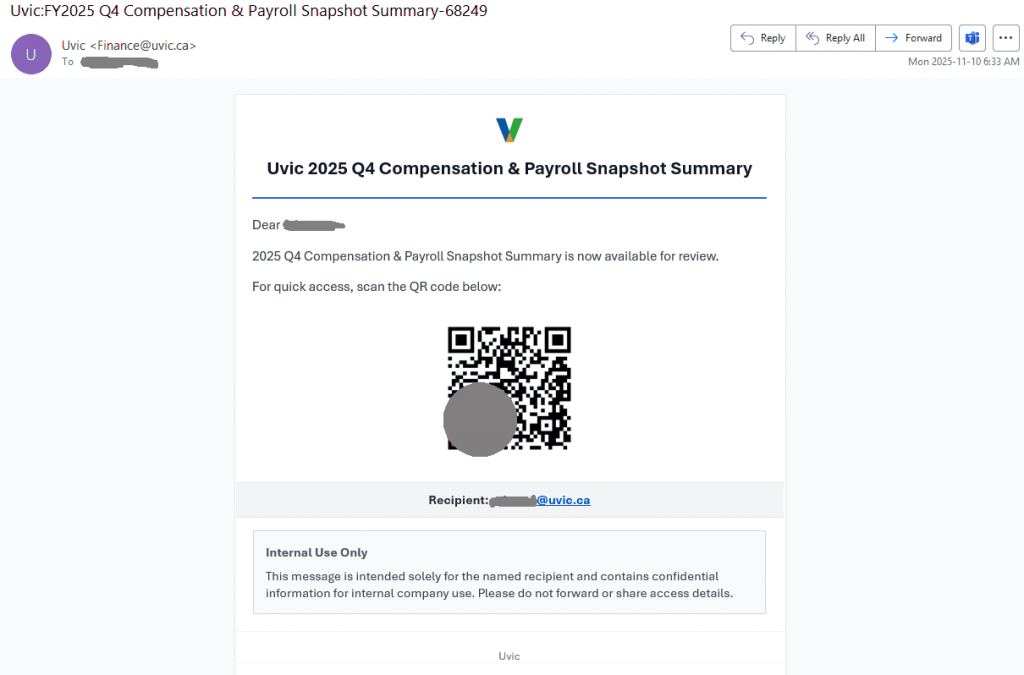
This phish is circulating today. The sender is spoofed as if internal. In fact it is external and scanning the QR code leads to visiting a malicious website.

screenshot of the phish message. The text is quoted below


Sender: Uvic <Finance@uvic.ca>
Subject: Uvic 2025 Q4 Compensation & Payroll Snapshot Summary

Dear <your netlink>,
2025 Q4 Compensation & Payroll Snapshot Summary is now available for review.
For quick access, scan the QR code below:
<qr code here>
Recipient: <your UVIc email address>

Internal Use Only
This message is intended solely for the named recipient and contains confidential information for internal company use. Please do not forward or share access details.

Flexible Work Opportunity

Job scammers are a truly remorseless bunch–they have no qualms about using the name of a real UVic professor to target students who might be struggling to pay for necessities like rent, groceries and tuition, and who would therefore leap at what looks like an easy and lucrative job opportunity. This latest example shows many of the usual red flags:

  • The scam came from a Gmail address. If the person claims to be from UVic but isn’t using their UVic email address, it might not actually be them.
  • The sender name doesn’t match the name in the signature block. Inconsistencies like this can be a sign that the offer is a lie.
  • The salary is higher than would be expected for casual student work. If it’s sounds too good to be true, it usually is.

Other signs of a job scam that may materialize later on:

  • You are offered a job without having to go through an interview.
  • You never get to meet your employer/supervisor before you start work. At the very least, you should have the chance to meet them on a video call during the interview or onboarding process.
  • You have to pay money or a deposit as part of accepting the job.
  • You are told to use your own funds to transfer money to someone, or buy gift cards and send photos with the PIN cover scratched off. This may occur after you are sent a picture of a cheque to deposit–it will eventually bounce.

In general, if a job offer comes out of the blue from someone you don’t know, it’s probably a scam.

Job scam email from a Gmail address that impersonates a UVic professor

From: A******** <a********@gmail.com>
Subject: Flexible Work Opportunity

You don’t often get email from a********@gmail.com. Learn why this is important

The service of a student research assistant is urgently required to work part-time and get paid $320 weekly. Tasks will be carried out remotely and the work hours are 8hrs/week.

To apply for this role, kindly submit a cover letter and your updated resume to the Department of Psychology via this email. Once we receive your application, we will send further details about the offer and next steps to proceed.

Sincerely
B********
[Title redacted]
Department of Psychology
Office: [redacted]

*Exclusive Opportunity for Students and Staff*

This item giveaway scam was sent from a compromised account at another Canadian university. It claims that a faculty member is giving away a number of high-value items for free and you just have to pay the delivery cost. That last part is the catch–you’ll be told to send money to a mover that the scammer specifies, but you’ll never receive the items after paying the considerable sum.

The faculty member named in this email is actually fictitious. Do a search on the name of the person who is supposedly giving away the items; finding nothing to indicate that there is actually someone by that name at that university is a strong sign that the whole thing is a scam. But even if they are real, look for signs of impersonation, such as the use of a freemail address (e.g.: Gmail, Outlook.com, Hotmail or Yahoo), or a sender address that seems to belong to someone else. When in doubt, do not reply to the email or use any contact information from it; contact the person via a phone or video call using official contact information from their directory listing.

Also note how the scam tells you to reply by sending a text message. Asking to switch to SMS or messaging apps is often a sign of a scam; scammers do this to move the conversation to a place that can’t be monitored by our security systems. Additionally, the phone number has a Washington, D.C. area code, which is not something that a real faculty or staff member from a Canadian university would be likely to use.

As the old saying goes, if it sounds too good to be true, it probably is.

Scam claiming that a (fictitious) professor is giving away high-value items for free and you just have to pay the delivery cost

You don’t often get email from [redacted]. Learn why this is important

Dear Students and Staff,

I hope this message finds you well.

Dr. Hannah Brezesky recently completed a successful business venture and has since moved into a new home. As part of this transition, she has generously decided to give away several high-quality personal items—completely free of charge, to members of our community, with a special focus on students and staff.

The available items include:

Leica Q2 47.3 MP Digital Camera (Black)

Schecter Electric Guitar

Yamaha G2 Grand Piano

PlayStation 5 (Used, Like New)

Kaabo mantis x plus electric scooter

Drone SWELLPRO FD1

All items are in excellent condition. The only requirement is that interested individuals cover the delivery cost to their preferred address.

If you’re interested in receiving any of these items, please contact Dr. Hannah Brezesky directly via text at +1 (202) ***-**** for more details. Items will be gifted on a first-come, first-served basis.

Warm regards,
On behalf of Dr. Hannah Brezesky

Impersonation scam with subject “University of Victoria”

This scam email impersonates the university’s acting president. In all likelihood, this will turn out to be a gift card scam, where the scammer tells the recipient to purchase several hundred dollars’ worth of gift cards (typically for Apple iTunes or some other major brand). The recipient is then supposed to send photographs of the cards with the PIN cover scratched off, which gives the scammer enough information to redeem the balance. Here’s an example of how this type of scam might play out.

The red flags in this particular email:

  • The email claims to be from someone from UVic but came from an external email address–this is typically a sign of impersonation.
  • The request for assistance is vague and the sender asks for confidentiality. The scammer is probably trying to isolate the recipient to stop them from telling someone who might let them know it’s a scam.
  • The message says to send text messages to a phone number with a 401 area code, which is from Rhode Island. The non-Canadian phone number and the refusal to take phone calls indicates this number is fraudulent. Shifting the conversation away from UVic email is often done to move it to somewhere that can’t be caught by our security systems.

Therefore, do not reply and do not contact the phone number in the email. Reach out to the Computer Help Desk or your department’s IT support staff if you need assistance.

Scam email sent from Gmail, impersonating the UVic acting president.

From: Robina Thomas <office******7@gmail.com>
Subject: University of Victoria

[Recipient name],
Please let me know if you’re available. I have something I need your assistance with, and I would appreciate your confidentiality. Kindly reply to this email or, preferably, send me a text message only (no calls) at +1 (401) ***-**** for a quicker response.

Thank you,
Robina Thomas
President and vice-chancellor
www.uvic.ca
+1 (401) ***-****

Confidentiality Notice: This message, including any attachments, is intended solely for the use of the individual(s) to whom it is addressed. It may contain confidential and/or legally privileged information. If you are not the intended recipient, you are hereby notified that any review, dissemination, distribution, copying, or action taken in relation to the contents of this message any any attachments is strictly prohibited and may be unlawful

From the archives: How can I tell it’s really you?

This piece was originally written by Nav Bassi on September 17, 2020, for the now-defunct UVic CISO Blog. Reposting it here as much of the content remains relevant. The sad truth is that we’ve recently been seeing a lot of phishing emails coming from compromised accounts belonging to people the recipient knows. Even if the email is from someone you know, check for signs of phishing, like messages that don’t sound right for that person/organization or links that don’t go where they say they go.

If you get an email from someone you know but it feels a bit off, don’t reply to the email. The mailbox could be compromised or the email may have been crafted to send replies to a different, fraudulent email address. Either way, you could get a reply from the phisher saying that the email is legitimate when it really isn’t. Instead, verify in person, or reach out to a different contact method (such as by phone or video call) that you already have and know is legitimate.


Way back in 1993, Peter Stiener drew his “On the Internet, nobody knows you’re a dog” cartoon. It was referring to Internet anonymity but I think today, 27 years later, it is also relevant for impersonation email scams.

Most people understand that phishing is a form of social engineering conducted via email, and that it is often used to trick you into revealing your username and password. But what happens after you reveal your username and password? This depends on the attacker and their motivation. Some are loud and fast, they immediately use your username and password to log into your email account and use your account to send spam or more phishing emails. Others are quiet and fast, they immediately try to use your username and password to access services on your behalf to see what useful data they can steal. At UVic, just log into your online services and think about what an attacker could do if they could see and access everything as you! Some are both quiet and slow – hard to detect, and often patient enough to try something bold.

If you receive an email from someone out of the blue, and it doesn’t sound like them, you might get suspicious. Maybe it’s the wording or language, or maybe it’s even the topic of the message, but you might use your phishing awareness training to take a closer look at the From: address or even report it to your IT personnel and discover the sending address is wrong. This is an impersonation email, and we get them all the time: An email exchange with the President (not really).

What if you are already in an email conversation with someone, having a series of back and forth exchanges? Would you notice if suddenly the response to your last email was not from them? In this case, what has happened is an attacker has accessed a person’s email account and spent time, perhaps many days or weeks, monitoring emails going in and out of the mailbox until they see something of interest. For example, a conversation about payments, and perhaps direct deposit account information:

[Attacker has access to Person A’s email account]
Person A: “Sounds good, are you ready to transfer funds?”
Person B: “Yes, can you send me your direct deposit information?”
[At this point, the attacker takes Person B’s message and deletes or files it, and responds on their behalf]
Attacker as Person A: “Yes, here it is.”

The attacker also sets up a mail rule so all emails from Person B are no longer visible to Person A; from this point on, Person B is corresponding with the attacker impersonating Person A. How long before they can tell? Do they deposit the information in the wrong account? Does Person A catch on and decide to call Person B?

Takeways:

  1. Your username and password protect your accounts and the information they contain; protect them by making sure they are long and hard to guess. Expect attackers are phishing you, so take phishing awareness training and if in doubt, pick up the phone and call the sender.
  2. Do not share sensitive, confidential or highly confidential information via email without password protecting it (and don’t put the password in email either!); the example above was direct deposit information but it could have been any password – e.g. Interact e-Transfer password. If your email account is compromised, sensitive information is visible to attackers and they could impersonate you to anyone you’ve corresponded with previously.
  3. Check each email, even replies to emails you have sent, for signs of phishing. If you see any suspicious behaviour, pick up the phone and call the person you are corresponding with to verify.

The above post was prompted by a real event which was fortunately detected by a recipient who spotted the signs of phishing and took action.

From the archives: An email exchange with the President (not really)

This piece was originally written by Nav Bassi on February 20, 2020, for the now-defunct UVic CISO Blog. Reposting here as much of the content remains relevant and is referenced by many of our posts on Phish Bowl.

The email warning banner service described below has since been superseded by newer security features. Nowadays, we recommend you keep an eye out for any warning banners that say that you don’t normally get emails from the sender–if you see that banner on an email claiming to be from someone within UVic, that’s a strong sign of an impersonation scam.


In late December 2019, we received a number of Gift Card Scam emails. These follow the usual pattern of impersonating someone in authority to compel someone else to purchase gift cards on their behalf and send them the codes electronically. Unfortunately, it is a common fraud and some of our colleagues have been victimized by these criminals.

The best defense to detect someone from outside of the organization impersonating someone from inside is to opt-in to our Email Warning Banner Service; this provides banner warning messages at the top of All External Emails and/or External Spoofed Email (email that claims to be from UVic based on the From: address, but the actual path the email took doesn’t match).

It’s also a good idea to verify requests that involve money, especially spending or transferring, by calling the supposed requester.

The Manager of our Information Security Office received one of these during the Winter Closure and decided to reply. It all began with a single email impersonating our President:

How are you ? Where are you? i need a little assistance from you

President
Jamie Cassels
University of Victoria
Greater Victoria
British Columbia, Canada

Sent from my Device

There are some obvious clues! For example, it is an odd email to receive. It doesn’t address the recipient by name, and the wording doesn’t reflect our articulate President. The signature is also odd, “Greater Victoria” looks like it was picked based on some Googling and not by anyone actually from the city. If you receive a message like this, your best options are to:

  1. Delete it (or click the Report Phishing button)
  2. Call the President’s office to verify the legitimacy of the message. Since it doesn’t contain any links or attachments, you could also inquire about it’s legitimacy with the Computer Help Desk.

Don’t do this, but our Manager decided to reply:

Hi Jamie.
I am doing super awesome! How are you?
I’d be glad to be of assistance. What can I do for you?
Eric

And got a quick response back:

I’m sorry for bothering you, I really do need your assistance with purchasing (Google Play gift cards) for my friend who is a cancer patient. I promised her a Google Play card as a birthday gift but I can’t do this right now. i tried purchasing it online but unfortunately all effort to no avail.

Wondering if you could get it from any store around you ? I’ll pay back asap. Kindly let me know if you can handle this.

President
Jamie Cassels
University of Victoria
Greater Victoria
British Columbia, Canada

Sent from my Device

Again, don’t do this, but our Manager continued the exchange:

She must be a really special friend for you to splurge on Google play gift cards. But maybe she’d like to be taken out for dinner or given an InstaPot – I hear they’re all the rage right now.
What store should I go to?

The instructions that came back are quick helpful and specific; clearly some more Googling has been done to see where gift cards can be purchased. It’s a common tactic; this person has done it before, and is probably corresponding with a number of other people at the same time. Note the instructions regarding sending a photo of the cards – this is the key: they need this information to redeem the value on the cards. This is how the theft occurs!

I’m checking…from what I can find out they are readily available at the following stores Walmart, Shoppers drug mart & Canadian tire value on google play gift card ($100 denomination) × 5 pcs= 500 CAD

As soon as you pick up cards, CAREFULLY Scratch the back of all 5 cards revealing pin on each card, then take a snap shot of the back of each card showing it’s pin and have photos attached and email me, so i can have it forwarded to her e-mail address. Keep me posted,
I owe you

President
Jamie Cassels
University of Victoria
Greater Victoria
British Columbia, Canada

Sent from my Device

Now our Manager is just having a little fun at the criminal’s expense:

I’m not sure where those stores are, but I’ll look them up. When do you need the cards by?
Why do you need pictures of the cards? I can just run them over to your office in person.
Aren’t you in your office?

Clearly the criminal does not want our Manager to take the gift cards to the actual President’s office…

You could just email me with the photos of card. soon as you pick them up.

i left office, would be back by tomorrow…how soon can you pick it up

President
Jamie Cassels
University of Victoria
Greater Victoria
British Columbia, Canada

Sent from my Device

How long will the criminal keep up the exchange? Our Manager responds:

I will head out to the store shortly and will email them to you when I get them.

The criminal responds:

keep me posted.

Our Manager is playing along:

Ok, I have a bunch of cards! I’m on my way back to the office. I’ll send you pictures when I get there.

Oops, looks like the criminal is getting impatient:

Still waiting

President
Jamie Cassels
University of Victoria
Greater Victoria
British Columbia, Canada

Sent from my Device

Our Manager provides a classic Canadian response:

Ok, sorry.

The last message of the exchange:

Hello
Could you please send me the photo attachment of the gift cards?
Thanks

President
Jamie Cassels
University of Victoria
Greater Victoria
British Columbia, Canada

Sent from my Device

Takeaways: Gift Card Scams and other forms of Business Email Compromise rely on trying to trick the recipient into believing the criminal is a trusted individual within the organization authorized to make whatever request is being made. The best way to defend yourself is to:

  1. Opt-in to our Email Warning Banner Service to give you a visual cue that the message is from outside the organization and/or it is misrepresenting itself from inside when it’s really outside***
  2. Pick up the phone and verify any and all requests that involve spending money or transferring funds.

***There are some legitimate situations where a message could be from outside the organization but represent itself as inside. For example, if you are using an external third-party mailing list service to email a newsletter, the email will come from the service outside of UVic but may have a UVic email address appear in the From: field to represent it as from a UVic sender. This is why we generate a banner to inform and empower the recipient instead of just blocking these messages.

Final thought: One of the reasons scams like this work is because they mimic our own practices. If we regularly ask our colleagues to purchase gifts cards via email, and also ask for photos of the redemption codes via email, then it is harder to detect this type of scam as unusual behavior. We should alter our practices to include, for example, telephone verification, so that it’s more difficult for someone to mimic our own practices. It is worth thinking about some of our activities that involve funds, and could therefore be a target for criminals, to see whether they are susceptible to fraud and how we can reduce this risk. Remember the old security saying: Trust, but verify.

Action Required: 334207-001-R1 571-379-0917

This email claims to be a document signing request from UVic. However, the sender (not shown here) was a long, partially randomized address from outside of UVic, which is the first red flag. The grammatical errors (especially the lowercase “victoria”) and the copyright footer’s erroneous reference to “University of victoria Corporation” are further signs that this email wasn’t actually from UVic. Hovering over the link will also reveal that its destination is not UVic or one of the cloud services that UVic has approved for university business.

Always look carefully at the email before you click on anything. Generally speaking, if the email doesn’t look quite right, it probably is a phish.

An error-filled phishing email claiming to be for a document from "University of victoria"

Signature-Required:University of victoria Resolution Document Completion Notice

Hi [redacted],

University of victoria Completed Document has been assigned to you for timely review and completion report.

File Name: University of victoria_Q4Remittance/Submission.pdf

Assigned To: [redacted]@uvic.ca

Open Document [link in big blue box]

Please take a moment to review this document for University of victoria.


Explore more with University of victoria

© Copyright University of victoria Corporation 2025.

Fake OneDrive email with no subject

Sometimes phishers send phish through OneDrive using compromised accounts, and other times they just create imitation OneDrive emails. This phish falls into the second category. Signs that this is not a real OneDrive file sharing notification include:

  • The sender is not from UVic or Microsoft
  • The “RECIPIENTS REAL DOMAIN LLC” banner is generic/placeholder content that wouldn’t be present on a real OneDrive email
  • There are errors in spelling (e.g., “Adjusment” and “Automatated”) and capitalization
  • Hovering over the link shows that it does not go to UVic or Microsoft
A fake OneDrive email from a non-Microsoft, non-UVic sender. The text is riddled with errors.

You don’t often get email from info@******centre.com. Learn why this is important.

RECIPIENTS REAL DOMAIN LLC

Uvic,

You have one New Document waiting on your OneDrive

Document Details

File:
5894 Adjusment to Fiscal Policies Q4.pdf
Size: 23.12kb
Date
September 01, 2025
Note:
You are required to review the shared document and advise accordingly

[Button/link: View on OneDrive]

3584059-359-6-46-492-693-02035

This is an Automatated OneDrive Communication. Do not reply to this mailbox.

Invitation to bid

This phish often comes from a compromised sender email address that may be known to you or one that is from a local organization. This makes it more difficult to recognize that it’s phish. There are warning signs that this is phish though. The email is unsolicited, the greeting is generic and does not address anyone in particular. If the link goes to a page with a button or a link supposedly for viewing the actual content be wary as that second link or button will probably lead to a fake sign in page.

Fake proposal and invitation to bid

If you are unsure, do not respond to the sender via email (you may be responding directly to the attacker), rather reach out to the UVic helpdesk for assistance or contact the sender by phone to verify the authenticity of the email.

Hello,

We are pleased to inform you that your organization has been selected to submit a proposal and quote for an upcoming project opportunity. We invite you to review the project details and consider participating in this competitive bid process.

You can access the full package here:

Halifax Partnership- RFI-32-7613-125.pdf (Preview)

The package outlines the scope, expected deliverables, and the terms that will govern the engagement. Please review all materials carefully and submit your completed proposal electronically by 3:00PM on August 30th, 2025.

The contents of this package are confidential and must not be shared or distributed without prior written authorization.

Thank you,

Authenticate Your Account Activity

This is a classic account deactivation phish that pretends to be from Microsoft Office 365. It creates a false sense of urgency and threatens you with account deactivation to trick you into hastily clicking the link. However, if you hover over the big red “VERIFY NOW” link, you will find that it goes to a site that isn’t from Microsoft (or UVic). Other signs that something isn’t right about this email include the awkward wording/bad grammar and the long random text in the sender address and subject. If you manage to find the end of the sender address after all that random text, you can then see that the sender is not from UVic or Microsoft.

A fake Office 365 email that threatens to deactivate your account unless you click the phishing link to verify it now

From: <SysadminSExchangeServerGE8YI27DX[…long random text omitted]
Subject: Authenticate Your Account Activity #42e77c85919f7bec71588667c799a78f

Office 365

Attention [username redacted]

As part of our scheduled security and compliance process, we will be deactivating inactive Microsoft accounts on August 22, 2025

Please verify your account status ([redacted]@uvic.ca), remains active by completing the verification below.

[Link: VERIFY NOW]

To avoid any disruption, complete this verification within 48hrs.

Job recruitment text messages (SCAMS)

Be on the look out for job recruitment scams like the one below that impersonate real companies to try and lure you into providing personal information or ask you for money before submitting your application.

  • An unsolicited offer that is too good to be true.
  • Check the number or email address it came from. The area code is most often out of country and the email address is from a free provider.
  • They request you to contact them via WhatsApp or follow peculiar links.
  • A job offer without an interview and in some cases requesting payment to process your application.

Do not follow any links or respond to the text message, use the report junk option at the bottom of the text message. Alternately, you can forward the message to 7726. Both will report it to your mobile carrier. If you are unsure, reach out to the UVic helpdesk for assistance at helpdesk@uvic.ca

  • – Work only 60-90 minutes a day
  • – Daily pay ranges from $100 to $300, depending on your working hours
  • – Work from anywhere, any time

If you would like to join us, please contact us via WhatsApp: +133<redacted>

(Please note that applicants must be at least 23 years old to be eligible for this role)

You’ve been added to a new workgroup in Teams

This phishing attempt is mostly quarantined by our automatic filters. However:

A) Some users request its release.
B) Similar scams could appear, using the idea that you’ve been added to a group, granted permissions, or need to open Microsoft Teams.

Unlike typical phishing emails, this one lacks urgency—it doesn’t claim anything is broken, expiring, or at risk. Instead, it relies purely on curiosity to lure victims into clicking.

How to Identify It as Phishing:

The most reliable way is by hovering over the link. If it directs you to a site that does not belong to Microsoft (Teams) or UVic, it’s likely malicious. Usually, these are newly registered domains, but sometimes, they are hacked websites storing malicious content in subfolders. The group name or purpose may vary—it could mention SharePoint, OneDrive, Zoom, Office, or something else. No matter what service it claims to be related to, the key detail remains: if the link points to an unknown site, do not click.

Instead, report the message using the Phish button in Outlook to help prevent further phishing attempts.

screenshot of the phishing email. The content is transcribed below.

Microsoft Teams

You’ve been added to the “UVic contracts” work group in Microsoft Teams.
<Open Microsoft Teams>

Urgent Zoom meeting

A phishing campaign circulates that targets victims with fake Zoom meeting invites from colleagues.

Links open what appears to be a live Zoom meeting with ‘real’ participants – which are pre-recorded videos of fake participants

Invite emails imply urgency with carefully constructed subject lines and meeting details – and closely mimic legitimate Zoom invites.

Malicious login pages look legitimate but are there to harvest the victim’s UVic credentials.


The Information Security Office suggests:

Report suspicious emails: If you receive a questionable Zoom invite, report it by the “phishing” button in Outlook to help prevent further attacks.

Verify the sender: Always check the email address carefully. Scammers often use addresses that look similar to legitimate ones but contain subtle misspellings or extra characters.

Avoid clicking on links: Instead of clicking directly, hover over the link to inspect the full URL. If in doubt, navigate to Zoom manually by typing its official website into your browser.

Be wary of urgency tactics: Phishing emails often create a sense of urgency to pressure victims into acting quickly. If an invite seems rushed or unexpected, take a moment to verify its legitimacy.

Check for inconsistencies: Look for spelling errors, unusual formatting, or odd phrasing in the email. Legitimate Zoom invites are typically well-structured and free of mistakes.

Someone shared a file with you – “FACULTY & ᏚTAFF B0NUS” or “Essential_Departmental_interview”

These phishing emails claimed to be from various UVic department chairs in an attempt to make the emails look legitimate and important. However, looking at the sender information raises some red flags: not only does the name not match the name of the department chair, but the email address is also not from UVic. That’s a strong sign that this is an impersonation attempt and you should not open any links or attachments in the email.

Not surprisingly, salary increases and bonuses, or important internal documents, are some email themes that phishers regularly use to lure people into clicking links and attachments. If you are sharp-eyed, you might also notice that there’s a zero instead of an O in “B0NUS”. This is a further sign that the email is not legitimate.

If you opened the attachment, run a full malware scan on your device as a precaution, and contact the Computer Helpdesk or your department’s IT support staff immediately. Be wary of documents that ask you to click on a link to login or access the real content. Also, watch out for and report any MFA pushes that come from outside of the country that you’re in, and change your password immediately if that sort of MFA push comes your way.

Phishing email impersonating a department chair, with a phishing document called "Faculty & Staff B0nus" attached

From: N********@*****.edu
Subject: Dr. J***** ****** shared a file with you- FACULTY & ᏚTAFF B0NUS

Attachment: [Word Document icon] FACULTY & ᏚTAFF B0NUS.docx

Some people who received this message don’t often get email from n********@*****.edu. Learn why this is important

Dr. J***** ****** shared a file with you- FACULTY & ᏚTAFF B0NUS

Phishing email impersonating a department chair, with a phishing document attached called "Essential Departmental Interview"

From: N********@*****.edu
Subject: Dr. M****** ******* shared a file with you- Essential_Departmental_interview

Attachment: [Word document icon] Essential Departmental Inter…

Some people who received this message don’t often get email from n********@*****.edu. Learn why this is important

Dr. M****** ******* shared a file with you- Essential_Departmental_interview

Action Required – Webmail Account Verification

This email might look like it came from UVic, but in reality it’s a phishing email that leads to a fake CAS login page. Notice how the email threatens you with account deletion if you do not act immediately–the phisher is trying to trigger your fight-or-flight reaction to make you act hastily and do something that isn’t in your best interest. If a message leaves you with a feeling of fear, urgency or panic, try to pause for a moment and take a few deep breaths before you click or reply, then examine the message to see if there are any red flags.

In addition to the urgent and threatening language, other signs that this message is a phish are:

  • The sender address: although the email claims to be from UVic, the email came from an educational institution in Poland (probably a compromised account)
  • The generic, impersonal greeting
  • The link destination: hovering over the link shows it does not go to a site from UVic or Microsoft

If you clicked on the link from this email, contact the Computer Helpdesk or your department’s IT support person immediately, especially if you entered your username and password.

Webmail account verification phishing email that pretends to be from UVic IT support

From: University of Victoria <[redacted].edu.pl>
Subject: Action Required – Webmail Account Verification

You don’t often get email from [redacted].edu.pl. Learn why this is important

Dear User,

As part of the update to our Webmail platform for the year 2025, we kindly invite you to verify your account to ensure its proper functionality.

  • VERIFY MY ACCOUNT [link]

Please note that all unverified accounts will be considered inactive and will be deleted within 72 hours of receiving this message.

We appreciate your understanding and remain available for any assistance you may require.

Best regards,
IT Support Team University of Victoria