From the archives: How can I tell it’s really you?

This piece was originally written by Nav Bassi on September 17, 2020, for the now-defunct UVic CISO Blog. Reposting it here as much of the content remains relevant. The sad truth is that we’ve recently been seeing a lot of phishing emails coming from compromised accounts belonging to people the recipient knows. Even if the email is from someone you know, check for signs of phishing, like messages that don’t sound right for that person/organization or links that don’t go where they say they go.

If you get an email from someone you know but it feels a bit off, don’t reply to the email. The mailbox could be compromised or the email may have been crafted to send replies to a different, fraudulent email address. Either way, you could get a reply from the phisher saying that the email is legitimate when it really isn’t. Instead, verify in person, or reach out to a different contact method (such as by phone or video call) that you already have and know is legitimate.


Way back in 1993, Peter Stiener drew his “On the Internet, nobody knows you’re a dog” cartoon. It was referring to Internet anonymity but I think today, 27 years later, it is also relevant for impersonation email scams.

Most people understand that phishing is a form of social engineering conducted via email, and that it is often used to trick you into revealing your username and password. But what happens after you reveal your username and password? This depends on the attacker and their motivation. Some are loud and fast, they immediately use your username and password to log into your email account and use your account to send spam or more phishing emails. Others are quiet and fast, they immediately try to use your username and password to access services on your behalf to see what useful data they can steal. At UVic, just log into your online services and think about what an attacker could do if they could see and access everything as you! Some are both quiet and slow – hard to detect, and often patient enough to try something bold.

If you receive an email from someone out of the blue, and it doesn’t sound like them, you might get suspicious. Maybe it’s the wording or language, or maybe it’s even the topic of the message, but you might use your phishing awareness training to take a closer look at the From: address or even report it to your IT personnel and discover the sending address is wrong. This is an impersonation email, and we get them all the time: An email exchange with the President (not really).

What if you are already in an email conversation with someone, having a series of back and forth exchanges? Would you notice if suddenly the response to your last email was not from them? In this case, what has happened is an attacker has accessed a person’s email account and spent time, perhaps many days or weeks, monitoring emails going in and out of the mailbox until they see something of interest. For example, a conversation about payments, and perhaps direct deposit account information:

[Attacker has access to Person A’s email account]
Person A: “Sounds good, are you ready to transfer funds?”
Person B: “Yes, can you send me your direct deposit information?”
[At this point, the attacker takes Person B’s message and deletes or files it, and responds on their behalf]
Attacker as Person A: “Yes, here it is.”

The attacker also sets up a mail rule so all emails from Person B are no longer visible to Person A; from this point on, Person B is corresponding with the attacker impersonating Person A. How long before they can tell? Do they deposit the information in the wrong account? Does Person A catch on and decide to call Person B?

Takeways:

  1. Your username and password protect your accounts and the information they contain; protect them by making sure they are long and hard to guess. Expect attackers are phishing you, so take phishing awareness training and if in doubt, pick up the phone and call the sender.
  2. Do not share sensitive, confidential or highly confidential information via email without password protecting it (and don’t put the password in email either!); the example above was direct deposit information but it could have been any password – e.g. Interact e-Transfer password. If your email account is compromised, sensitive information is visible to attackers and they could impersonate you to anyone you’ve corresponded with previously.
  3. Check each email, even replies to emails you have sent, for signs of phishing. If you see any suspicious behaviour, pick up the phone and call the person you are corresponding with to verify.

The above post was prompted by a real event which was fortunately detected by a recipient who spotted the signs of phishing and took action.

From the archives: An email exchange with the President (not really)

This piece was originally written by Nav Bassi on February 20, 2020, for the now-defunct UVic CISO Blog. Reposting here as much of the content remains relevant and is referenced by many of our posts on Phish Bowl.

The email warning banner service described below has since been superseded by newer security features. Nowadays, we recommend you keep an eye out for any warning banners that say that you don’t normally get emails from the sender–if you see that banner on an email claiming to be from someone within UVic, that’s a strong sign of an impersonation scam.


In late December 2019, we received a number of Gift Card Scam emails. These follow the usual pattern of impersonating someone in authority to compel someone else to purchase gift cards on their behalf and send them the codes electronically. Unfortunately, it is a common fraud and some of our colleagues have been victimized by these criminals.

The best defense to detect someone from outside of the organization impersonating someone from inside is to opt-in to our Email Warning Banner Service; this provides banner warning messages at the top of All External Emails and/or External Spoofed Email (email that claims to be from UVic based on the From: address, but the actual path the email took doesn’t match).

It’s also a good idea to verify requests that involve money, especially spending or transferring, by calling the supposed requester.

The Manager of our Information Security Office received one of these during the Winter Closure and decided to reply. It all began with a single email impersonating our President:

How are you ? Where are you? i need a little assistance from you

President
Jamie Cassels
University of Victoria
Greater Victoria
British Columbia, Canada

Sent from my Device

There are some obvious clues! For example, it is an odd email to receive. It doesn’t address the recipient by name, and the wording doesn’t reflect our articulate President. The signature is also odd, “Greater Victoria” looks like it was picked based on some Googling and not by anyone actually from the city. If you receive a message like this, your best options are to:

  1. Delete it (or click the Report Phishing button)
  2. Call the President’s office to verify the legitimacy of the message. Since it doesn’t contain any links or attachments, you could also inquire about it’s legitimacy with the Computer Help Desk.

Don’t do this, but our Manager decided to reply:

Hi Jamie.
I am doing super awesome! How are you?
I’d be glad to be of assistance. What can I do for you?
Eric

And got a quick response back:

I’m sorry for bothering you, I really do need your assistance with purchasing (Google Play gift cards) for my friend who is a cancer patient. I promised her a Google Play card as a birthday gift but I can’t do this right now. i tried purchasing it online but unfortunately all effort to no avail.

Wondering if you could get it from any store around you ? I’ll pay back asap. Kindly let me know if you can handle this.

President
Jamie Cassels
University of Victoria
Greater Victoria
British Columbia, Canada

Sent from my Device

Again, don’t do this, but our Manager continued the exchange:

She must be a really special friend for you to splurge on Google play gift cards. But maybe she’d like to be taken out for dinner or given an InstaPot – I hear they’re all the rage right now.
What store should I go to?

The instructions that came back are quick helpful and specific; clearly some more Googling has been done to see where gift cards can be purchased. It’s a common tactic; this person has done it before, and is probably corresponding with a number of other people at the same time. Note the instructions regarding sending a photo of the cards – this is the key: they need this information to redeem the value on the cards. This is how the theft occurs!

I’m checking…from what I can find out they are readily available at the following stores Walmart, Shoppers drug mart & Canadian tire value on google play gift card ($100 denomination) × 5 pcs= 500 CAD

As soon as you pick up cards, CAREFULLY Scratch the back of all 5 cards revealing pin on each card, then take a snap shot of the back of each card showing it’s pin and have photos attached and email me, so i can have it forwarded to her e-mail address. Keep me posted,
I owe you

President
Jamie Cassels
University of Victoria
Greater Victoria
British Columbia, Canada

Sent from my Device

Now our Manager is just having a little fun at the criminal’s expense:

I’m not sure where those stores are, but I’ll look them up. When do you need the cards by?
Why do you need pictures of the cards? I can just run them over to your office in person.
Aren’t you in your office?

Clearly the criminal does not want our Manager to take the gift cards to the actual President’s office…

You could just email me with the photos of card. soon as you pick them up.

i left office, would be back by tomorrow…how soon can you pick it up

President
Jamie Cassels
University of Victoria
Greater Victoria
British Columbia, Canada

Sent from my Device

How long will the criminal keep up the exchange? Our Manager responds:

I will head out to the store shortly and will email them to you when I get them.

The criminal responds:

keep me posted.

Our Manager is playing along:

Ok, I have a bunch of cards! I’m on my way back to the office. I’ll send you pictures when I get there.

Oops, looks like the criminal is getting impatient:

Still waiting

President
Jamie Cassels
University of Victoria
Greater Victoria
British Columbia, Canada

Sent from my Device

Our Manager provides a classic Canadian response:

Ok, sorry.

The last message of the exchange:

Hello
Could you please send me the photo attachment of the gift cards?
Thanks

President
Jamie Cassels
University of Victoria
Greater Victoria
British Columbia, Canada

Sent from my Device

Takeaways: Gift Card Scams and other forms of Business Email Compromise rely on trying to trick the recipient into believing the criminal is a trusted individual within the organization authorized to make whatever request is being made. The best way to defend yourself is to:

  1. Opt-in to our Email Warning Banner Service to give you a visual cue that the message is from outside the organization and/or it is misrepresenting itself from inside when it’s really outside***
  2. Pick up the phone and verify any and all requests that involve spending money or transferring funds.

***There are some legitimate situations where a message could be from outside the organization but represent itself as inside. For example, if you are using an external third-party mailing list service to email a newsletter, the email will come from the service outside of UVic but may have a UVic email address appear in the From: field to represent it as from a UVic sender. This is why we generate a banner to inform and empower the recipient instead of just blocking these messages.

Final thought: One of the reasons scams like this work is because they mimic our own practices. If we regularly ask our colleagues to purchase gifts cards via email, and also ask for photos of the redemption codes via email, then it is harder to detect this type of scam as unusual behavior. We should alter our practices to include, for example, telephone verification, so that it’s more difficult for someone to mimic our own practices. It is worth thinking about some of our activities that involve funds, and could therefore be a target for criminals, to see whether they are susceptible to fraud and how we can reduce this risk. Remember the old security saying: Trust, but verify.

Action Required: 334207-001-R1 571-379-0917

This email claims to be a document signing request from UVic. However, the sender (not shown here) was a long, partially randomized address from outside of UVic, which is the first red flag. The grammatical errors (especially the lowercase “victoria”) and the copyright footer’s erroneous reference to “University of victoria Corporation” are further signs that this email wasn’t actually from UVic. Hovering over the link will also reveal that its destination is not UVic or one of the cloud services that UVic has approved for university business.

Always look carefully at the email before you click on anything. Generally speaking, if the email doesn’t look quite right, it probably is a phish.

An error-filled phishing email claiming to be for a document from "University of victoria"

Signature-Required:University of victoria Resolution Document Completion Notice

Hi [redacted],

University of victoria Completed Document has been assigned to you for timely review and completion report.

File Name: University of victoria_Q4Remittance/Submission.pdf

Assigned To: [redacted]@uvic.ca

Open Document [link in big blue box]

Please take a moment to review this document for University of victoria.


Explore more with University of victoria

© Copyright University of victoria Corporation 2025.

Fake OneDrive email with no subject

Sometimes phishers send phish through OneDrive using compromised accounts, and other times they just create imitation OneDrive emails. This phish falls into the second category. Signs that this is not a real OneDrive file sharing notification include:

  • The sender is not from UVic or Microsoft
  • The “RECIPIENTS REAL DOMAIN LLC” banner is generic/placeholder content that wouldn’t be present on a real OneDrive email
  • There are errors in spelling (e.g., “Adjusment” and “Automatated”) and capitalization
  • Hovering over the link shows that it does not go to UVic or Microsoft
A fake OneDrive email from a non-Microsoft, non-UVic sender. The text is riddled with errors.

You don’t often get email from info@******centre.com. Learn why this is important.

RECIPIENTS REAL DOMAIN LLC

Uvic,

You have one New Document waiting on your OneDrive

Document Details

File:
5894 Adjusment to Fiscal Policies Q4.pdf
Size: 23.12kb
Date
September 01, 2025
Note:
You are required to review the shared document and advise accordingly

[Button/link: View on OneDrive]

3584059-359-6-46-492-693-02035

This is an Automatated OneDrive Communication. Do not reply to this mailbox.

Invitation to bid

This phish often comes from a compromised sender email address that may be known to you or one that is from a local organization. This makes it more difficult to recognize that it’s phish. There are warning signs that this is phish though. The email is unsolicited, the greeting is generic and does not address anyone in particular. If the link goes to a page with a button or a link supposedly for viewing the actual content be wary as that second link or button will probably lead to a fake sign in page.

Fake proposal and invitation to bid

If you are unsure, do not respond to the sender via email (you may be responding directly to the attacker), rather reach out to the UVic helpdesk for assistance or contact the sender by phone to verify the authenticity of the email.

Hello,

We are pleased to inform you that your organization has been selected to submit a proposal and quote for an upcoming project opportunity. We invite you to review the project details and consider participating in this competitive bid process.

You can access the full package here:

Halifax Partnership- RFI-32-7613-125.pdf (Preview)

The package outlines the scope, expected deliverables, and the terms that will govern the engagement. Please review all materials carefully and submit your completed proposal electronically by 3:00PM on August 30th, 2025.

The contents of this package are confidential and must not be shared or distributed without prior written authorization.

Thank you,

Authenticate Your Account Activity

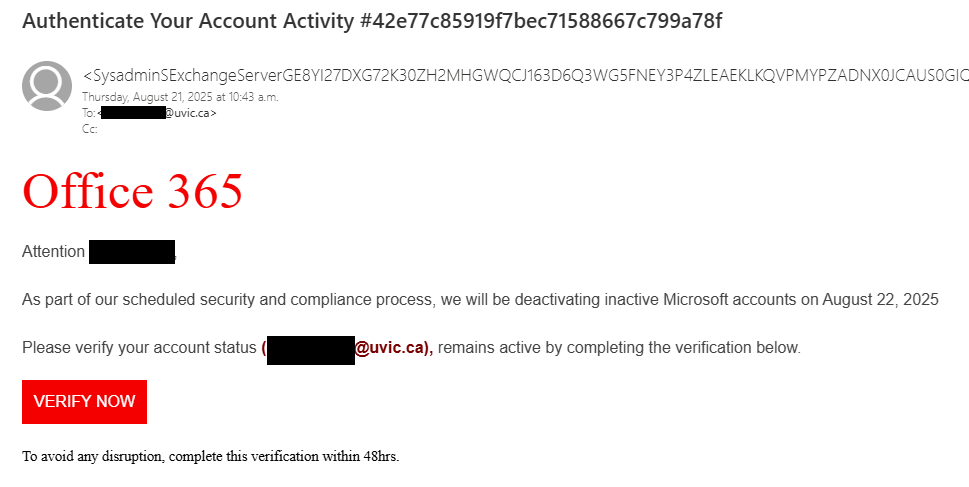
This is a classic account deactivation phish that pretends to be from Microsoft Office 365. It creates a false sense of urgency and threatens you with account deactivation to trick you into hastily clicking the link. However, if you hover over the big red “VERIFY NOW” link, you will find that it goes to a site that isn’t from Microsoft (or UVic). Other signs that something isn’t right about this email include the awkward wording/bad grammar and the long random text in the sender address and subject. If you manage to find the end of the sender address after all that random text, you can then see that the sender is not from UVic or Microsoft.

A fake Office 365 email that threatens to deactivate your account unless you click the phishing link to verify it now

From: <SysadminSExchangeServerGE8YI27DX[…long random text omitted]
Subject: Authenticate Your Account Activity #42e77c85919f7bec71588667c799a78f

Office 365

Attention [username redacted]

As part of our scheduled security and compliance process, we will be deactivating inactive Microsoft accounts on August 22, 2025

Please verify your account status ([redacted]@uvic.ca), remains active by completing the verification below.

[Link: VERIFY NOW]

To avoid any disruption, complete this verification within 48hrs.

Job recruitment text messages (SCAMS)

Be on the look out for job recruitment scams like the one below that impersonate real companies to try and lure you into providing personal information or ask you for money before submitting your application.

  • An unsolicited offer that is too good to be true.
  • Check the number or email address it came from. The area code is most often out of country and the email address is from a free provider.
  • They request you to contact them via WhatsApp or follow peculiar links.
  • A job offer without an interview and in some cases requesting payment to process your application.

Do not follow any links or respond to the text message, use the report junk option at the bottom of the text message. Alternately, you can forward the message to 7726. Both will report it to your mobile carrier. If you are unsure, reach out to the UVic helpdesk for assistance at helpdesk@uvic.ca

  • – Work only 60-90 minutes a day
  • – Daily pay ranges from $100 to $300, depending on your working hours
  • – Work from anywhere, any time

If you would like to join us, please contact us via WhatsApp: +133<redacted>

(Please note that applicants must be at least 23 years old to be eligible for this role)

You’ve been added to a new workgroup in Teams

This phishing attempt is mostly quarantined by our automatic filters. However:

A) Some users request its release.
B) Similar scams could appear, using the idea that you’ve been added to a group, granted permissions, or need to open Microsoft Teams.

Unlike typical phishing emails, this one lacks urgency—it doesn’t claim anything is broken, expiring, or at risk. Instead, it relies purely on curiosity to lure victims into clicking.

How to Identify It as Phishing:

The most reliable way is by hovering over the link. If it directs you to a site that does not belong to Microsoft (Teams) or UVic, it’s likely malicious. Usually, these are newly registered domains, but sometimes, they are hacked websites storing malicious content in subfolders. The group name or purpose may vary—it could mention SharePoint, OneDrive, Zoom, Office, or something else. No matter what service it claims to be related to, the key detail remains: if the link points to an unknown site, do not click.

Instead, report the message using the Phish button in Outlook to help prevent further phishing attempts.

screenshot of the phishing email. The content is transcribed below.

Microsoft Teams

You’ve been added to the “UVic contracts” work group in Microsoft Teams.
<Open Microsoft Teams>

Urgent Zoom meeting

A phishing campaign circulates that targets victims with fake Zoom meeting invites from colleagues.

Links open what appears to be a live Zoom meeting with ‘real’ participants – which are pre-recorded videos of fake participants

Invite emails imply urgency with carefully constructed subject lines and meeting details – and closely mimic legitimate Zoom invites.

Malicious login pages look legitimate but are there to harvest the victim’s UVic credentials.


The Information Security Office suggests:

Report suspicious emails: If you receive a questionable Zoom invite, report it by the “phishing” button in Outlook to help prevent further attacks.

Verify the sender: Always check the email address carefully. Scammers often use addresses that look similar to legitimate ones but contain subtle misspellings or extra characters.

Avoid clicking on links: Instead of clicking directly, hover over the link to inspect the full URL. If in doubt, navigate to Zoom manually by typing its official website into your browser.

Be wary of urgency tactics: Phishing emails often create a sense of urgency to pressure victims into acting quickly. If an invite seems rushed or unexpected, take a moment to verify its legitimacy.

Check for inconsistencies: Look for spelling errors, unusual formatting, or odd phrasing in the email. Legitimate Zoom invites are typically well-structured and free of mistakes.

Someone shared a file with you – “FACULTY & ᏚTAFF B0NUS” or “Essential_Departmental_interview”

These phishing emails claimed to be from various UVic department chairs in an attempt to make the emails look legitimate and important. However, looking at the sender information raises some red flags: not only does the name not match the name of the department chair, but the email address is also not from UVic. That’s a strong sign that this is an impersonation attempt and you should not open any links or attachments in the email.

Not surprisingly, salary increases and bonuses, or important internal documents, are some email themes that phishers regularly use to lure people into clicking links and attachments. If you are sharp-eyed, you might also notice that there’s a zero instead of an O in “B0NUS”. This is a further sign that the email is not legitimate.

If you opened the attachment, run a full malware scan on your device as a precaution, and contact the Computer Helpdesk or your department’s IT support staff immediately. Be wary of documents that ask you to click on a link to login or access the real content. Also, watch out for and report any MFA pushes that come from outside of the country that you’re in, and change your password immediately if that sort of MFA push comes your way.

Phishing email impersonating a department chair, with a phishing document called "Faculty & Staff B0nus" attached

From: N********@*****.edu
Subject: Dr. J***** ****** shared a file with you- FACULTY & ᏚTAFF B0NUS

Attachment: [Word Document icon] FACULTY & ᏚTAFF B0NUS.docx

Some people who received this message don’t often get email from n********@*****.edu. Learn why this is important

Dr. J***** ****** shared a file with you- FACULTY & ᏚTAFF B0NUS

Phishing email impersonating a department chair, with a phishing document attached called "Essential Departmental Interview"

From: N********@*****.edu
Subject: Dr. M****** ******* shared a file with you- Essential_Departmental_interview

Attachment: [Word document icon] Essential Departmental Inter…

Some people who received this message don’t often get email from n********@*****.edu. Learn why this is important

Dr. M****** ******* shared a file with you- Essential_Departmental_interview

Action Required – Webmail Account Verification

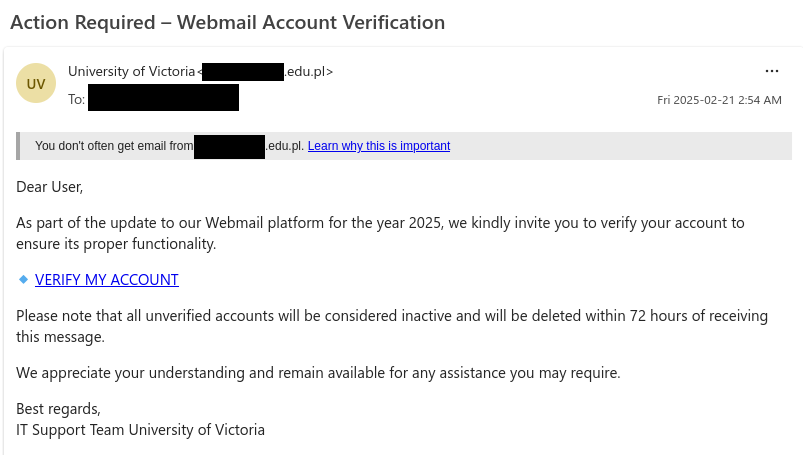
This email might look like it came from UVic, but in reality it’s a phishing email that leads to a fake CAS login page. Notice how the email threatens you with account deletion if you do not act immediately–the phisher is trying to trigger your fight-or-flight reaction to make you act hastily and do something that isn’t in your best interest. If a message leaves you with a feeling of fear, urgency or panic, try to pause for a moment and take a few deep breaths before you click or reply, then examine the message to see if there are any red flags.

In addition to the urgent and threatening language, other signs that this message is a phish are:

  • The sender address: although the email claims to be from UVic, the email came from an educational institution in Poland (probably a compromised account)
  • The generic, impersonal greeting
  • The link destination: hovering over the link shows it does not go to a site from UVic or Microsoft

If you clicked on the link from this email, contact the Computer Helpdesk or your department’s IT support person immediately, especially if you entered your username and password.

Webmail account verification phishing email that pretends to be from UVic IT support

From: University of Victoria <[redacted].edu.pl>
Subject: Action Required – Webmail Account Verification

You don’t often get email from [redacted].edu.pl. Learn why this is important

Dear User,

As part of the update to our Webmail platform for the year 2025, we kindly invite you to verify your account to ensure its proper functionality.

  • VERIFY MY ACCOUNT [link]

Please note that all unverified accounts will be considered inactive and will be deleted within 72 hours of receiving this message.

We appreciate your understanding and remain available for any assistance you may require.

Best regards,
IT Support Team University of Victoria

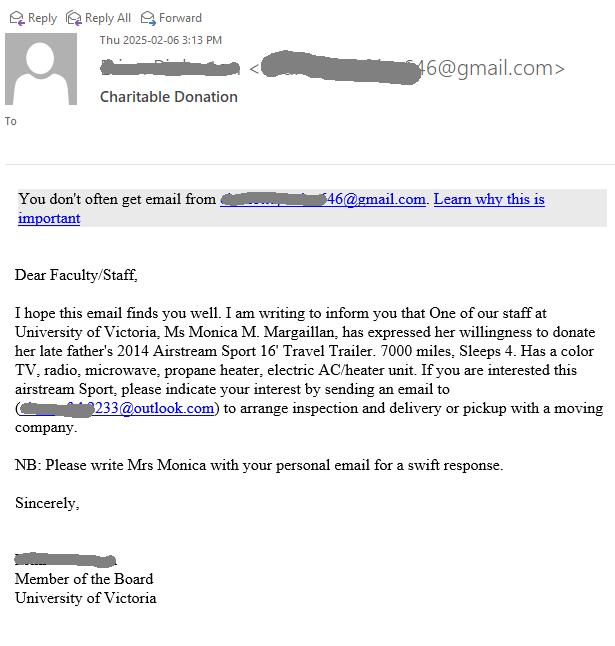
Charitable donation / Airstream trailer

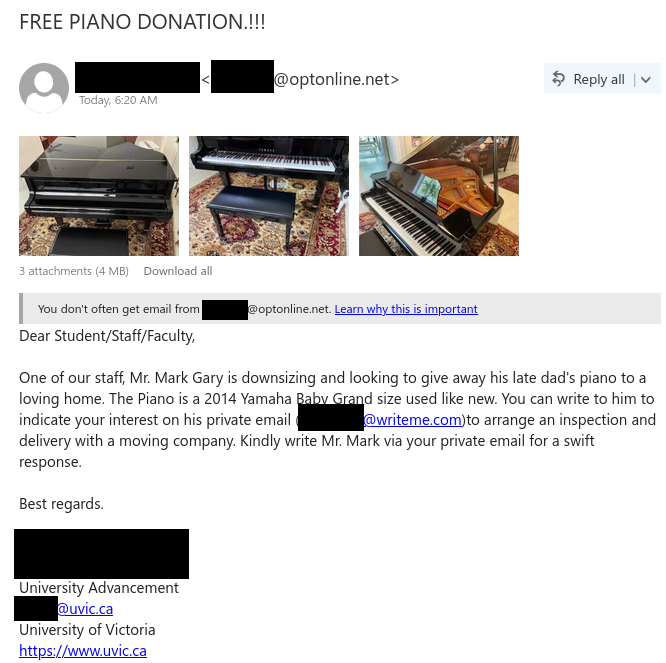
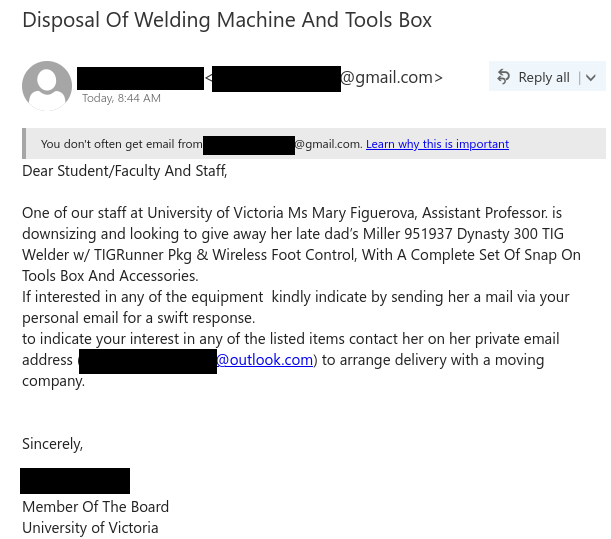
This scam has been circulating recently on campus. It is not a new idea but a variation of the well-known “Piano scam” and “Welding machine” scam.
The scenario is the same – something expensive is donated, and you only have to pay the delivery fee. You send the money, and you never see any piano, welder, or trailer.
They usually pretend to be some UVic faculty or staff, helping a colleague or relative to donate the goods. In this case, they also used the name of a UVic person, which is redacted in the screenshot below.
Please stay vigilant to such offers that sound too good to be true, and if in doubt, consult with your desktop support person or the UVic helpdesk.


Subject: Charitable donation

Dear Faculty/Staff,

I hope this email finds you well. I am writing to inform you that One of our staff at University of Victoria, Ms Monica M. Margaillan, has expressed her willingness to donate her late father’s 2014 Airstream Sport 16′ Travel Trailer. 7000 miles, Sleeps 4. Has a color TV, radio, microwave, propane heater, electric AC/heater unit. If you are interested this airstream Sport, please indicate your interest by sending an email to (<redacted>@outlook.com) to arrange inspection and delivery or pickup with a moving company.

NB: Please write Mrs Monica with your personal email for a swift response.

Sincerely,

<redacted>
Member of the Board
University of Victoria

Approved: See Completed EFT Payment (DocuSign scams)

Attackers do abuse legitimate services like DocuSign to send phish, commit spoofing, fraud or steal personal data.

Take note that the sender address is legitimate, dse_NA4@docusign.net. The body contains a 32 character security code in it, usual for a DocuSign email. If you scroll over the link, it also appears to be on DocuSign’s servers, however this could contain a redirect, sending you to a malicious website or download malware.

Red flags:

  • The sender name and email address contained in the body do not match. They are also very generic ie. james wood and mark harry.
  • The link contained in the email “_wildcard_.usentden***” is suspicous.
  • Grammatical error, the use of a capital letter in the middle of the sentence where it says, “These document(s) are related to the Completed transaction”.
  • If you do not recognize the sender, this should raise a red flag.

Reach out to the helpdesk if you have clicked on any links or provided any personal information to fake DocuSign emails like this.

Subject: Approved: See Completed EFT Payment
From: james wood via Docusign

james wood sent you a document to review and sign.
Review Document [by clicking on the review document button]

james wood
markharry[redacted]@outlook.com

These documents are related to the Completed transaction.

You can download these documents by clicking the links below.
_wildcard_.usentden[redacted]

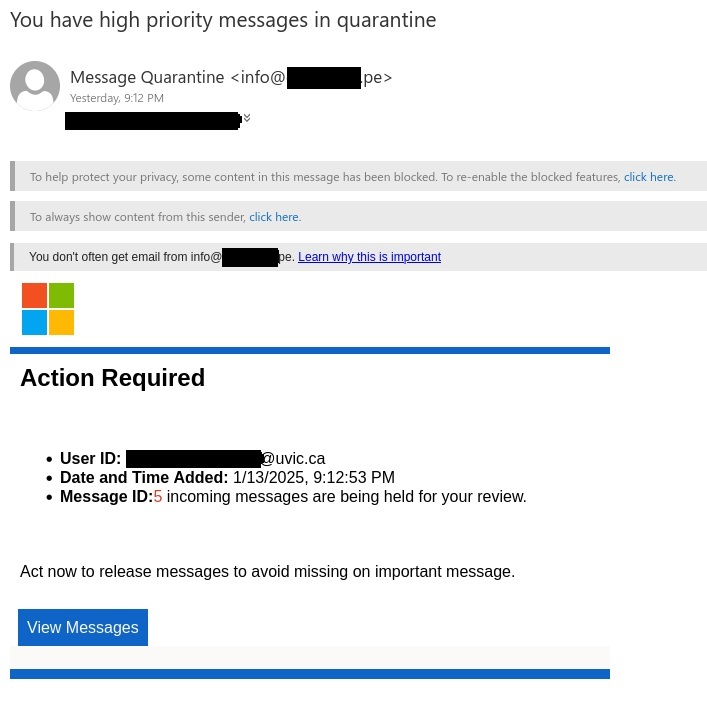
Fake email quarantine phish

This phishing email pretends to be from Microsoft alerting the user that their UVic email has quarantined messages. You may see variations of this pretending to come from UVic tech support or something to that effect. It uses a false sense of urgency to try and trick you into clicking on the “View Messages” button. They use the Microsoft logo to try appear to be legitimate.

Here are some ways to recognize this as a phishing email:

  • Always check the sender address, in this case it was a phishing email address.
  • Urgent call to action creating a false sense of urgency.
  • The warning message “You don’t often get email from info@***.pe. This is an alert that this sender may be untrusted.
  • Poor grammar – “act now to release messages to avoid missing on important message.”

Remember to be cautious and never click on any link unless you are sure it is coming from a trusted source. If you are unsure reach out to the helpdesk or your support person.

Subject: You have high priority messages in quarantine

From: info@[redacted].pe

You don’t often get email from info@[redacted].pe. Learn why this is important.

Action required

  • User ID: [redacted]@uvic.ca
  • Date and Time Added: 1/13/2025, 9:12:53 PM
  • Message ID: 5 incoming messages are being held for your review.

Act now to release messages to avoid missing on important message. [By clicking on View Messages button.]


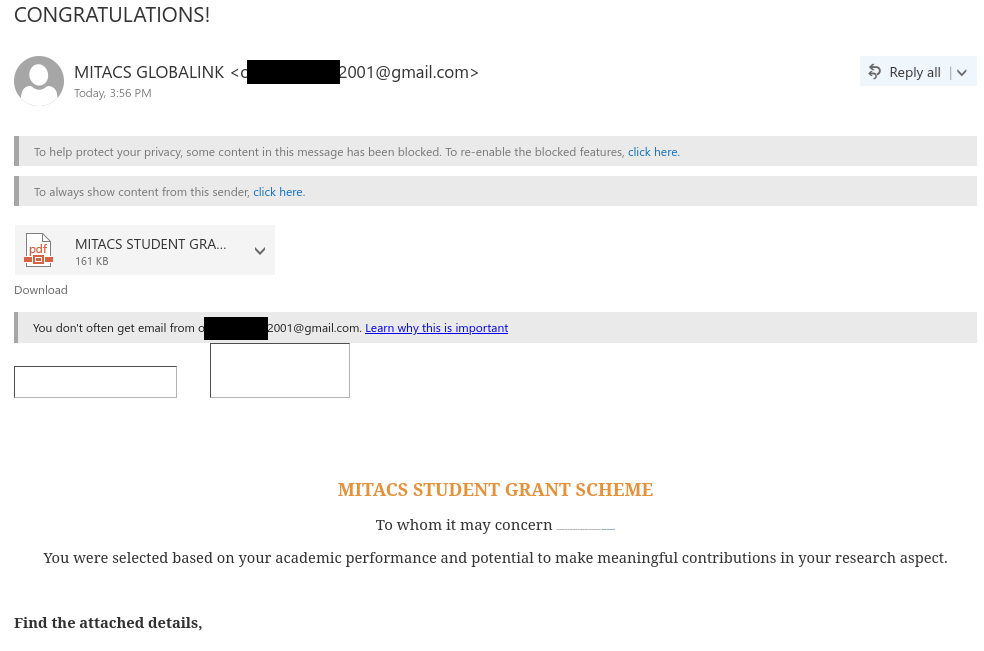
CONGRATULATIONS! [Student grant scam]

This grant scam impersonates a Canadian non-profit research organization and specifically targets UVic students by claiming to offer monetary grants to students. The attachment even includes MITACS and UVic logos to make the offer look more legitimate. However, there several signs that this is a scam:

  • The email came from a Gmail address–UVic or MITACS would send real grant notices from their organizational email email addresses, not using a free email provider.
  • The email says you were specifically selected based on your performance, but the email is addressed impersonally.
  • The formatting issues within the email and missing signature block give it a less-than-professional look.
  • The attachment directs you to apply by contacting a phone number with an American area code. If you are told to apply by SMS, it’s probably a scam. It also uses language that creates a sense of urgency to get you to act hastily.

If you replied to the scammer, contact the Computer Help Desk or your department’s IT support person immediately for assistance.

Grant scam email

From: MITACS GLOBALINK <o*******2001@gmail.com>
Subject: CONGRATULATIONS!

Attachment: [PDF] MITACS STUDENT GRANT SCHEME.pdf

You don’t often get email from o*******2001@gmail.com. Learn why this is important


MITACS STUDENT GRANT SCHEME

To whom it may concern We are delighted to offer you a grant to support your academic, personal use and research endeavors at University of Victoria (UVic).

You were selected based on your academic performance and potential to make meaningful contributions in your research aspect.

Find the attached details,