[Someone] shared “FILE REVIEW 2023” with you

This phish is an actual SharePoint Online file sharing email, but that doesn’t mean the file it goes to is legitimate. Phishers are known to use compromised Microsoft 365 accounts at other organizations to create a phishing document. Instead of creating their own phishing email, they instead send out the phish by sharing that phishing document with the other people they want to target. That can potentially make the phish harder to detect because the emails have the same look and feel as legitimate SharePoint Online file sharing emails.

Despite all that, there are still some red flags:

  • The message claims that the file is from the UVic president, but the file wasn’t shared by him or someone from the UVic President’s Office. Inconsistencies like this can often be a sign of a phish or scam.
  • The message is very vague. This may be a trick to make you curious and go to the file to find out what’s actually in it.
  • There is incorrect grammar and capitalization in the message.
  • At the bottom-right corner of the message, you’ll see a different university’s logo. This is a sign that the file did not come from within UVic’s Microsoft 365 tenant. An actual file from the UVic President should not be coming from a different university’s Microsoft 365 service.
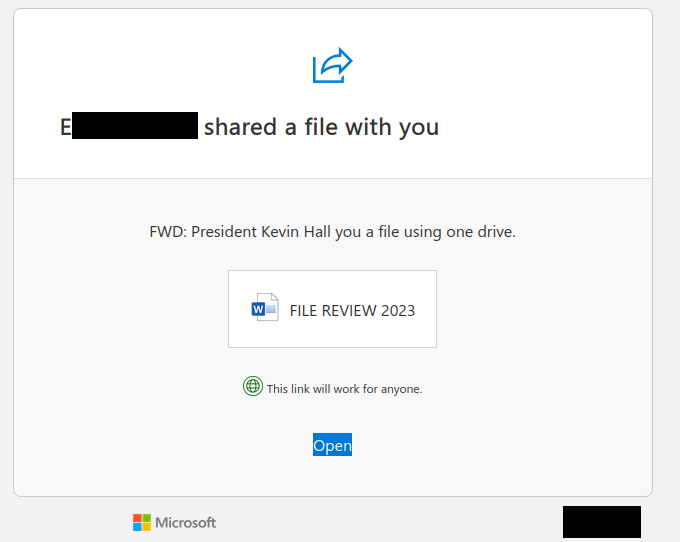
A SharePoint Online file sharing email from a compromised account at another organization. It pretends to be a file from President Kevin Hall but actually goes to a phishing document.

From: E********** <noreply@sharepointonline.com>
Subject: E********** shared “FILE REVIEW 2023” with you.

E********** shared a file with you

FWD: President Kevin Hall you a file using one drive.

[Word document icon] FILE REVIEW 2023

This link will work for anyone.

Open

[Microsoft logo]
[Other university’s logo]
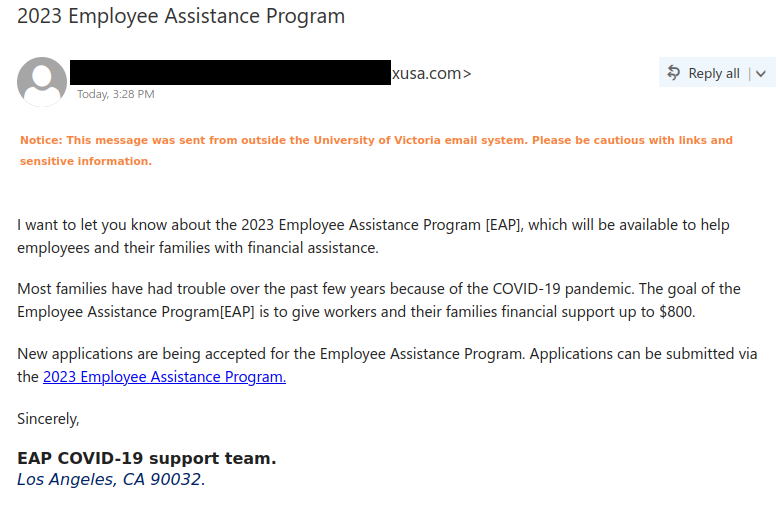
2023 Employee Assistance Program

Alas, scammers and phishers have no hesitation about taking advantage of events like the COVID-19 pandemic and preying on people who are in financial need. This phish does just that, using the lure of financial assistance to get people to click on the link. Look closely at the email and you will find a number of red flags that indicate that this is not a legitimate offer from UVic:

  • The sender is not from UVic.
  • The signature block is generic and does not mention UVic at all. It also contains an American city and zip code, which does not fit for a Canadian university.
  • Hovering over the link reveals a destination that is not on uvic.ca.

Therefore, do not click on the link from this email and do not enter login credentials on the page. Also, avoid rushing to approve MFA pushes when they come. If an MFA push is unexpected or it’s coming from a weird/unexpected location, it’s safest to deny the attempt, then report it as a suspicious login so that the UVic Information Security Office can investigate. You should also change your password as soon as possible.

Phishing email making a fraudulent offer of financial assistance to employees in light of the COVID-19 pandemic.


Subject: 2023 Employee Assistance Program
From: [redacted]@******xusa.com

Notice: This message was sent from outside the University of Victoria email system. Please be cautious with links and sensitive information.

I want to let you know about the 2023 Employee Assistance Program [EAP], which will be available to help employees and their families with financial assistance.

Most families have had trouble over the past few years because of the COVID-19 pandemic. The goal of the Employee Assistance Program[EAP] is to give workers and their families financial support up to $800.

New applications are being accepted for the Employee Assistance Program. Applications can be submitted via the 2023 Employee Assistance Program [link].

Sincerely,

EAP COVID-19 support team.
Los Angeles, CA 90032.

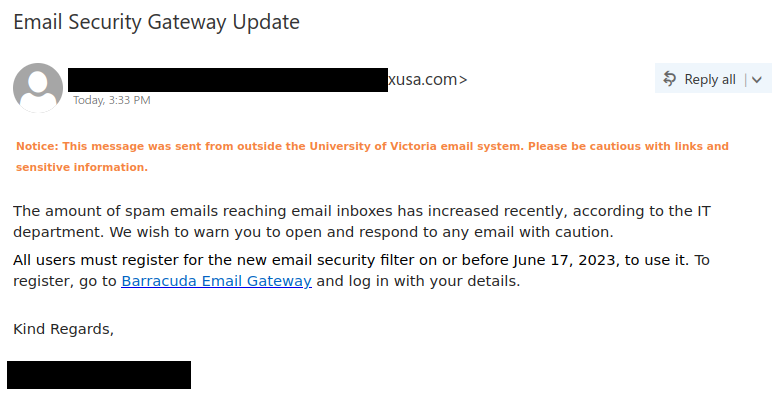
Email Security Gateway Update

It’s certainly ironic when phishers say something about an increase in spam emails and even say you should be careful when handling emails. That being said, it’s not an uncommon tactic; they do it to make you think it’s from your IT Security staff, hoping that you won’t apply that sense of caution to this particular email. They also create a false sense of urgency by requiring you to act before a fast-approaching deadline.

However, the sender address is not from UVic, which is a sign that the email is not legitimate. Hovering over the link (without clicking on it!) also reveals that the destination is not on uvic.ca. Do not click on the link from this email and do not enter login credentials on the page.

Also, avoid rushing to approve MFA pushes when they come. If an MFA push is unexpected or it’s coming from a weird/unexpected location, it’s safest to deny the attempt, then report it as a suspicious login so that the real UVic Information Security Office can investigate. You should also change your password as soon as possible.

Phishing email pretending to be a security alert and asking you to register for a new email security filter.


Subject: Email Security Gateway Update
From: [redacted] <[redacted]@******xusa.com>

Notice: This message was sent from outside the University of Victoria email system. Please be cautious with links and sensitive information.

The amount of spam emails reaching email inboxes has increased recently, according to the IT department. We wish to warn you to open and respond to any email with caution.

All users must register for the new email security filter on or before June 17, 2023, to use it. To register, go to Barracuda Email Gateway  and log in with your details.

Kind Regards,

[redacted]

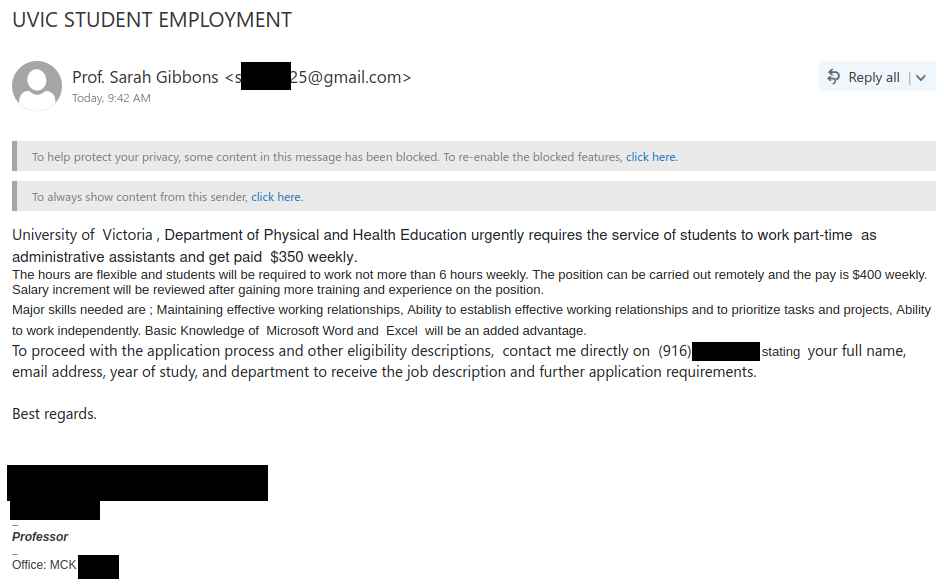
“UVIC STUDENT EMPLOYMENT” and similar job scam emails

Here is yet another job scam email impersonating a real UVic faculty member. This job scam uses a variety of different subject lines; other ones we’ve seen include:

  • UVIC STUDENT JOB
  • Part-time Student Job
  • Administrative Assistants Needed
  • Organizational Research

The red flags to look out for are pretty much the same as the ones we’ve seen in previous batches from earlier this month:

  • The emails come from Gmail addresses–a real UVic job opportunity should be coming from a UVic email address. Note: if the email appears to have been forwarded by someone at UVic, check to see who sent it to them in the first place, and be very wary if the original sender was using a Gmail or other freemail address.
  • The sender’s name may differ from the professor supposedly offering the position.
  • The salary offered is too good to be true, especially for a small number of hours of remote casual work. The scammer also can’t seem to get their own facts straight, as they give two different weekly amounts in the same email!
  • There are errors in capitalization, spacing and formatting, as well as odd/awkward wording.
  • The scammer asks you to reach them via SMS to shift the conversation to a place that UVic can’t monitor. Also, the phone number provided is not local; the 916 area code corresponds to Sacramento, California.

Do not engage with the scammer via email or SMS and do not forward these emails around. If you responded to the scam, contact the Computer Help Desk immediately for assistance, especially if you sent personal information or money.

Job scam email from fake professor "Sarah Gibbons" on Gmail, impersonating a real UVic faculty member

Subject: UVIC STUDENT EMPLOYMENT
From: Prof. Sarah Gibbons <s*****25@gmail.com>

University of Victoria , Department of Physical and Health Education urgently requires the service of students to work part-time as administrative assistants and get paid $350 weekly.
The hours are flexible and students will be required to work not more than 6 hours weekly. The position can be carried out remotely and the pay is $400 weekly. Salary increment will be reviewed after gaining more training and experience on the position.
Major skills needed are ; Maintaining effective working relationships, Ability to establish effective working relationships and to prioritize tasks and projects, Ability to work independently. Basic Knowledge of Microsoft Word and Excel will be an added advantage.
To proceed with the application process and other eligibility descriptions, contact me directly on ‪(916) ***-**** stating your full name, email address, year of study, and department to receive the job description and further application requirements.

Best regards.

[impersonated professor]
[impersonated professor]

Professor

Office: MCK ***

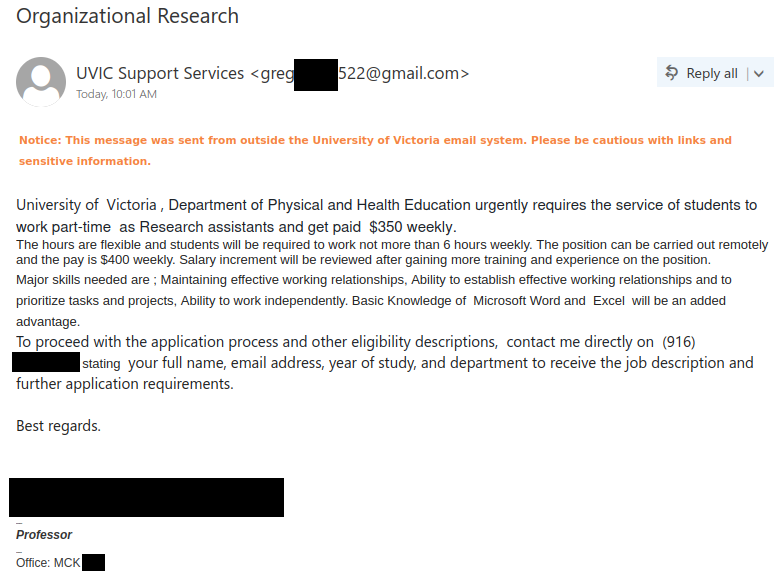
Job scam email claiming to be from "UVIC Support Services" that actually came from Gmail, impersonating a real UVic faculty member

Subject: Organizational Research
From: UVIC Support Services <greg*****522@gmail.com>

Notice: This message was sent from outside the University of Victoria email system. Please be cautious with links and sensitive information.

University of Victoria , Department of Physical and Health Education urgently requires the service of students to work part-time as Research assistants and get paid $350 weekly.
The hours are flexible and students will be required to work not more than 6 hours weekly. The position can be carried out remotely and the pay is $400 weekly. Salary increment will be reviewed after gaining more training and experience on the position.
Major skills needed are ; Maintaining effective working relationships, Ability to establish effective working relationships and to prioritize tasks and projects, Ability to work independently. Basic Knowledge of Microsoft Word and Excel will be an added advantage.
To proceed with the application process and other eligibility descriptions, contact me directly on ‪(916) ***-****‬ stating your full name, email address, year of study, and department to receive the job description and further application requirements.

Best regards.

[impersonated professor]

Professor

Office: MCK ***

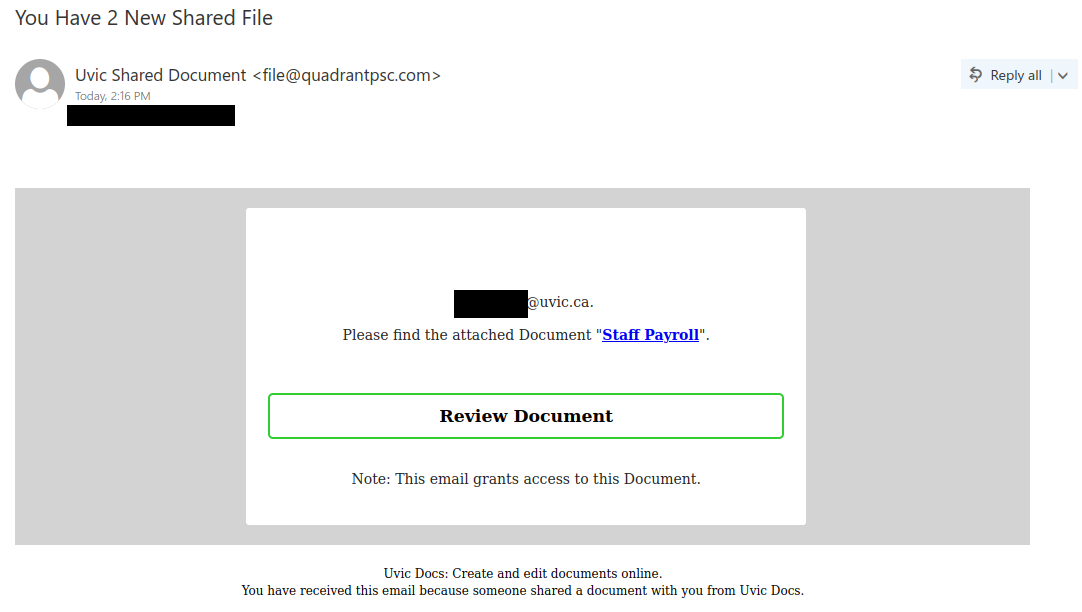
You Have 2 New Shared File

This phish tries to lure you in with a payroll-related document. It claims to be from UVic, but there are several signs it’s not from us:

  • The sender address is external. Real payroll or HR emails should come from a UVic email address.
  • “Uvic” uses incorrect capitalization, and there are other capitalization errors.
  • The subject line has incorrect grammar.

Hovering over the link will show that its destination is also not uvic.ca. The phisher also seems to have used individualized click tracking links for this campaign. This highlights another good reason why you shouldn’t click the link out of curiosity–the phisher may be tracking who clicked and send those people more phishing emails.

Phish claiming to be a staff payroll document from "Uvic Docs", with a link to click to review the supposed document.

Subject: You Have 2 New Shared File
From: Uvic Shared Document <file@quadrantpsc.com>

[redacted]@uvic.ca

Please find the attached Document “Staff Payroll”.

Review Document

Note: This email grants access to this Document.

Uvic Docs: Create and edit documents online.
You have received this email because someone shared a document with you from Uvic Docs.

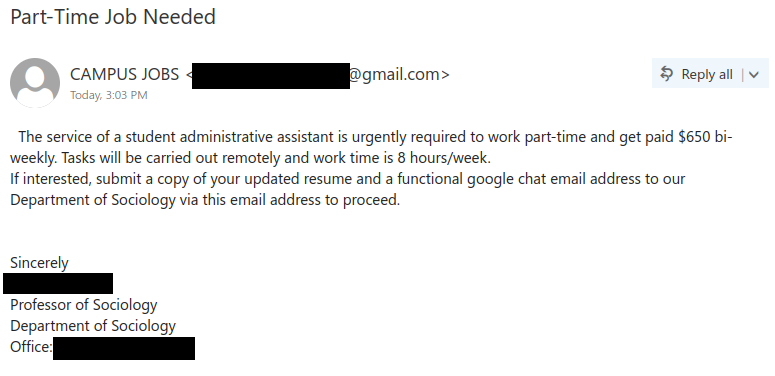
Part-Time Job Needed

Once again, scammers are sending out fake job offers that are impersonating real UVic faculty. These emails are similar to four previous batches we saw on May 8, 12, 16 and 19. Nevertheless, it’s worth doing a refresher on the red flags to look out for:

  • The emails are coming from Gmail addresses. A legitimate UVic job offer should come from a UVic email address.
  • The salary offered is too good to be true, especially for only eight hours per week of casual work.
  • The scammer tries to move the conversation away from non-UVic email to avoid UVic’s monitoring.
  • In some variants, the sender’s name will be different from the faculty member who is supposedly offering the job. Inconsistencies like that can be a sign that something isn’t right about the email.

If you received this email, do not reply to the scammer with your resume or contact information. If you did, cease contact with the scammer and reach out to the Computer Help Desk for assistance. If you forwarded the email to other people, recall the message and contact the recipients immediately to warn them of the scam.

Subject: Part-Time Job Needed
From: CAMPUS JOBS <[redacted]@gmail.com>

The service of a student administrative assistant is urgently required to work part-time and get paid $650 bi-weekly. Tasks will be carried out remotely and work time is 8 hours/week.

If interested, submit a copy of your updated resume and a functional google chat email address to our Department of Sociology via this email address to proceed.

Sincerely
[name redacted]
Professor of Sociology
Department of Sociology
Office: [redacted]

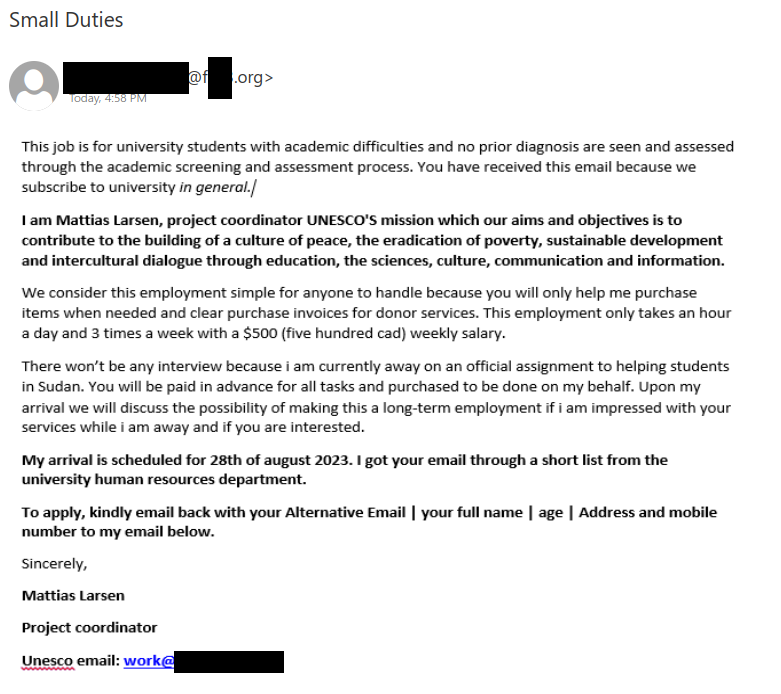
Small Duties

This is yet another job scam impersonating a UN agency, where the scammer has taken the additional step of using a reply address on a fraudulent domain that impersonates UNESCO. Here are the red flags indicating that this email is not legitimate:

  • The offer is way too good to be true: $500 for only three hours of casual work per week and no need to go through an interview is not realistic at all.
  • The email is poorly-written, with lots of awkward wording and grammatical errors.
  • The email asks you to send personal information and reply with your “Alternative Email”. This is a ploy to move the conversation off UVic email to evade monitoring.
  • The entire message is actually an image, not text. This is a trick scammers use to evade spam filters and is therefore a bad sign. The image has also been turned into a link that will make your mail app begin a new email with the scammer’s email address prefilled.
  • The sender is not from the UN and does not match the representative named in the email. Inconsistencies like this can often be a sign of a scam.

If you replied to this email, cease contact with the scammer and reach out to the Computer Help Desk immediately for assistance.

Job scam email impersonating someone from UNESCO


Subject: Small Duties
From: [redacted] <*****@f***.org>

This job is for university students with academic difficulties and no prior diagnosis are see and assessed through the academic screening and assessment process. You have received this email because we subscribe to the university in general./

I am Matthias Larsen, project coordinator UNESCO’s mission which our aims and objectives is to contribute to the building of a culture of peace, the eradication of poverty, sustainable development and intercultural dialogue through education, the sciences, culture, communication and information.

We consider this employment simple for anyone to handle because you will only help me purchase items when needed and clear purchase invoices for donor services. This employment only takes an hour a day and 3 times a week with a $500 (five hundred cad) weekly salary.

There won’t be any interview because i am currently away on an official assignment to helping students in Sudan. You will be paid in advance for all tasks and purchased to be done on my behalf. Upon my arrival we will discuss the possibility of making this a long-term employment if i am impressed with your services while i am away and if you are interested.

My arrival is scheduled for 28th of august 2023. I got your email through a short list from the university human resources department.

To apply, kindly email back with your Alternative Email | your full name | age | Address and mobile number to my email below.

Sincerely,

Matthias Larsen

Project coordinator

Unesco email: work@[scam email domain redacted]

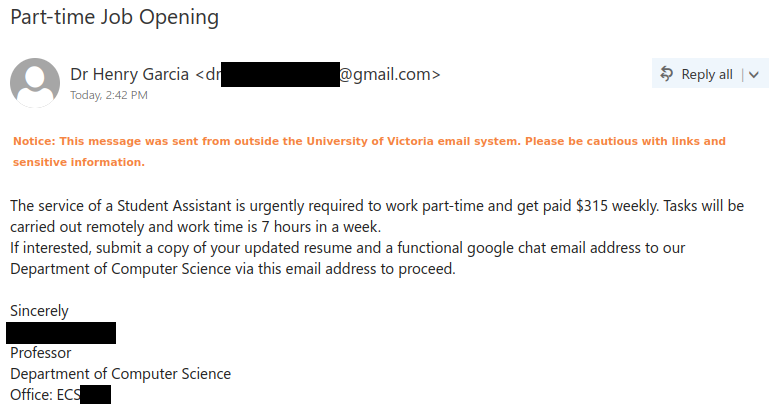
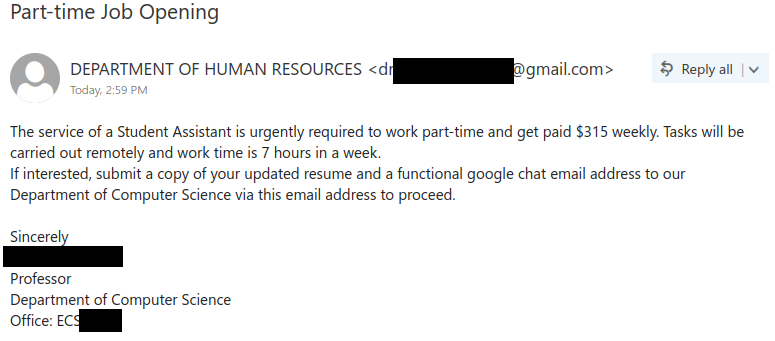
Part-time Job Opening

Today’s batch of job scam emails is very similar to the ones we wrote about on May 8 and May 12. Like the previous rounds, the scam uses the name of a real professor from the UVic Department of Computer Science to make the offer seem legitimate. As a refresher, here are the red flags in the email that indicate this offer is a scam:

  • The emails come from Gmail addresses. A legitimate UVic research job opportunity should come from a UVic email address.
  • The sender of the email differs from the professor named in the signature block. Inconsistencies like this can be a sign that the offer isn’t legitimate.
  • The email tries to shift the conversation off UVic email to Google Chat to evade monitoring.
  • The offer is too good to be true–$315 for 7 hours of work a week is more than twice the minimum wage in BC.

We have since learned that people who respond to the scammer will be told they got the job without having to go through an interview or even meet the professor (not even virtually). This is yet another sign that the supposed opportunity is a scam.

The scammer will then proceed to build trust by sending tasks for performing market research for office equipment and supplies. Eventually, this will culminate in asking the victim to purchase office supplies by sending their own money to a specified “supplier” (actually the scammer) and that they will be reimbursed later (which of course doesn’t happen).

If you received this email, do not reply to the scammer with your resume or contact information. If you did, cease contact with the scammer and reach out to the Computer Help Desk for assistance. If you forwarded the email to other people, recall the message and contact the recipients immediately to warn them of the scam.

Subject: Part-time Job Opening
From: Dr Henry Garcia <dr[redacted]@gmail.com>

Notice: This message was sent from outside the University of Victoria email system. Please be cautious with links and sensitive information.

The service of a Student Assistant is urgently required to work part-time and get paid $315 weekly. Tasks will be carried out remotely and work time is 7 hours in a week.
If interested, submit a copy of your updated resume and a functional google chat email address to our Department of Computer Science via this email to proceed.

Sincerely
[name redacted]
Professor
Department of Computer Science
Office: ECS [room redacted]

Subject: Part-time Job Opening
From: DEPARTMENT OF HUMAN RESOURCES <dr[redacted]@gmail.com>

The service of a Student Assistant is urgently required to work part-time and get paid $315 weekly. Tasks will be carried out remotely and work time is 7 hours in a week.
If interested, submit a copy of your updated resume and a functional google chat email address to our Department of Computer Science via this email address to proceed.

Sincerely
[name redacted]
Professor
Department of Computer Science
Office: ECS [room redacted]

“Student Research Assistant Urgently Needed” or “Office of Research Assistants” job scam emails

We’ve been seeing several variations of these fake research assistant job offers, each one impersonating a real UVic faculty member to make the opportunity look legitimate. However, there are several red flags that indicate these are scams:

  • The emails come from Gmail addresses, not from the faculty members’ UVic email addresses.
  • The scammer asks you to respond using a different communication method (SMS or Google chat). This is an attempt to evade our monitoring systems by moving the conversation away from UVic email.
  • The versions that request responses via SMS don’t provide a local phone number; the 323 area code corresponds to Los Angeles, California.
  • The pay offered is several times higher than the minimum wage in BC and therefore too good to be true, especially for part-time/casual work.
  • The messages contain errors in grammar, spacing and/or punctuation.
  • The name of the sender of the email may differ from the professor mentioned in the message.

If you replied to one of these emails, contact the Computer Help Desk immediately for assistance, especially if you sent money or personal information.

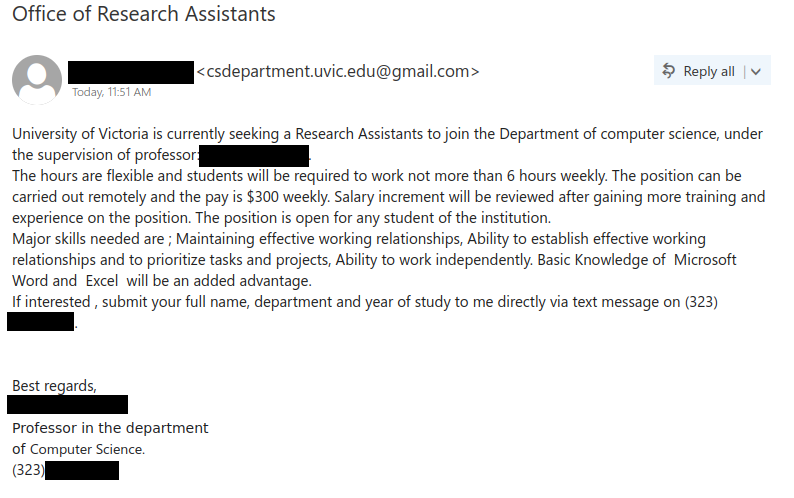
Subject: Office of Research Assistants
From: [name redacted] <csdepartment.uvic.***@gmail.com>

University of Victoria is currently seeking a Research Assistants to join the Department of computer science, under the supervision of professor: [name redacted].
The hours are flexible and students will be required to work not more than 6 hours weekly. The position can be carried out remotely and the pay is $300 weekly. Salary increment will be reviewed after gaining more training and experience on the position. The position is open for any student of the institution.
Major skills needed are ; Maintaining effective working relationships, Ability to establish effective working relationships and to prioritize tasks and projects, Ability to work independently. Basic Knowledge of Microsoft Word and Excel will be an added advantage.
If interested , submit your full name, department and year of study to me directly via text message on (323) [scammer’s phone number redacted].

Best regards,
[name redacted]
Professor in the department
of Computer Science.
(323) [scammer’s phone number redacted].

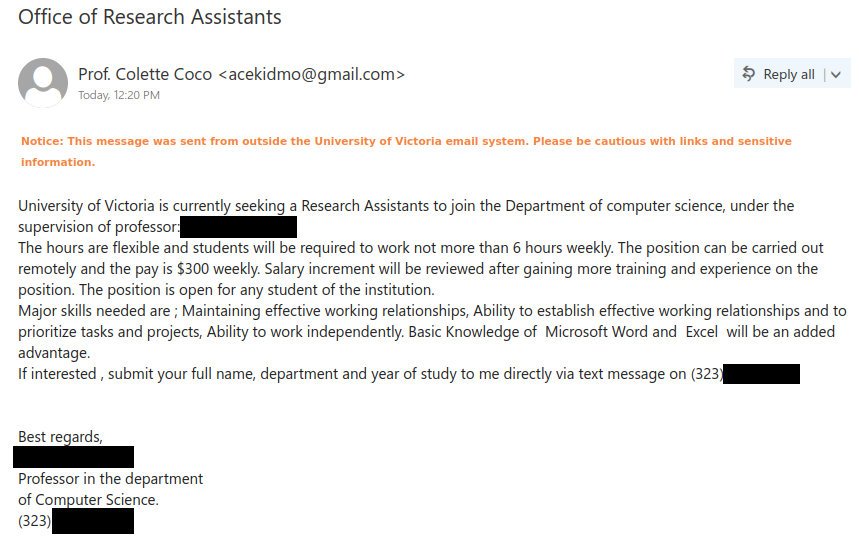
Subject: Office of Research Assistants
From: Prof. Colette Coco <ac****mo@gmail.com>

Notice: This message was sent from outside the University of Victoria email system. Please be cautious with links and sensitive information.

University of Victoria is currently seeking a Research Assistants to join the Department of computer science, under the supervision of professor: [name redacted].
The hours are flexible and students will be required to work not more than 6 hours weekly. The position can be carried out remotely and the pay is $300 weekly. Salary increment will be reviewed after gaining more training and experience on the position. The position is open for any student of the institution.
Major skills needed are ; Maintaining effective working relationships, Ability to establish effective working relationships and to prioritize tasks and projects, Ability to work independently. Basic Knowledge of Microsoft Word and Excel will be an added advantage.
If interested , submit your full name, department and year of study to me directly via text message on (323) [scammer’s phone number redacted].

Best regards,
[name redacted]
Professor in the department
of Computer Science.
(323) [scammer’s phone number redacted].

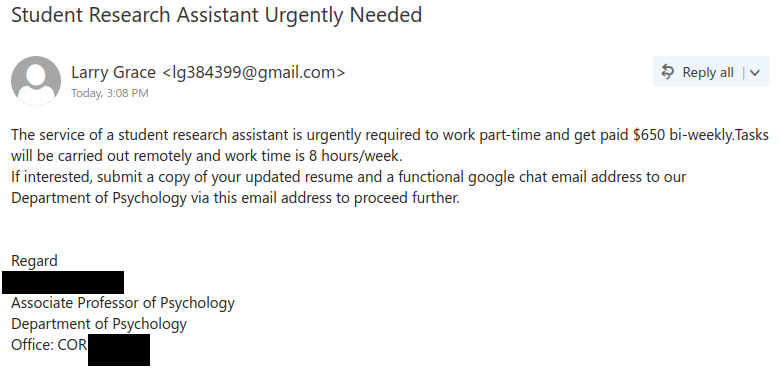
Subject: Student Research Assistant Urgently Needed
From: Larry Grace <lg3****9@gmail.com>

The service of a student research assistant is urgently required to work part-time and get paid $650 bi-weekly.Tasks will be carried out remotely and work time is 8 hours/week.
If interested, submit a copy of your updated resume and a functional google chat email address to our Department of Psychology via this email address to proceed further.

Regard
[name redacted]
Associate Professor of Psychology
Department of Psychology
Office: COR [room redacted]

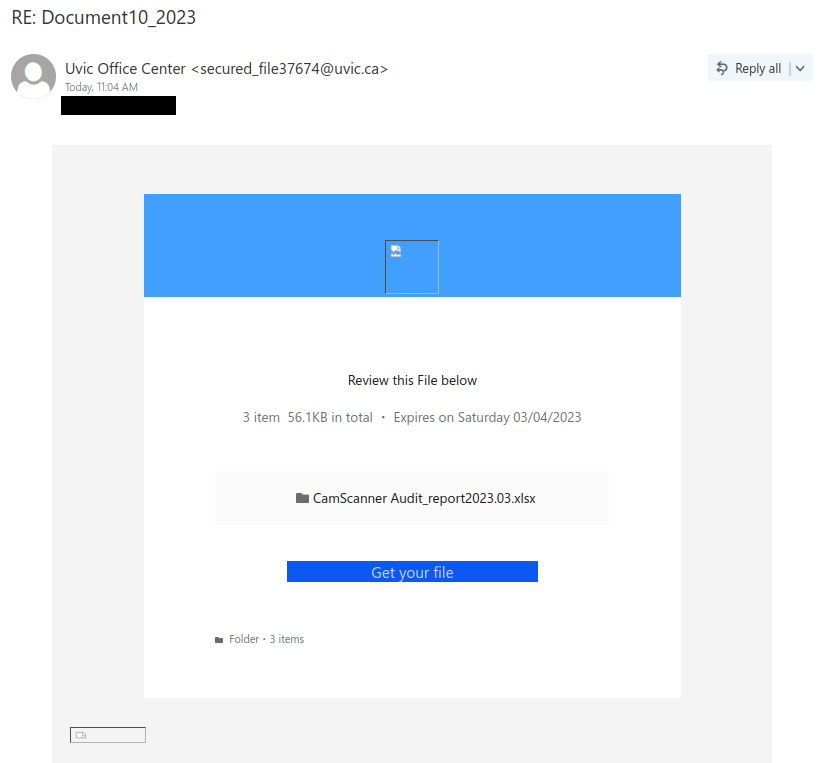
RE: Document10_23

This phish tries to look like a secure file that came from an internal system, but in reality the uvic.ca sender address has been spoofed.

Other signs that this email is not legitimate:

  • There are grammatical and capitalization errors, including the incorrect “Uvic” in the sender display name
  • The email creates a false sense of urgency by saying the file will expire tomorrow
  • Hovering over “Get your file” would reveal a destination link that’s not on UVic or Microsoft.
  • The broken images might also be a bad sign, but in this case it’s not clear whether they would have worked in a different mail client.

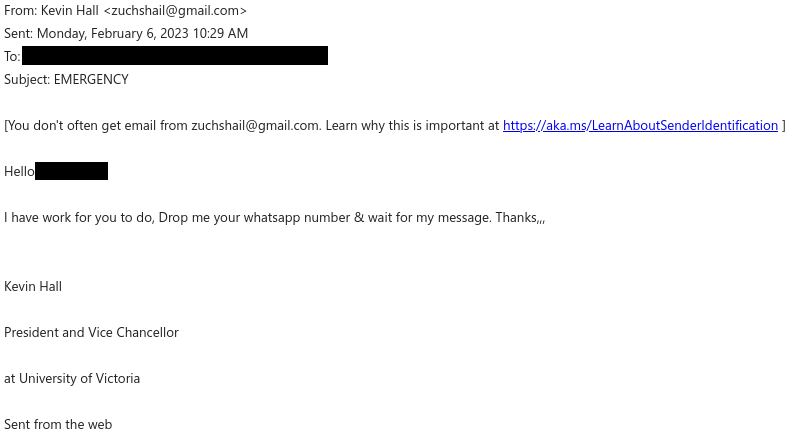
EMERGENCY

This scam email is trying to impersonate President Kevin Hall and resembles the start of a gift card scam. Below are some signs that this email is not really from the president:

  • The “From” address is from Gmail, not UVic. Also note the warning banner at the top saying that you don’t often get email from that address; that is a signal to take an extra minute to evaluate whether this email is legitimate and actually coming from the person it claims to be from.
  • The subject line creates a sense of urgency, and yet the actual message is extremely vague. That probably means there isn’t really an emergency.
  • The email contains quite a few errors in capitalization, grammar and punctuation, which is not the writing style you would expect from a university president.
  • The email is trying to shift to a different communication channel to evade detection (WhatsApp in this case, though Google Chat, SMS and personal email are also common requests). If you replied with your alternative contact information, be vigilant and watch out for further phishing or scam attempts on that channel, since your contact information is now in the hands of someone malicious.

If you receive an email that claims to be from someone at UVic but you’re not sure if it’s genuine, do not reply to the email or use any contact information from it. Instead, contact that person through a different method that you know is safe, such as by phoning the Office of the President.

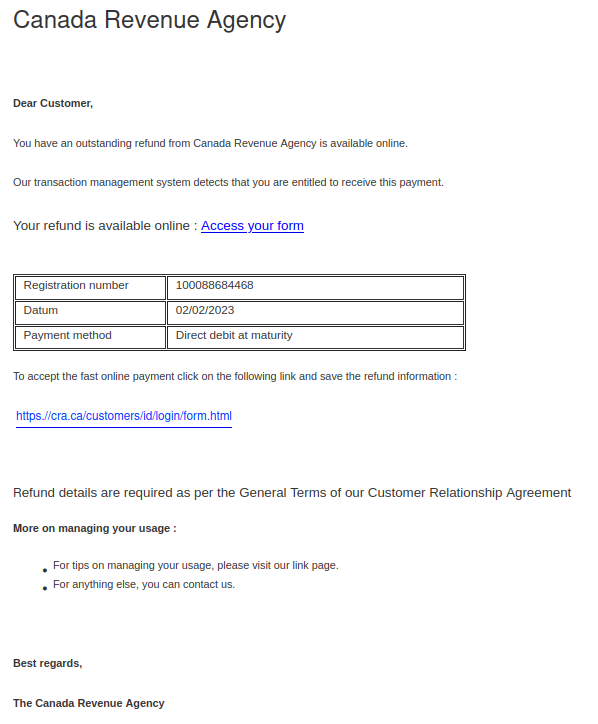
You have an outstanding refund from Canada Revenue Agency.

With income tax filing season approaching, it’s not surprising that phishers are sending emails pretending to be from the Canada Revenue Agency (CRA). The “From” addresses for these emails were not ones from canada.ca or a domain ending in .gc.ca, meaning the emails did not actually come from the Government of Canada. The samples reported to us had sender addresses from various Austrian domains.

There are several other signs that this is a phish in the message contents:

  • The greeting is impersonal, and it seems odd for the CRA to address you as a customer when they’re a government agency.
  • There are some grammatical errors and also weird extra spaces before colons.
  • The use of “datum” instead of “date” is a word choice error.
  • The text about “managing your usage” near the end of the message doesn’t make sense in this context.

The ultimate red flag: hovering over either link will reveal that they use TinyURL or some other link shortener. Be very suspicious of shortened links in emails, as phishers often use them to hide the true malicious destination of the link. We used a security scanner on these shortened URLs and can confirm that they do not go to the real CRA website.

Real CRA webpages are on either canada.ca or domains with names ending in .gc.ca. It’s also worth noting that cra[.]ca actually belongs to a market research company, not the CRA!

For more information, the Canada Revenue Agency also has a page with additional tips on how to protect yourself from fraud.

Free Yamaha Baby Grand Piano

This is not the first time we’ve posted about piano scams, but this one is unusually well-crafted and also takes the extra step of impersonating President Kevin Hall. The sender email address in the example below even looks like it came from within UVic, but in reality it was spoofed.

The fact that the email tells you to contact someone you don’t know at a different email address from a free email provider is a red flag. If you’re not sure about the legitimacy of the email, verify it by contacting the supposed sender through a different contact method that you know is safe. Do not reply directly to the suspicious email–in this case, the email was crafted to send any replies to yet another Gmail address that is controlled by the scammer. And as always, be wary of unsolicited offers that look too good to be true.

Delayed package phishes

With the holidays coming soon, there’s a fair chance that you’re someone who is waiting for a package to be delivered. Phishers regularly try to take advantage by sending out phony package notification emails, hoping that someone will think  it’s related to a delivery they’re expecting and click the link.

If you are expecting a package and want to check the status of the delivery, obtain tracking information from your order receipt or by logging into the site on which you made the order, and then go to the official site of the delivery provider to track your package. Do not use a link from an email to go to those sites if you’re not certain that the email is legitimate. Instead, use a bookmark for the site if you made one earlier, or carefully type the site’s address into your browser. Alternatively, for delivery providers you can use Amazon.ca’s reference page with links and phone numbers for delivery providers that they work with.

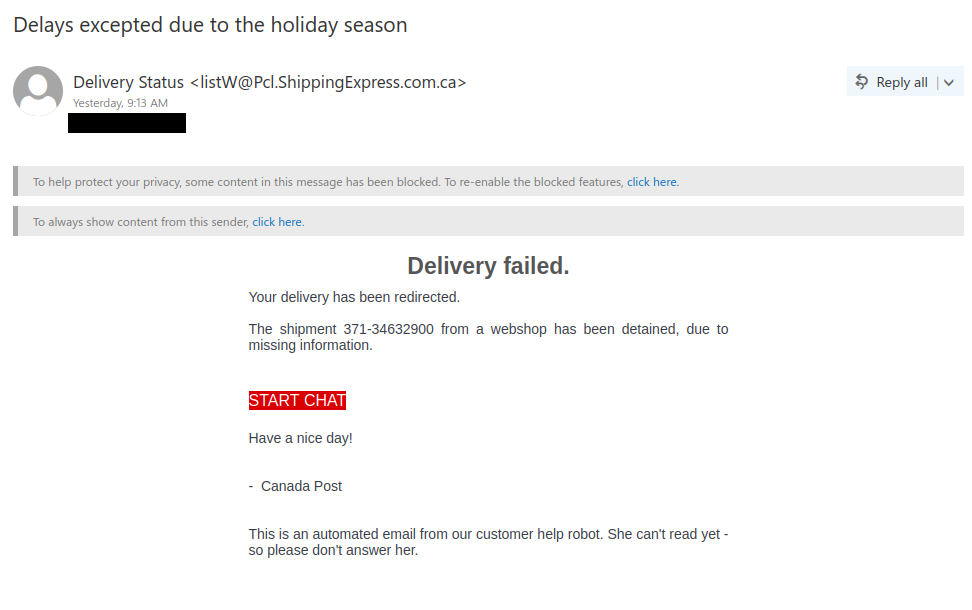
Now we’ll look at some examples of package phishes and how to spot them. Below is an example of a fake Canada Post email. There are quite a few signs that the email is not legitimate:

  • In the subject line, there is a word choice error (malapropism) in “Delays excepted”
  • The sender display name and address are very generic in that they don’t match a specific delivery provider
  • The description of the shipment as being “from a webshop” is oddly vague

The link in this phish seems to be abusing a legitimate link scanning and redirect service to hide the true destination. That can make it tricky to determine where the link actually goes, but given the red flags above, you can reasonably conclude it’s not going to be the real Canada Post website.

Here’s an example of a fake UPS email. This one is better-crafted than the one above, but there are still some red flags you can spot:

  • The sender email address is not from UPS (it appears to be from an unrelated Japanese site)
  • Wonky formatting like the misaligned “Track This Parcel” button can be a sign the email is fake

Hovering over “Track This Parcel” will reveal a link to a site on s3.amazonaws.com. It’s worth noting that Amazon isn’t just an online marketplace. Amazon AWS is a major cloud computing provider, and phishers are known to abuse it to host phishing sites. If you see a link to a site on s3.amazonaws.com in an unsolicited email, be wary. Links from an Amazon order email are more likely to go to amazon.com or amazon.ca.


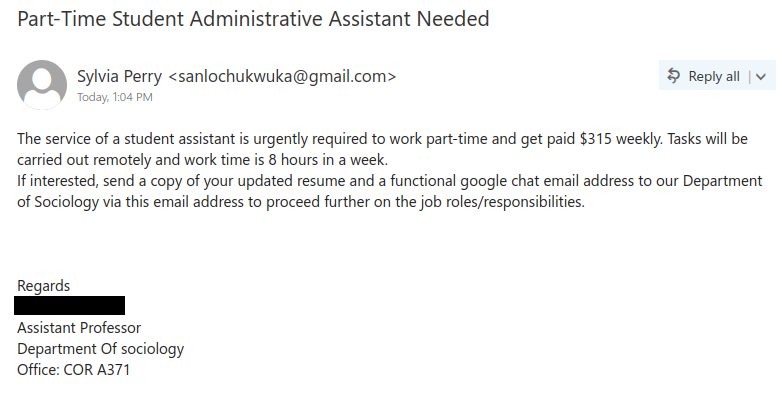
Part-Time Student Administrative Assistant Needed

This purported job offer uses the name of a real faculty member from the Department of Sociology, but this job offer did not come from that person or department and is a scam. There are several signs that this is not a legitimate opportunity:

  • The sender’s name does not match the name of the faculty member in the signature. This can be a sign of an impersonation scam.
  • The sender is not using UVic email. Instead, they are using a Gmail address and asking you to reply to it. Always be wary of unsolicited job offers that come from  an address from a free email provider or that ask you to contact that sort of email address.
  • The pay being offered for 8 hours of work per week is too good to be true–that’s much higher than the minimum wage in BC!
  • The scammer is asking you to send alternative contact information to move the conversation away from UVic email to evade detection.
  • There are capitalization errors in the signature block.

If you replied to the scammer, especially if you provided money or sensitive personal information, reach out to the Computer Help Desk for assistance and advice on how to report the fraud.