A view into a fake job scam

Scammers routinely attempt to target students with job scams, taking advantage of those trying to make ends meet or pay tuition and rent with a seemingly-attractive job offer.  In reality, the victim is asked to deposit a fake cheque and immediately send an e-transfer from their personal banking account.  Given the cheque is fake, the victim will see the deposit cancelled/reversed by the bank, and they will have lost their own personal funds.

Recently I had the opportunity to play the role of the victim using a persona configured for this purpose.  The following are some screenshots of SMS messages and emails that give insight into how the attacker works and how a victim might be fooled into giving up their hard-earned personal funds.

Note that some details have been redacted.  Also, do NOT try this yourself.  This is posted for educational purposes only.

A recent phishing attack included form fields for username, password, and cell phone number.  For this attack, a fake username and password were entered, as well as a temporary phone number from a SMS app.  A couple weeks after the data was entered into the form, I received a text at that temporary number.
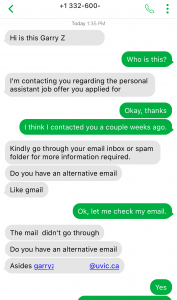
 

The attacker tries to pivot off of @uvic.ca email so that the information security team can’t discover or block the fraudulent activity.  The use of SMS is also a common tactic for scammers to move the conversation off university infrastructure.  I had to quickly create a new Gmail address to engage with the scammer.
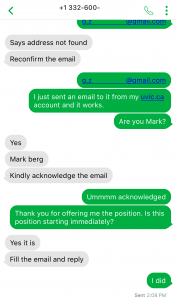
In my brand new Gmail account, I receive an email about the job offer.  “Mark” is careful to make sure I know why I won’t be interviewing in person (or by Zoom) just to make sure I won’t ask questions.  I carefully read the email, and then I respond with the requested information (plausible, but fake answers, knowing that Mark wouldn’t actually read them or care about them).
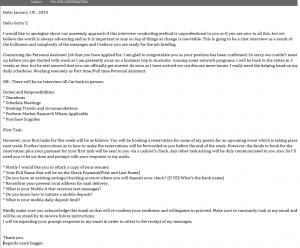
Date: January 19! , 2024
Hello Garry Zebaurelios
I would like to apologize about our unseemly approach if this interview conducting method is unprofessional to you or if you are new to all this, but we believe the world is always advancing and so it is important to stay on top of things as change is inevitable. This is going to be a chat interview as a result of the bulkiness and complexity of the messages and I believe you are ready for the job briefing.

Concerning the Personal Assistant Job that you have applied for. I am glad to congratulate you as your position has been confirmed. So sorry we couldn't meet up before you get started with work as I am presently away on a business trip in Australia  running some network programs. I will be back to the states in 3 weeks or less, but be rest assured that you can officially get started. As soon as I have arrived we can discuss more issues. I really need the helping hand on my daily schedules. Working remotely as Part time/Full time Personal Assistant.

NB : There will be no Interview till I'm back in person.

Duties and Responsibilities:
* Donations
* Schedule Meetings
* Booking Travels and Accommodations
* Perform Market Research Where Applicable
* Purchase Supplies

First Task: 
However, your first tasks for this week will be as follows. You will be booking a reservation for some of my guests for an upcoming event which is taking place next week. Further instructions as to how to make the reservations will be forwarded to you before the end of the week. However, the funds to book for the reservation plus your payment for your first task will be sent to you via a cashier's check. Any other task arising will be duly communicated to you also. So I'll need you to be on-time and prompt with your response to my mails.

* Firstly I would like you to attach a copy of your resume.
* Your Full Name that will be on the Check Payment(First and Last Name)
* Do you have an existing savings/checking account where you will deposit your check? (If YES What's the bank name)
* Reconfirm your present local address for mail delivery.
* What is your Mobile # that receives text messages?
* Do you know how to initiate a mobile deposit?
* What is your mobile daily deposit limit?

Kindly make sure you acknowledge this email as that will re-confirm your readiness and willingness to proceed. Make sure to constantly look at my email and will be on stand-by to receive future instructions. 

I will be expecting your prompt response to my email in order to attest to the receipt of my messages.

Thank you.
Regards mark begger


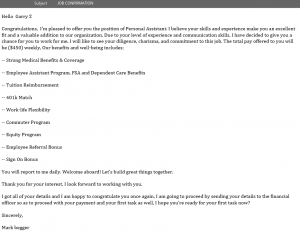
And there it is!  I’ve gone through the very difficult interview process and have now become Mark’s employee.  And I’m really looking forward to my 401k (a US financial instrument, even though I’m Canadian), multiple employment benefits, and a sign-on bonus!  All for $450 per week.  Time to quit my CISO job for the lucrative opportunity….
 

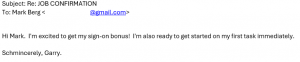
Of course, I have to be polite and let Mark know how excited I am.  I wonder if he knows how “schmincere” I really am.
 

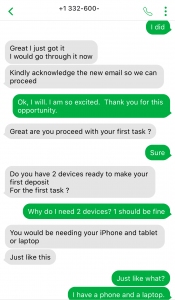
I am soooooo ready for the first task as my boss’s new personal assistant.


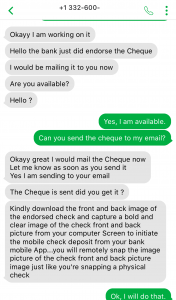
Amazingly, Mark emails me instructions on how to do a mobile deposit for the fake cheque using two devices.  The support and instruction is superb for a new employee.
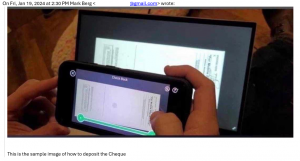
 

While I review the instructions, Mark pretends to have the bank endorse the cheque, so that I will be more comfortable doing the mobile deposit.  Knowing the bank has blessed it makes me feel so much better.  And of course, he gives me some great instructions on how to deposit, just so I get it right.  Maybe Mark has worked at a help desk before.
 

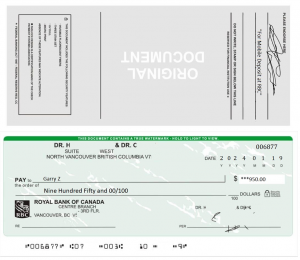
Here is where it get’s even more interesting.  Mark emails me an image of a cheque from Royal Bank (I had indicated in my job application that I banked at Royal Bank).

The cheque appears to be plausible, if not legitimate.  The transit numbers were validated using an online bank routing database, and matched the branch address information on the cheque.  The names and address of the people on the cheque seem to be real, or at least based on a real person, from what I could tell from a searches of Google and Google Maps.

For most people, this look like a legitimate cheque… except that it’s a picture of a cheque, not a paper one.  (Note that I’ve reported this to Royal Bank.)
 

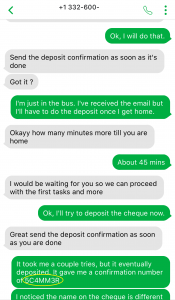
Now that I have some interesting information from Mark, I wanted to play a little and see if he noticed I was on to the scam.  I don’t think he picked up on the confirmation number I received when I “deposited” the cheque.
 

Mark’s name shockingly didn’t match the names on the cheque, so of course I had to see what reason he would give for that…
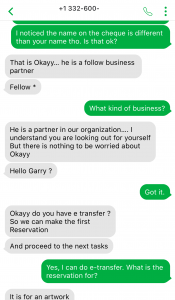
 

Mark still hasn’t told me what kind of business he is in, so I ask him, and of course it doesn’t even match the kind of business mentioned on the fake cheque.  Clearly he doesn’t want to share lots of detail, and he has an urgent job to do.  He provides me the name and email address to which I need to send an e-transfer.  (I’ve reported this to Interac support for their awareness and action.)
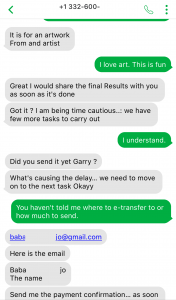
 

We suspect this threat actor is possibly of Nigerian origin, based on some past activity.  I decided to see if Mark would get another hint that I knew it was a scam, by mentioning Black Axe, which is a notorious Nigerian crime organization.
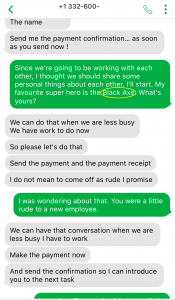
 

Mark is too busy for small talk and personal chatter.  I dropped another hint for him.  Air Lords are another known Nigerian criminal organization.  Perhaps Mark isn’t familiar with them, or maybe he’s not really reading what I’m saying.
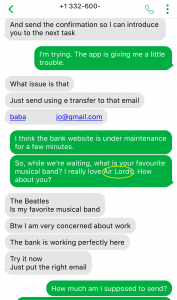
 

Earlier Mark had sent me the name and email address of the person to whom I was supposed to send the e-transfer.  I looked up the person’s name on social media, and came back with several results, with multiple profiles indicating they lived in a particular town in Nigeria (surprise!).  So, I used that town name as a confirmation code.  I wonder if Mark started to suspect something…
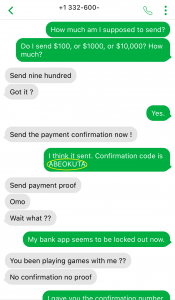
 

I think he’s on to me….
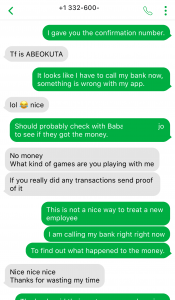
Mark and I eventually got tired of each other, and the conversation ended up dwindling after nearly 24 hours.

Hopefully this gives some insight into how someone could become a victim of such a scam and how the scammer tries to extract money from victims.

Uvic Mandatory Multi-factor Authenticator

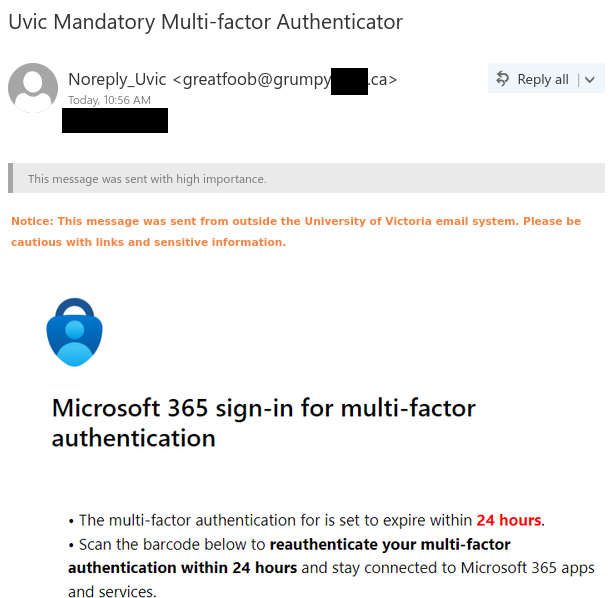
While it’s true that we are requiring everyone to enrol in UVic MFA, this email is not legitimate and is a case of quishing (QR code phishing). Here are the signs that this email is fraudulent and the QR code is not safe to scan:

  • Although the sender name mentions UVic, the email actually came from an external email address.
  • UVic is capitalized incorrectly and there are some wording errors in the message.
  • The email instills a sense of urgency by threatening expiry within a very short period of time, which is an attempt to trick you into acting hastily. Genuine emails of this nature will usually give you multiple notices well in advance of the deadline.
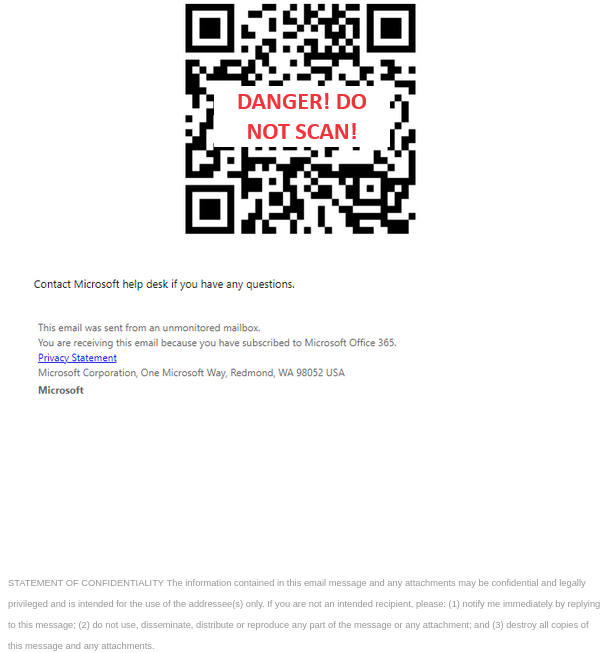
  • The email contains a QR code. Legitimate QR codes for MFA setup will never be sent by email. If a QR code is in an email, it’s usually because the scammer is using it to disguise a malicious link.

First half of MFA-themed quishing email - includes external sender and urgent language

Second half of MFA-themed quishing email - contains a malicious QR code that should not be scanned


From: Noreply_Uvic <greatfoob@grumpy******.ca>
Subject: Uvic Mandatory Multi-factor Authenticator
This message was sent with high importance.

Notice: This message was sent from outside the University of Victoria email system. Please be cautious with links and sensitive information.

[Microsoft Authenticator icon]

Microsoft 365 sign-in for multi-factor authentication

  • The multi-factor authentication for is set to expire within 24 hours.
  • Scan the barcode below to reauthenticate your multi-factor authentication within 24 hours and stay connected to Microsoft 365 apps and services.

[Malicious QR code]

Contact Microsoft help desk if you have any questions.

This email was sent from an unmonitored mailbox.
You are receiving this email because you have subscribed to Microsoft Office 365.
Privacy Statement
Microsoft Corporation, One Microsoft Way, WA 98052 USA
Microsoft

STATEMENT OF CONFIDENTIALITY The information contained in this email message and any attachments may be confidential and legally privileged and is intended for the use of the addressee(s) only. If you are not an intended recipient, please (1) notify me immediately by replying to this message; (2) do not use, disseminate, distribute or reproduce any part of the message or any attachment; and (3) destroy all copies of

Salary Adjustment Letter

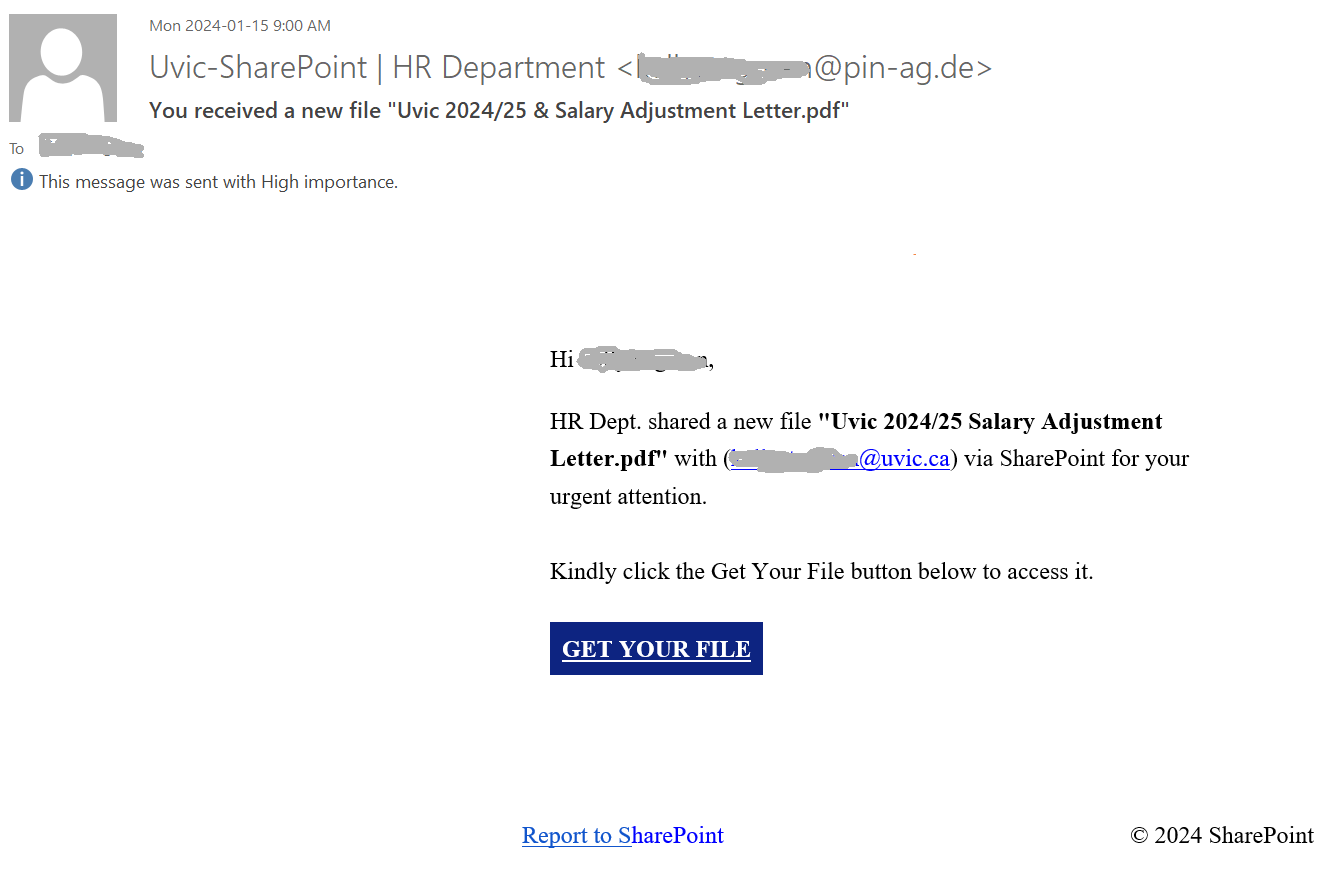
This phish is circulating today. The sender address is spoofed. It has a domain in Germany and the username can be your own netlinkID.  The display name of the sender pretends to be “UVic HR department”.

Please do not open attachments from unknown senders. They may contain malware,  links to malware loaded web pages or links to fake login pages.

Transcript:


Hi <your netlink>,

HR Dept. shared a new file “Uvic 2024/25 Salary Adjustment Letter.pdf” with (yournetlink@uvic.ca) via SharePoint for your urgent attention.


Kindly click the Get Your File button below to access it.


GET YOUR FILE


Report to SharePoint © 2024 SharePoint


Work-Study Opportunity

Yet another job scam is circulating today. As always, impersonating a real UVic professor to make the job offer look legitimate.

Here are some of the red flags:

  • The email comes from a Gmail address. Emails about real UVic job offers should come from a UVic email address.
  • The salary offered is too good to be true, that too for a part-time job.
  • The email requests your Google Chat email. Scammers often request alternative contact information to evade UVic detection.
  • The sender name does not match the name of the professor supposedly offering the job.

Never reply to such scams, always look for warning signs before taking any action. If you did reply, please stop any further conversation and reach out to helpdesk for assistance.

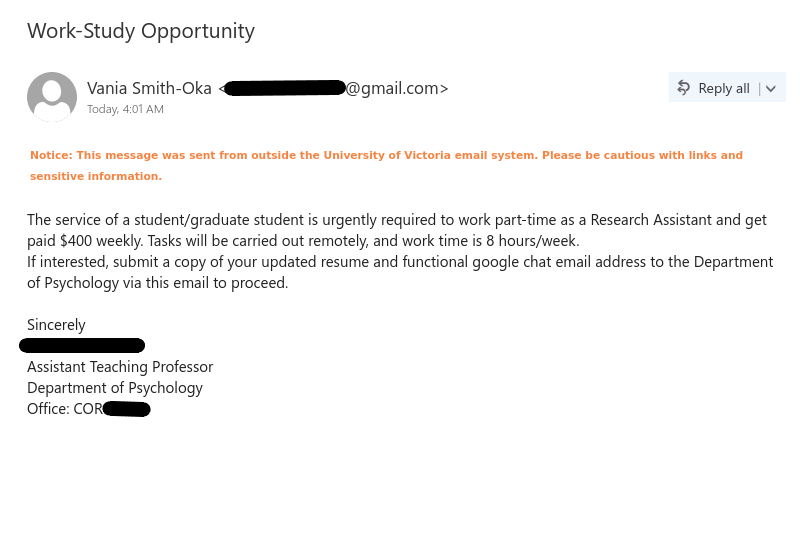
Job scam with subject "Work-Study Opportunity" impersonating UVic professor.

Subject: Work-Study Opportunity
From: Vania Smith-Oka <****@gmail.com>

Notice: This message was sent from outside the University of Victoria email system. Please be cautious with links and sensitive information.

The service of a student/graduate student is urgently required to work part-time as a Research Assistant and get paid $400 weekly. Tasks will be carried out remotely, and work time is 8 hours/week.
If interested, submit a copy of your updated resume and functional google chat email address to the Department of Psychology via this email to proceed.

Sincerely
[impersonated professor name]
Assistant Teaching Professor
Department of Psychology
Office: COR ****

Tremendous Growth Opportunity!!!

If a job offer comes your way claiming to be too good to be true, it probably is. This job scam offers too good a salary for number of hours required for the job. Email doesn’t even mention the name of the post or the organization offering the job. The job description is too vague.

Even if the phish is being sent from an internal address doesn’t necessarily means it is trustworthy, one still needs to pay attention to the phishing signs as the sender address could be spoofed.

Always think and look for red flags in an email before taking any action. Whenever in doubt contact helpdesk.


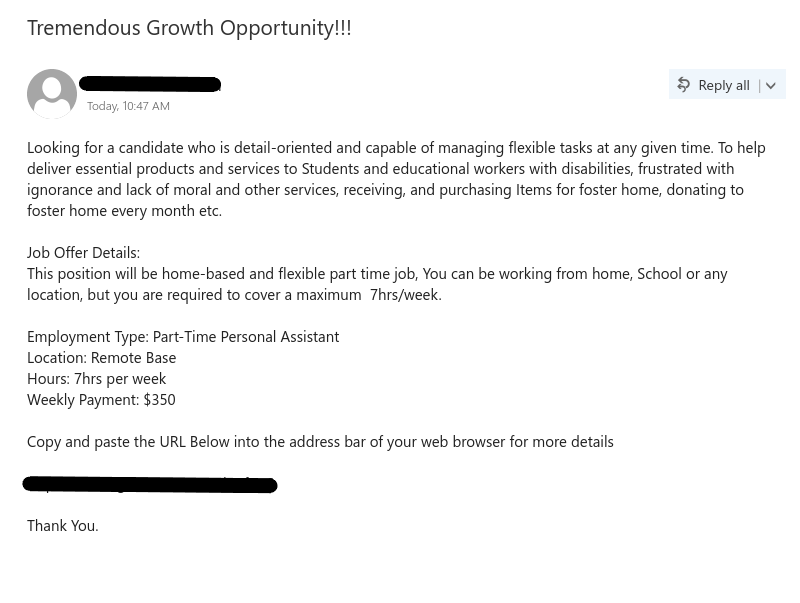
Job scam phish with subject "Tremendous Growth Opportunity!!!", that also has phishing link to steal the credentials.

Subject: Tremendous Growth Opportunity!!!
Sender: [redacted sender name]

Looking for a candidate who is detail-oriented and capable of managing flexible tasks at any given time. To help deliver essential products and services to Students and educational workers with disabilities, frustrated with ignorance and lack of moral and other services, receiving, and purchasing Items for foster home, donating to foster home every month etc.

Job Offer Details:
This position will be home-based and flexible part time job, You can be working from home, School or any location, but you are required to cover a maximum 7hrs/week.

Employment Type: Part-Time Personal Assistant
Location: Remote Base
Hours: 7hrs per week
Weekly Payment: $350

Copy and paste the URL Below into the address bar of your web browser for more details

[redacted phish link]

Thank You.

Authenticator To Helpdesk!!!

This phish uses scary tactic to get the user to take action to click on the link. The subject of the email is very generic, link is also external to UVic, it has formatting errors, no signature. The phishng link will clearly ask for the password as its mentioned in the email body, keep in mind, UVic will never ask for your password.  All these are phishing signs. Even if the phish is being sent from an internal address doesn’t necessarily means it is trustworthy, one still needs to pay attention to the phishing signs as the sender address could be spoofed.

Always think and look for red flags in an email before taking an action. Whenever in doubt contact helpdesk.

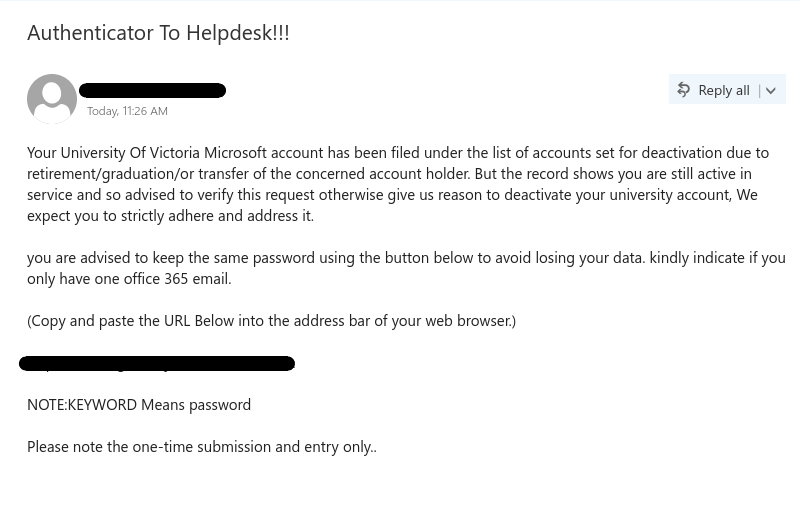
Phish with subject "Authenticator to Helpdesk!!!" that attempts to steal credentials.

Subject:Authenticator To Helpdesk!!!
Sender: [redacted sender name]

Your University Of Victoria Microsoft account has been filed under the list of accounts set for deactivation due to retirement/graduation/or transfer of the concerned account holder. But the record shows you are still active in service and so advised to verify this request otherwise give us reason to deactivate your university account, We expect you to strictly adhere and address it.

you are advised to keep the same password using the button below to avoid losing your data. kindly indicate if you only have one office 365 email.

(Copy and paste the URL Below into the address bar of your web browser.)

[redacted phish link]

NOTE:KEYWORD Means password

Please note the one-time submission and entry only..


UVIC IMPORTANT VERIFICATION!

We wrote about this phish a few days ago. It is circulating around today too.

There could be slight variations in the text or the signature the scammers used, but the idea remains the same – to steal your credentials.

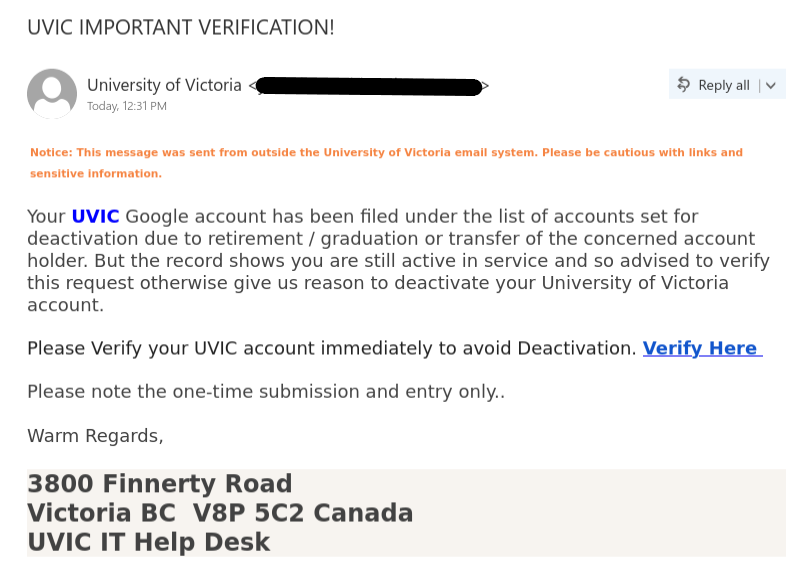
Phish with subject "UVIC IMPORTANT VERIFICATION!" has a phishing link to steal user credentials.

Subject: UVIC IMPORTANT VERIFICATION!
Sender: University of Victoria <****>

Notice: This message was sent from outside the University of Victoria email system. Please be cautious with links and sensitive information.

Your UVIC Google account has been filed under the list of accounts set for deactivation due to retirement / graduation or transfer of the concerned account holder. But the record shows you are still active in service and so advised to verify this request otherwise give us reason to deactivate your University of Victoria account.

Please Verify your UVIC account immediately to avoid Deactivation. Verify Here [Phishing link]

Please note the one-time submission and entry only..

Warm Regards,

3800 Finnerty Road
Victoria BC V8P 5C2 Canada
UVIC IT Help Desk

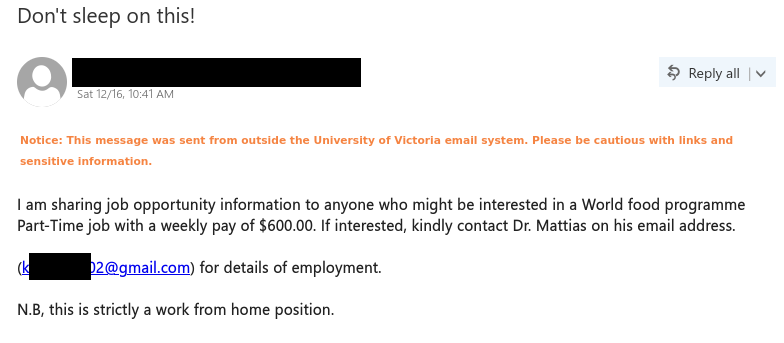
Don’t sleep on this!

In these days when the cost of living is so high, the prospect of getting generous pay for part-time work would be appealing, but scammers are well aware of that and trying to take advantage. The following job scam claims to offer an opportunity with the UN World Food Programme, but in reality the email was sent from a compromised account at another Canadian university.

A major red flag is that the email asks you to reply to a Gmail address. A real UN job offer would not ask you to contact an email address from a free email provider like Gmail, Hotmail/Outlook or Yahoo. Also, the fact that the email contains grammatical errors is another sign that the offer is not legitimate.

Remember, if you receive a job offer out of the blue and it offers a generous salary for a minimal amount of casual part-time work, in all likelihood it is a scam. In general, if an offer sounds too good to be true, it probably is. If you replied to this email, contact the Computer Help Desk or your department’s IT support staff immediately for assistance.

Job scam email pretending to be from the UN World Food Programme

From: [redacted]
Subject: Don’t sleep on this!

Notice: This message was sent from outside the University of Victoria email system. Please be cautious with links and sensitive information.

I am sharing job opportunity information to anyone who might be interested in a World food programme Part-Time job with a weekly pay of $600.00. If interested, kindly contact Dr. Mattias on his email address.

(k*****02@gmail.com) for details of employment.

N.B, this is strictly a work from home position.

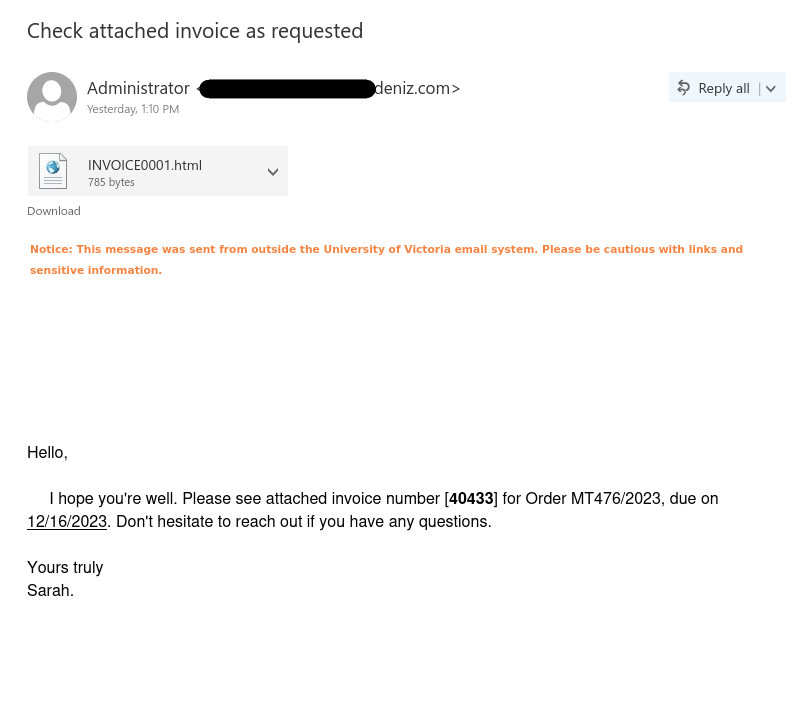
Check attached invoice as requested

There is no reason for anyone to open the attachment in this email as it is clearly a phish. It is not clearly stated what this invoice is for, or which organization is sending this invoice. Everything in this email is generic, be it the sender name, salutation, signature, subject and file name.

Never be curious about email attachments as opening those can lead to malware on your device. Hence, only open attachments which are coming from your known sources and you were expecting it.

Phish email with subject "Check attached invoice as requested" which has a malicious attachment.

Subject: Check attached invoice as requested
Sender: Administrator <****debiz.com>
Attached file: INVOICE0001.html

Hello,

I hope you’re well. Please see attached invoice number [40433] for Order MT476/2023, due on 12/16/2023. Don’t hesitate to reach out if you have any questions.

Yours truly
Sarah.


UVIC IMPORTANT VERIFICATION!

Another run of the high volume phish encountered yesterday. To spot the phishing signs check out the post below:

IMPORTANT: Verification

Below is the sample of the new variant:

Phish with subject "UVIC IMPORTANT VERIFICATION!" has a phishing link to steal user credentials.

Subject: UVIC IMPORTANT VERIFICATION!
Sender: University of Victoria <****>

Notice: This message was sent from outside the University of Victoria email system. Please be cautious with links and sensitive information.

Your UVIC Google account has been filed under the list of accounts set for deactivation due to retirement / graduation or transfer of the concerned account holder. But the record shows you are still active in service and so advised to verify this request otherwise give us reason to deactivate your University of Victoria account.

Please Verify your UVIC account immediately to avoid Deactivation. Verify Here [Phishing link]

Please note the one-time submission and entry only..

Warm Regards,

3800 Finnerty Road
Victoria BC V8P 5C2 Canada
UVIC IT Help Desk

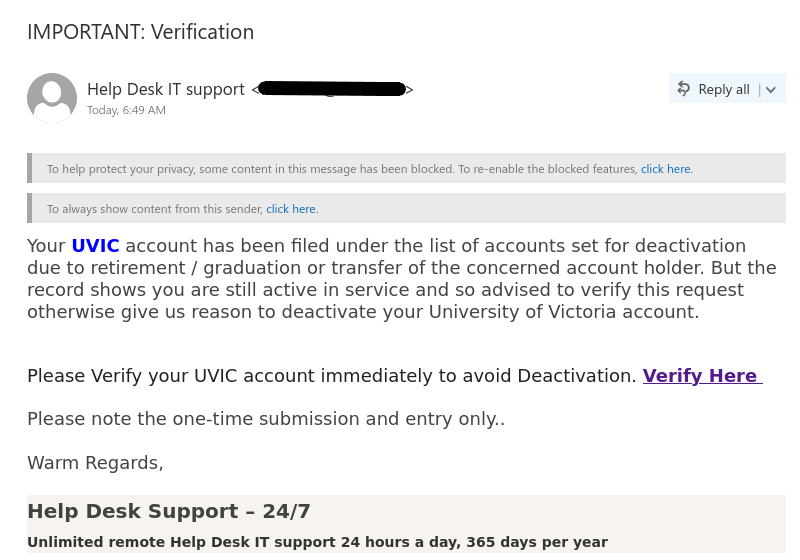
IMPORTANT: Verification

This phish uses scary tactic to get the user to take action to click on the link. The sender email address is external to UVic, the subject of the email is very generic, link is also external to UVic (check by hovering over it), it has formatting errors, and signature is also very generic. All these are phishing signs.

Always think and look for red flags in an email before taking an action. Whenever in doubt contact helpdesk.

Phish with subject "IMPORTANT: Verification" has a phishing link to steal user credentials.

Subject: IMPORTANT: Verification
Sender: Help Desk IT support <****>

Notice: This message was sent from outside the University of Victoria email system. Please be cautious with links and sensitive information.

Your UVIC account has been filed under the list of accounts set for deactivation due to retirement / graduation or transfer of the concerned account holder. But the record shows you are still active in service and so advised to verify this request otherwise give us reason to deactivate your University of Victoria account.

Please Verify your UVIC account immediately to avoid Deactivation. Verify Here [Phishing link]

Please note the one-time submission and entry only..

Warm Regards,

Help Desk Support – 24/7

Unlimited remote Help Desk IT support 24 hours a day, 365 days per year

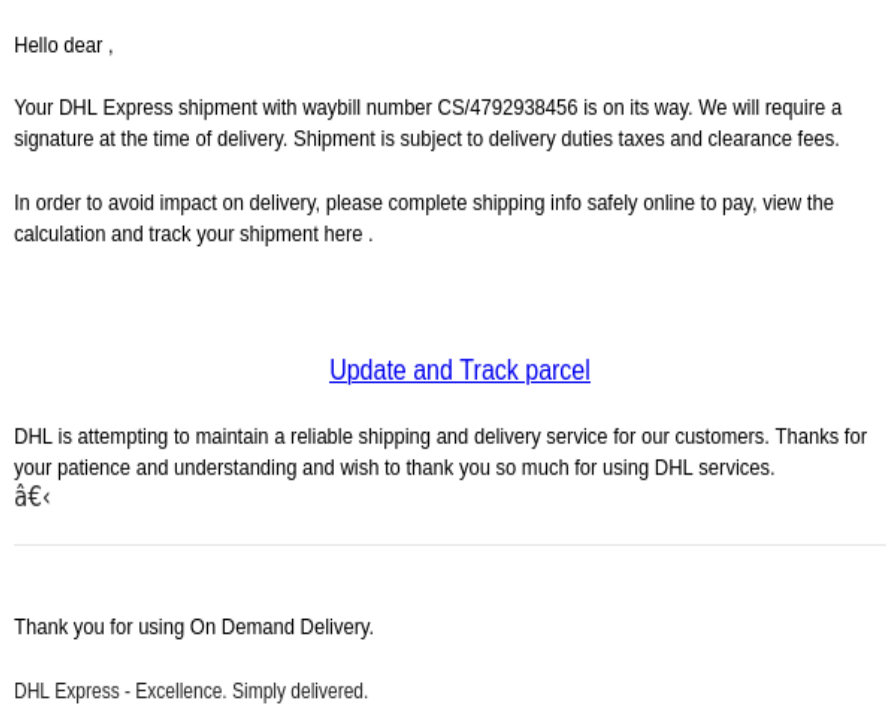
Delayed/Update/Track parcel

As the holidays approach, phishing attempts related to parcel updates (such as delays, imminent arrivals, tracking information, and requests for confirmation) become increasingly common.
These messages may contain links to malicious sites or fake login pages. An example of such a message that circulated today is shown below. Please resist the urge to click on these links out of curiosity. Instead, hover your mouse over the link to verify that it does not actually lead to the website of the supposed parcel courier.


Hello dear ,
Your DHL Express shipment with waybill number CS/4792938456 is on its way. We will require a signature at the time of delivery. Shipment is subject to delivery duties taxes and clearance fees.
In order to avoid impact on delivery, please complete shipping info safely online to pay, view the calculation and track your shipment here.
Update and Track parcel<link to the malicious cite>
DHL is attempting to maintain a reliable shipping and delivery service for our customers. Thanks for your patience and understanding and wish to thank you so much for using DHL services.
​
Thank you for using On Demand Delivery.
DHL Express – Excellence. Simply delivered.

Part-Time Job Opening or Student Assistant Urgently Needed

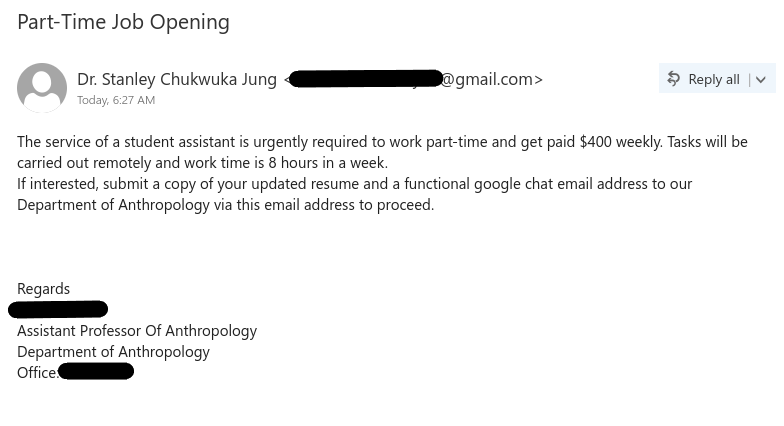
These types of job scams are not new. As always, impersonating a real UVic professor to make the job offer look legitimate.

Here are some of the red flags:

  • The email comes from a Gmail address. Emails about real UVic job offers should come from a UVic email address.
  • The salary offered is too good to be true, that too for a part-time job.
  • The email requests your Google Chat email. Scammers often request alternative contact information to evade UVic detection.
  • The sender name does not match the name of the professor supposedly offering the job.

Never reply to such scams, always look for warning signs before taking any action. If you did reply, please stop any further conversation and reach out to helpdesk for assistance.

Job scam phish with subject "Part-Time Job Opening" impersonating a UVic professor.

Subject: Part-Time Job Opening
From: Dr. Stanley Chukwuka Jung <****@gmail.com>

Notice: This message was sent from outside the University of Victoria email system. Please be cautious with links and sensitive information.

The service of a student assistant is urgently required to work part-time and get paid $400 weekly. Tasks will be carried out remotely and work time is 8 hours in a week.
If interested, submit a copy of your updated resume and a functional google chat email address to our Department of Anthropology via this email address to proceed.


Regards
[impersonated professor name]
Assistant Professor Of Anthropology
Department of Anthropology
Office: ****

Remote Flexible Job

Job scams that pretend to be from the Red Cross seem to becoming more common. As with many other job scams that we’ve seen before, the scammer tempts people with a generous salary for a minimal amount of work. If a job offer arrives unsolicited and the compensation is too good to be true, you can be sure it’s a scam.

Other red flags that indicate that the offer is fake:

  • The email was sent from an address that does not belong to the Red Cross. A legitimate email from the Canadian Red Cross would come from a redcross.ca email address.
  • The message contains multiple grammatical errors.
  • You are asked to reply from your personal email–this is a trick to move the conversation off UVic email to evade detection.
  • Replies are to be sent to a different address from a Red Cross lookalike domain.
  • The confidentiality notice is not from the Red Cross.

If you replied to this email, cease contact with the scammer and reach out to the Computer Help Desk immediately for assistance.

Job scam email that pretends to be from the Red Cross


Subject: Remote Flexible Job
From: [redacted] <********@iconpln.co.id>

Distribution Assistant is vacant at the National Red Cross with a weekly pay of $500. 3 hrs. per day, 3 times a week is required for purchasing of online items and delivering them to foster/disable homes in your local community. To apply, send cv/application to Mammen at jobs@arc-******.com with your personal email.

NRC


This message contains confidential information and is intended only for the individual named. If you are not the named addressee you should not disseminate, distribute or copy this e-mail. Please notify the sender immediately by e-mail if you have received this e-mail by mistake and delete this e-mail from your system. PT. Indonesia Comnets Plus ( ICON+) is neither liable for the proper and complete transmition of the information contained in this communication nor for any delay and its receipt.

UPDATE

This phish uses scary tactic to get the user to take action to click on the link. The sender email address is external to UVic, the subject of the email is very generic, mention of “College Email account”: mistakes like these indicate the same phish could have been used for other institutes, it has formatting errors, and signature are also very generic. All these are phishing signs.

Always think and look for red flags in an email before taking an action. Whenever in doubt contact helpdesk.

Phish with subject "UPDATE" with phishing link to steal credentials.

Subject: UPDATE
Sender: JARUNEE KONGSAWAT <****psu.ac.th>

Notice: This message was sent from outside the University of Victoria email system. Please be cautious with links and sensitive information.

Dear Student,

Your College Email account will be Deactivated shortly.
To stop Deactivation, CLICK HERE[Phishing link] and log in

Thank you,
IT Helpdesk