request (for money…)

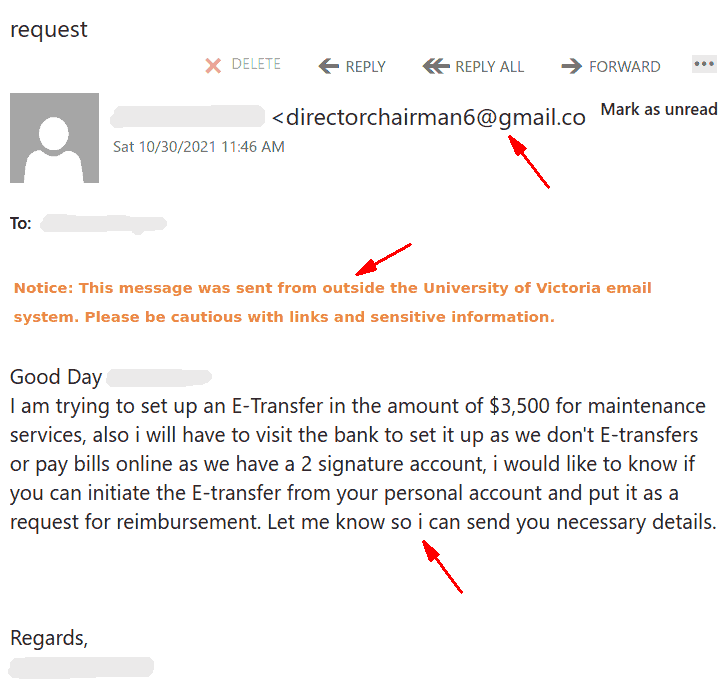
Today, a lot of UVic employees received an email impersonating a chair/director/manager and trying to extort money. You can see a screenshot below. Clearly the sender is not internal, it is another “director” account registered at gmail for the sole purpose of scamming.  Your director would not ask you for such a favour by using their gmail. Even better – you can confirm with your director/chair/manager that they would never ask for a favour like that by email.
If in doubt – try to find them by using another channel e.g. a phone call .

Note also that the scammer missed to capitalize “I” 3 times in that letter.  Mistakes like that are common in scams.

You have received (2) file via We-Transfer

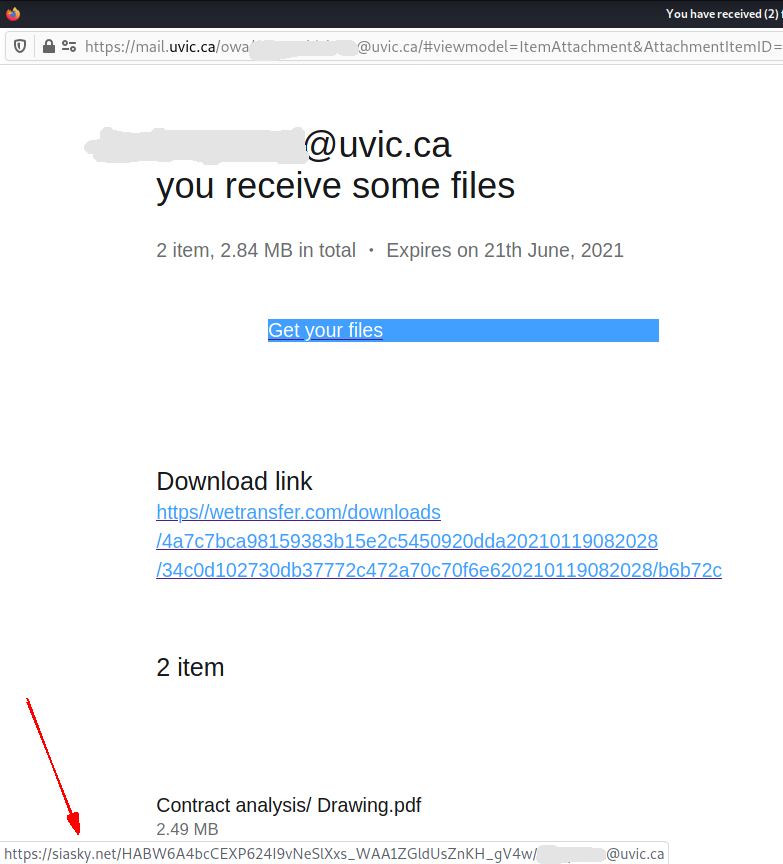
This phish comes with a relatively innocent subject suggesting you were sent files by “wetransfer” (a free file exchange platform). It contains a “Get your files” button and a separate “download link” which on screen seems to point to wetransfer.com.
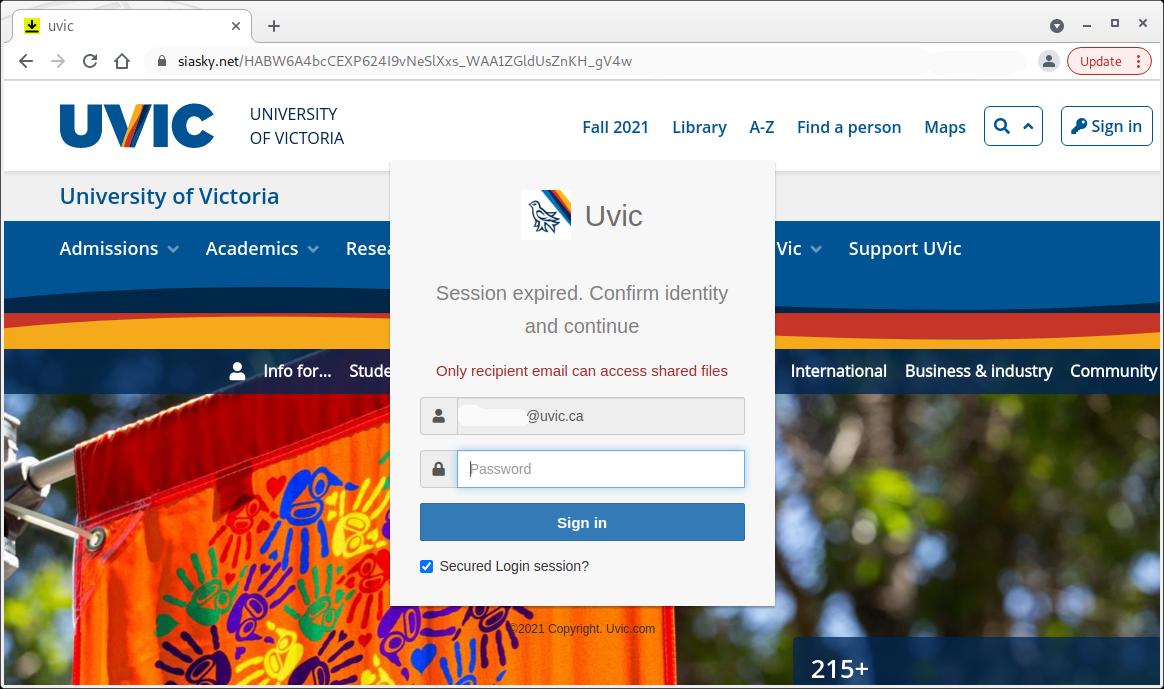
What’s really dangerous about this phish is that both the button and the download link in fact point to a malicious site which has nothing to do neither with wetransfer, nor with UVic.  The actual URL (pointed by the red arrow in the screenshot below) can be seen if you hover the mouse cursor over the link.   That site contains a copy of the main UVic page and asks you to login with your UVic credentials.  It looks so real that you may forgot what was the initial email about and you may forgot to check the address in the address bar.

——————————————————————————————-

And below is how the fake UVic page looks like. Note the malicious site address in the address bar.  As always – we suggest not to be curious and not to click on such links even for a quick look. Some of them may contain malware and infect your machine almost instantly. Our experts open those in dedicated isolated environments.

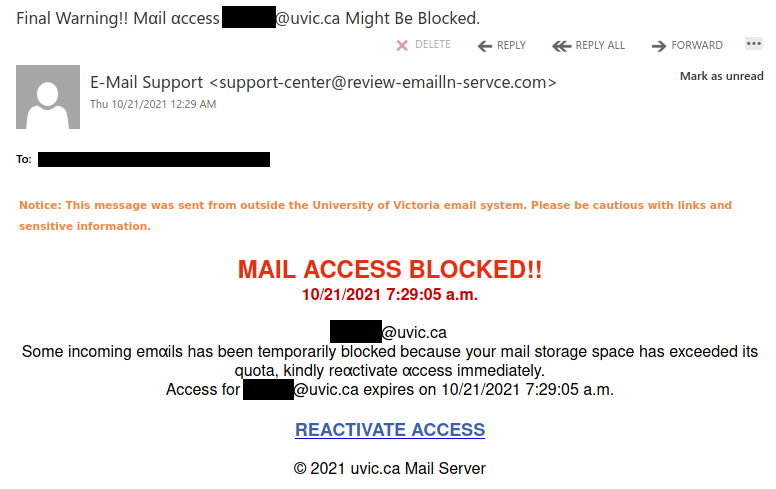
Final Warning!!

If you look closely at the lettering, you’ll notice that in some places a lowercase “a” has been replaced with “α” (lowercase Greek letter alpha). Phishers will sometimes use lookalike characters (a.k.a. homoglyphs) in this manner to try to evade spam filters. If you spot this sort of character substitution, you can be pretty certain the email is a phish.

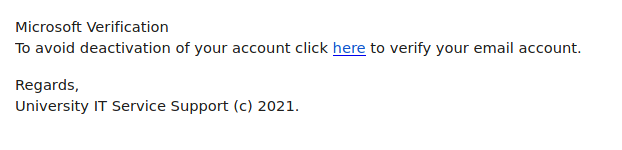
Service Support

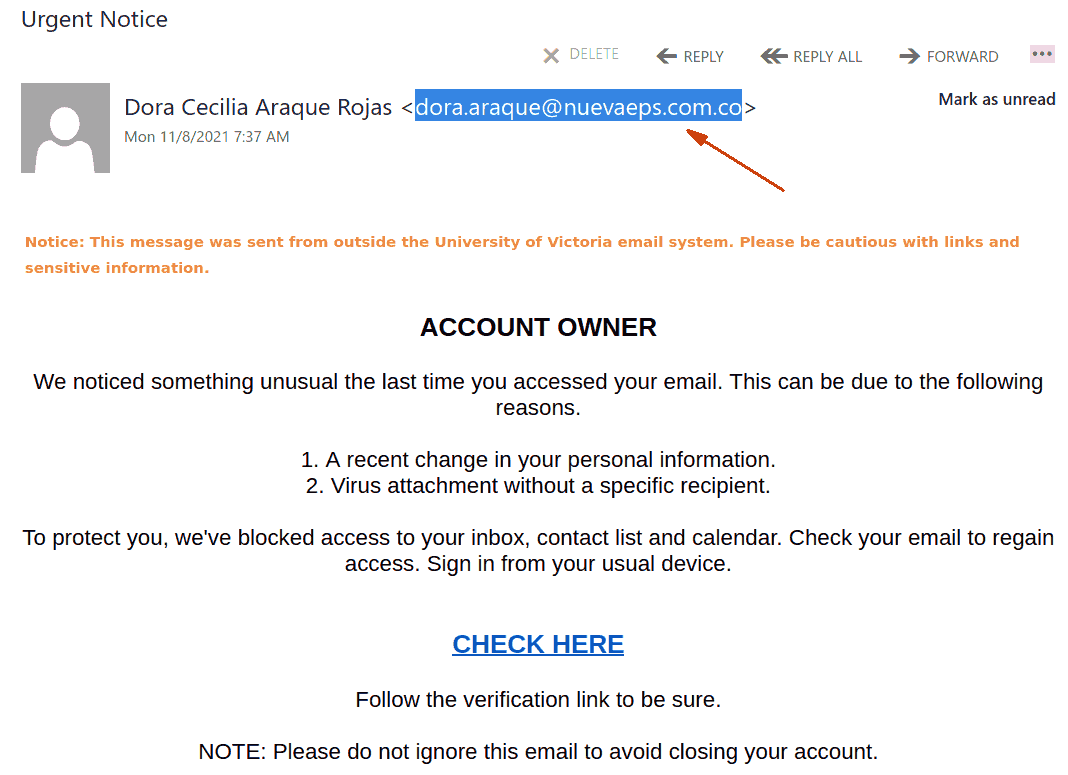
This phish was sent from a compromised account from another Canadian university. This phish targets higher education institutions in general and tries to pose as a Microsoft email alert. More often than not, emails asking you to click on a link to verify your account so that it doesn’t get deactivated are phishing attempts.

Microsoft account team

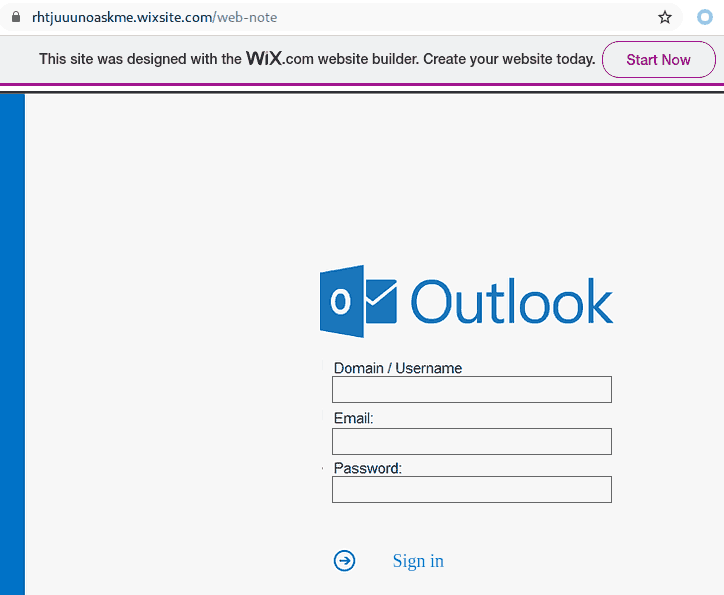
Another abuse of the wix web hosting service. This one is a fake quota warning attempting to cause anxiety about losing your ability to send or receive email. Consider their warning. Why would you have to verify your account because of a quota block? If you want to check anything related to your “account” ignore the link and go straight to the UVic Portal.

Any email processing issues not quickly resolved by a search of our UVic Support pages can quickly be explained by making a call to your IT Support contact or the Computer Help Desk.


Fake Remittance Copy: On Thursday, October 14, 2021

Another one from yesterday posing as a remittance payment. For those of you who handle plenty of accounting related processes, you can be a target here. Others of us expecting payment for some service, if curious or assuming the timing is right, may not recognize the red flags right away. Note sender. Note external banner.

Some UVic staff will expect and deal with external vendors and mailings all the time. So it’s particularly important to use caution. Ask yourself if you are expecting payments, is this a known vendor, do you have a purchase order etc. that matches such a payment?

For those of us that would only expect such a payment from a UVic source, using external banner warnings lets you know this was not sent from UVic. Some guidance on the availability of these banners and other options are available here.
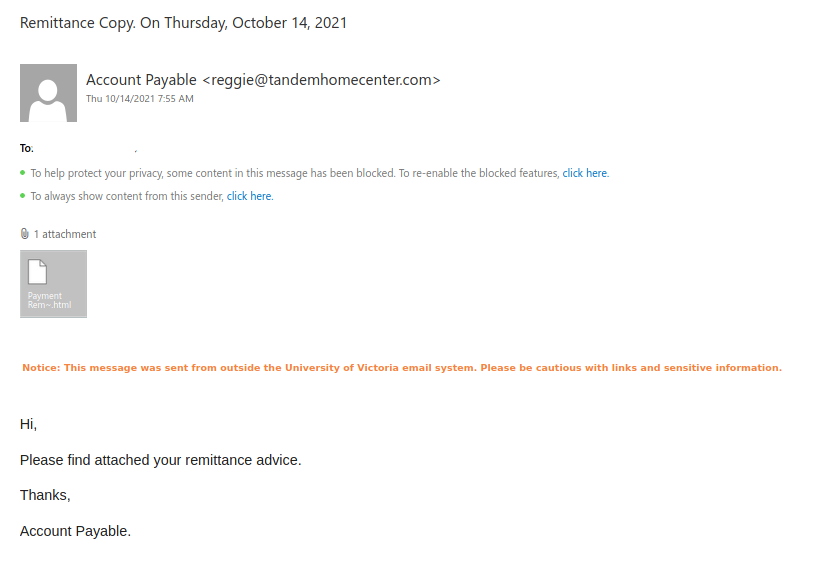
In this case, this is not likely a known or expected sender. Always pause, check the accounts that should have or will receive any expected payments. Verify. Verify.

Pause. Receiving an HTML attachment is likely less common and more often not legit at all.  Any attachment can be problematic or malicious including the common PDF or Word document. Treat any attachment as suspect.

Downloading and executing this malicious .html attachment eventually leads to a prompt for you to give away your credentials by logging in to a fake logon window.

If you have concerns or questions about such an email and/or attachment, or would like another set of eyes to examine the email, do not hesitate to contact your department IT support or the Computer Help Desk.



If you do not verify your account…


One of today’s phishing emails plays on encouraging an urgent response.

There are many flags in this messages.

  • “Your account will be suspended”?? No. Your account will not be suspended. There are many scenarios where you account may become inaccessible. If you cannot rectify it yourself from your UVic Portal,  typically a quick call to the Computer Help Desk should get you going again.
  • Who does the email seems to come from?
  • Why is it being sent to an email that “looks like” a Microsoft email? Is it a legit Microsoft email?? No, it is not.
  • Did you previously receive “multiple confirmations” that were verified to be legitimate? *This is perhaps a play on the volume of email you receive and how busy we are.
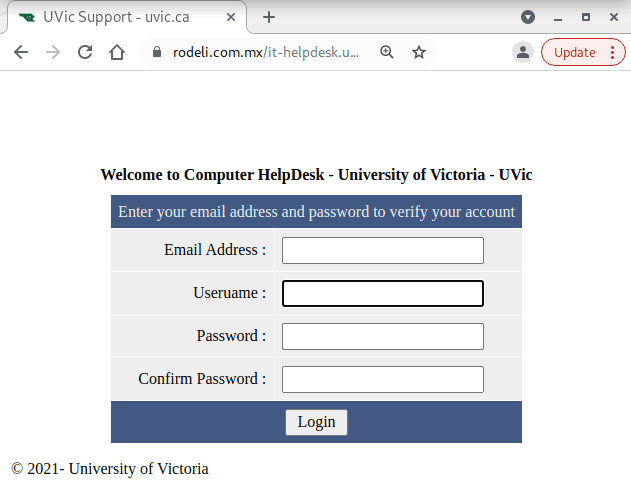
  • We will never ask you provide your email, username and password after clicking a link. In that very very rare scenario, you would have requested information but typically we will direct you to go to the UVic Account Portal.

This site will land on a Fake Outlook Web Access  (OWA) logon page. Note that in this case, there is a Wix banner. UVic does not host advertisements on the OWA logon page.

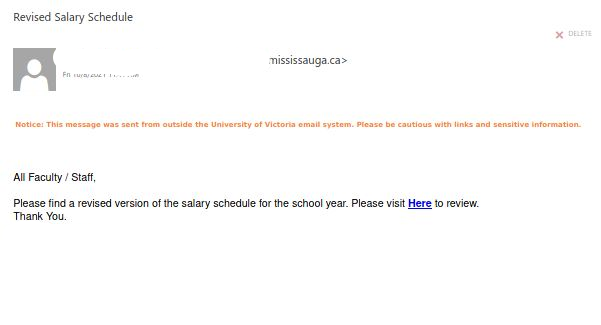
Revised Salary Schedule

Today’s phish is similar to the Updated Salary Schedule campaign we saw on Wednesday, only, instead of a PDF attachment, you are guided to click a problematic link.

You probably were not expecting a revised salary “schedule” and if you were, always best to check with your payroll service. The linked site is currently down but this is not likely the last of the variants of these malicious benefit and salary campaigns that we will see.

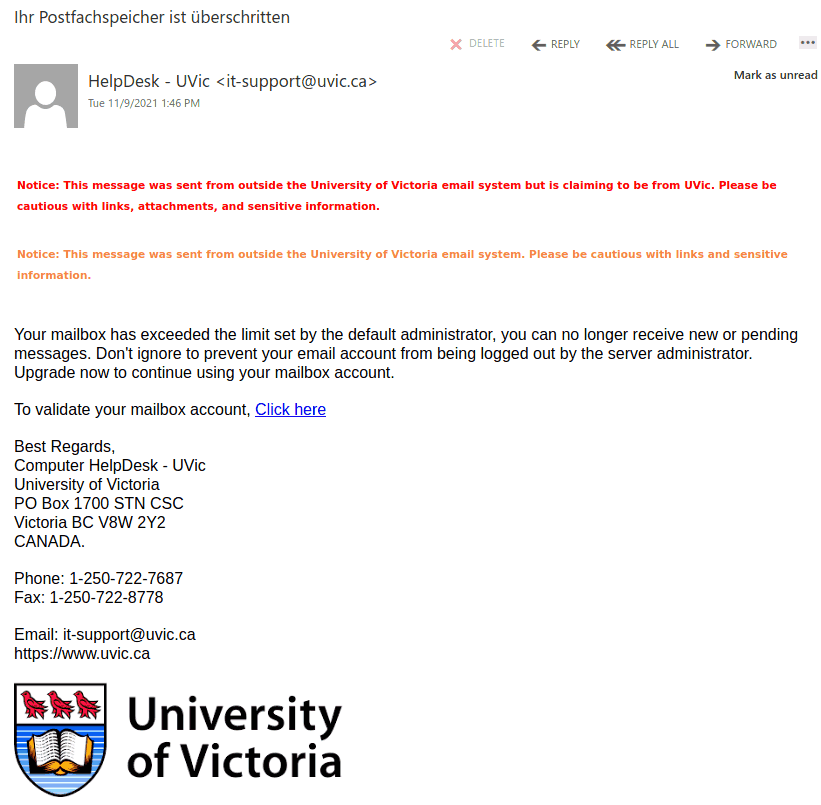
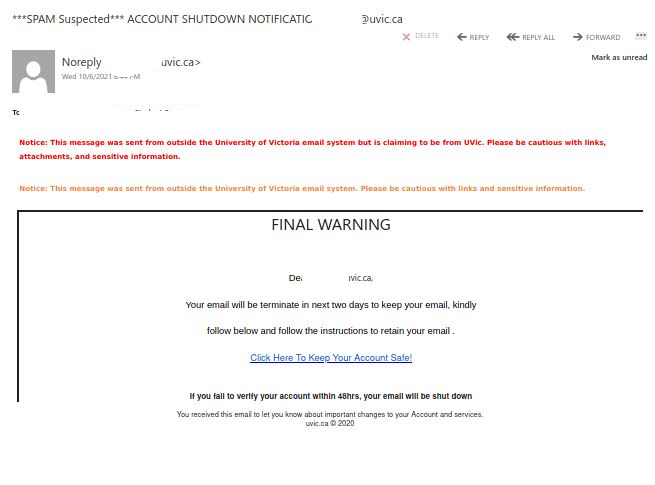
ACCOUNT SHUTDOWN NOTIFICATION

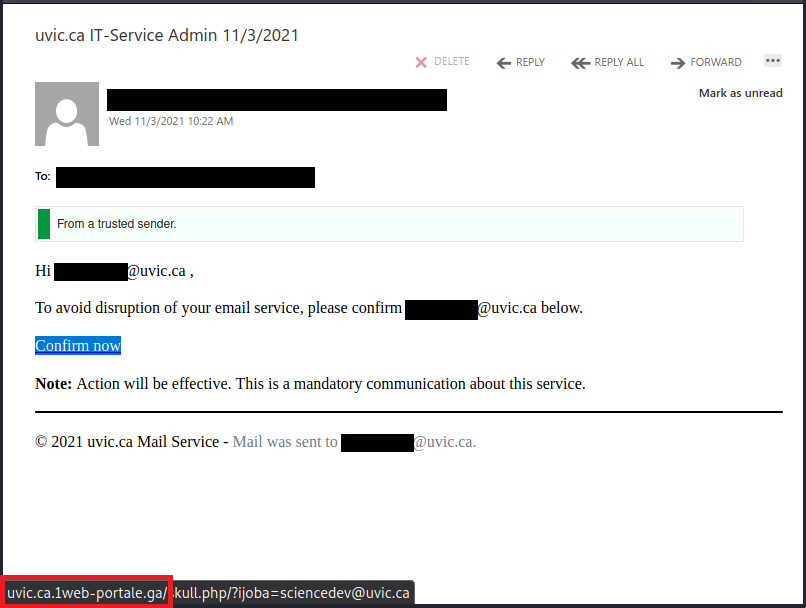
A common tactic used by those sending phishing campaigns is to alarm you with urgent and disruptive messaging. They want you to panic and attempt to rectify quickly urging you to click their link. We do not send these sort of mailings. If you discover problems with your account, you can call the Computer Help Desk for assistance.

Although a UVic email was spoofed here, you’ll notice that in this sample there are two external banner warnings letting you know this was not sent from UVic. Some guidance on the availability of these banners and other options are available here.

If such a mailing does seem or look legitimate, PAUSE and instead of clicking links, go to the UVic Portal to check on your account or contact the Computer Help Desk.
Thank you to those of you who continue to report these suspicious emails.

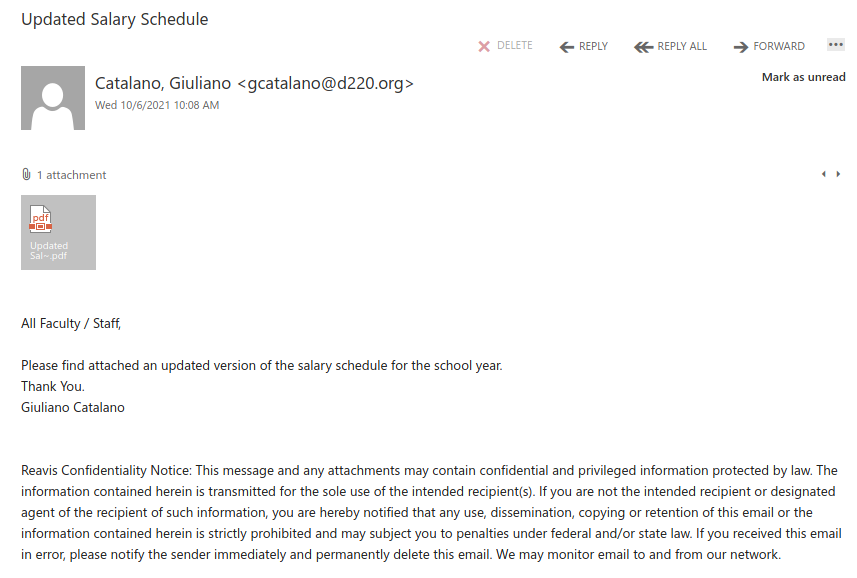
Updated Salary Schedule

Instead of using a link, this phish tries to entice you into opening a PDF attachment. The PDF contains what looks like a “View Document” button and instructs you to click on it. But that button is actually a link to a phishing page.

Always be wary of attachments from unsolicited emails and do not open them if you think they may not be legitimate. If you open an attachment and are instructed to click on a link or button to view the “real” contents, contact the Computer Help Desk or your department’s IT support staff immediately, as that is a sign that it is not legitimate.

FYI

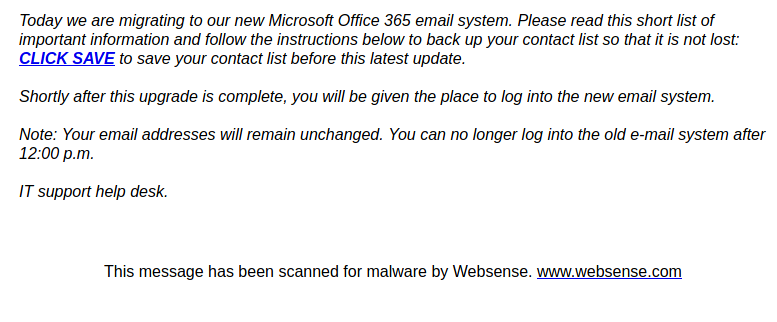
As always, don’t rush to click on the link; you should hover over it first to see where it goes. This one goes to a page on a free website builder, which is a sure sign this upgrade notice isn’t legitimate.

Notice the note at the end saying “This message has been scanned for malware”. That should not be interpreted as a sign the email is safe; the phisher could have faked that text.

New uvic.ca Shared_Document_ 0DFDA1C6

This phish tries to trick you into clicking the link by claiming to be an important document from management and HR (note the inclusion of HR@uvic.ca in the sender display name). The actual sender email address is not from UVic but uses a suspicious domain that is trying to pose as SharePoint. Hovering over the link would show that the link goes to neither UVic nor Microsoft SharePoint.

Payment for invoice#52190 is due today [Malware]

The purported invoice attachment in this email is a .img file. You might be tempted to think the file is an image (that is, a picture), but .img files are actually disk images, which means they can contain other files. This particular example contains a malicious program.

If you receive an email with a suspicious attachment, do not forward it as is, even to report it or warn other people. Doing so leaves the attachment exposed where someone could accidentally click on it. If you want to safely report it to your departmental support staff or the Computer Help Desk, forward the email as an attachment instead, or better yet, use the Report Phishing button if you have it.

System Administrator

Another typical generic phish pretending to be a Microsoft Exchange alert. Emails threatening to close your account if you do not click the link in a short period of time are a common sign of a phish (legitimate account closure warnings would give you much more advance notice, usually weeks or months). In this case, the phishy nature of the link is also on clear display.