Dear User, or Dear staff/student

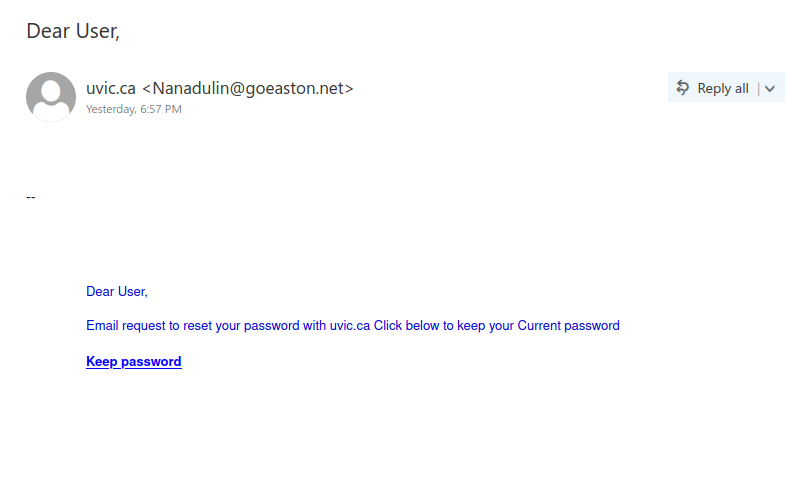
This phish was received by many recipients in our organization last evening.

It has usual phishing email signs:

  1. Subject line doesn’t make sense, salutation is the subject line.
  2. External Sender (see sender email address) but posing to be ‘uvic.ca’.
  3. Generic salutation.
  4. Sense of urgency, reset password was requested but click to keep your current password. Although, the language used is more confusing than urgency but still can lead to hasty actions on recipient’s part.
  5. External link, UVic will never ask you to fill your credentials on external webpage.

If in doubt, better to contact helpdesk or your DSS than clicking on links yourself.
 

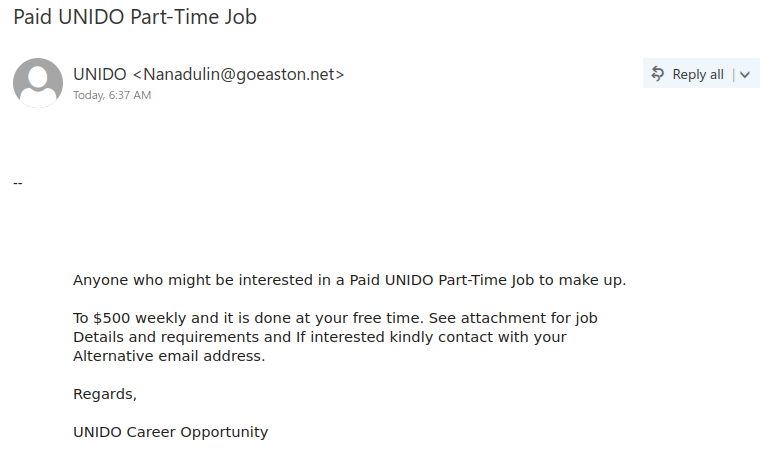
Paid UNIDO Part-Time Job

Once again, there is a job scam email circulating that is impersonating a UN organization, specifically the United Nations Industrial Development Organization (UNIDO). It is quite similar to a fake UNESCO job offer email that we saw a few weeks ago. Note that the sender is not someone from unido.org; this is a sign that the email is fraudulent.

Always be wary of job offers that come out of the blue from a person or organization that you don’t know; they are very likely to be a scam. The numerous capitalization and grammar errors in the email are also a bad sign. Do not open any attachments from such emails in case they contain malware.

If you’re wondering why the scammer is asking you to reply from your alternative email address, it’s because they want to shift the conversation off UVic email to evade our monitoring and detection systems.

For more tips on how to spot job scams, see this CBC article.

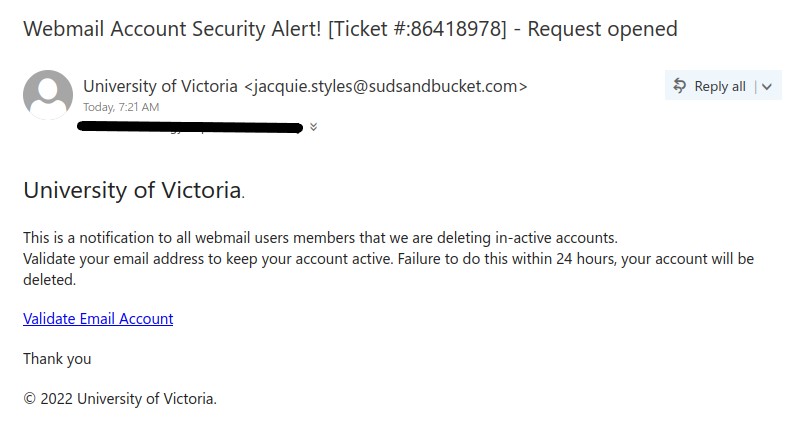
Webmail Account Security Alert! [Ticket #:{no.}] – Request opened

This email was received this morning. In the subject line, the ticket no. (in curly brackets) varies by the recipient.

As typical of phishing emails, this email also has signs that reveal it to be phish. External sender (check the email), no greeting, creating a sense of urgency, the link is external (never click on the links, always check by hovering over it), no legit signature.

You can protect yourself just by taking a moment and looking for the phishing signs. Never be in a hurry to take the action suggested by the email, there is a reason why phishers create urgency situation emails. If in doubt, contact helpdesk or your DSS.

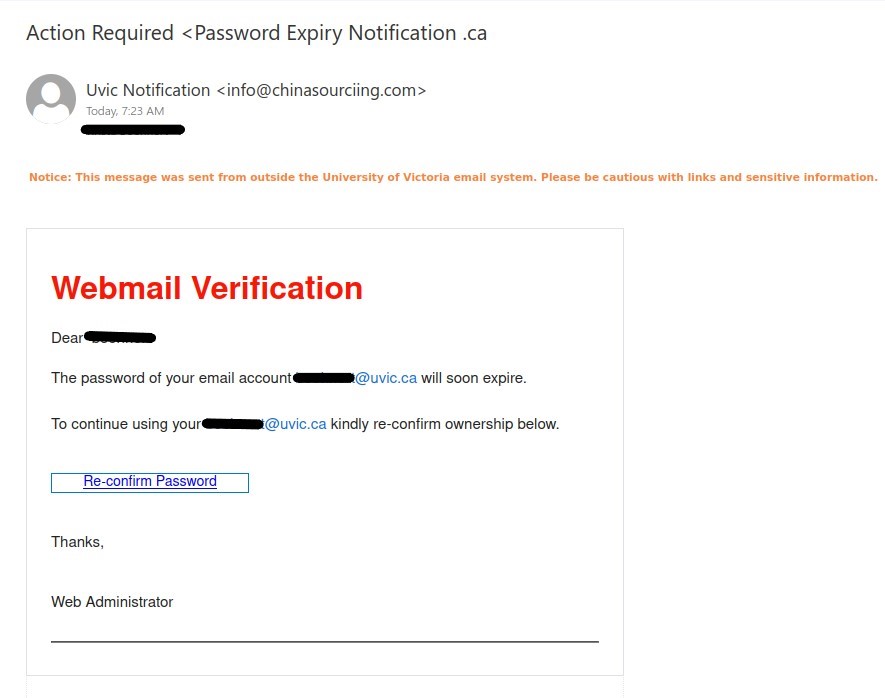
Action Required <Password Expiry Notification .ca

This email was mostly received by recipients in a particular department, hence could be a case of spear-phishing.

It had the usual tactics of creating a sense of urgency that your email account is about to expire so verify it by clicking on phisher’s link.

Warning signs: sender name is ‘Uvic Notification’ and sender email is external, vague signature ‘Web Administrator’ (not a UVic signature), if you hover over the link you would know the link is external (you will never be asked to verify a UVic account on a external domain).

Whenever in doubt, you can contact your DSS support or helpdesk for confirmation. It is always best to be cautious than be curious.

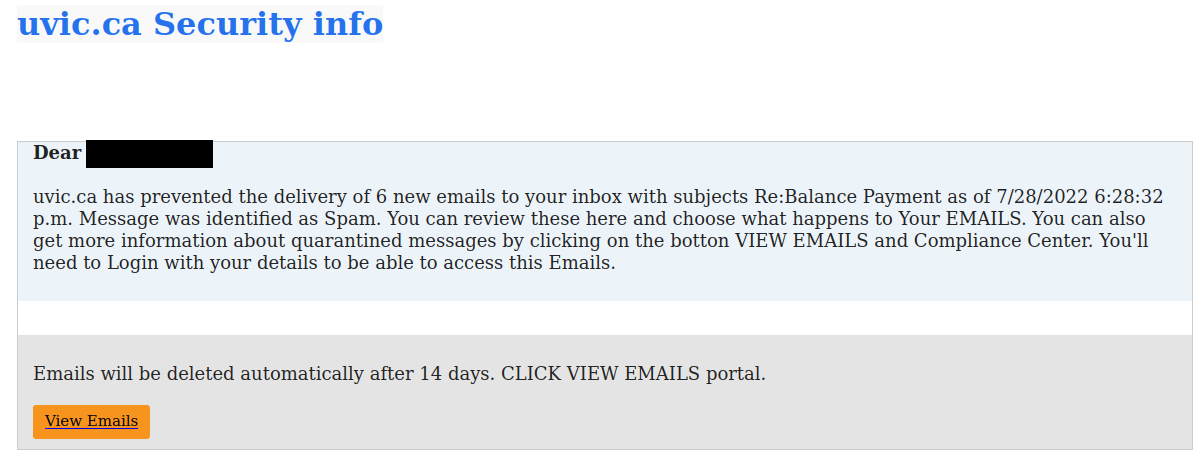
Your Immediate Request For Verification

This email looked like it came from “uvic.ca <email_server@uvic.ca>” but that sender information was spoofed; the email was actually external in origin. Like many phishing emails, it tries to instill a false sense of urgency to get you to click the link in haste. However, if you hover over the link, you’ll see the links don’t go to UVic. The many capitalization errors in this email are also a sign it isn’t legitimate.

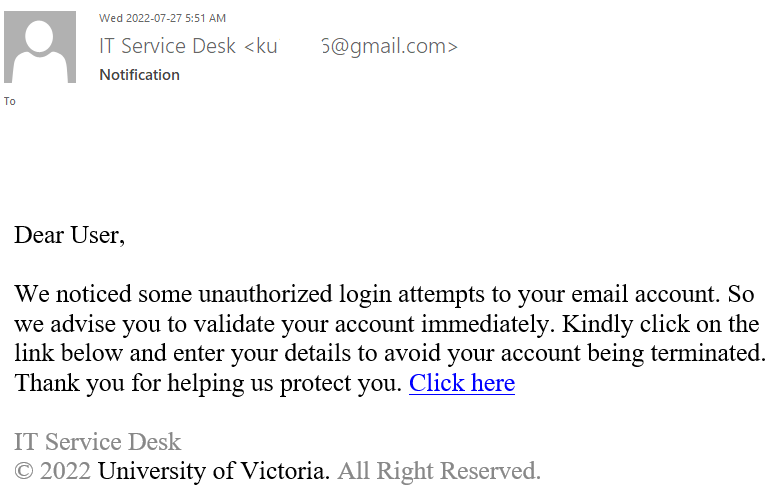
Notification (IT Service Desk)

Many UVic mailboxes received this phish in the morning. It is a copy of what we had earlier this month.

Again, it comes from a gmail sender and overall the short text does not make much sense – to validate (what?) because there were unauthorized login attempts?!?

Their fake page contains UVic symbols though. Please do not be curious and do not open such links as they may contain malware to infect your computer instantly (Mac users – that applies to you too!)


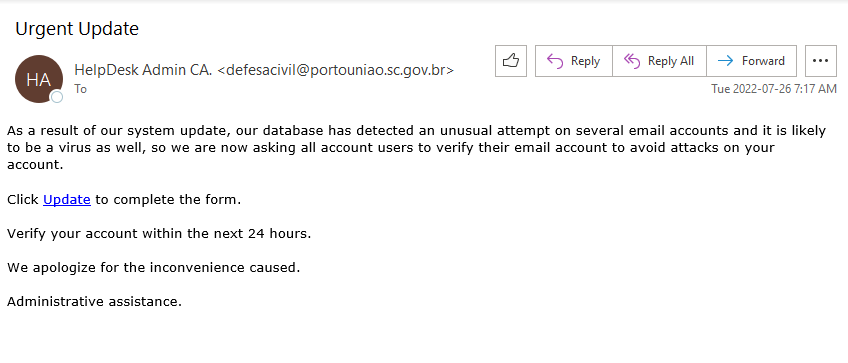
Email Update or Urgent Update

Apart from the heat,  Tuesday morning also brought us phish, received by around 700 recipients. This phish has two subjects either ‘Email Update’ or “Urgent Update’.

Signs that make this email a phish:
1. Weird sender name ‘HelpDesk Admin CA’, this title doesn’t make sense and the way it is formatted is phishy.

2. Sender email is not internal.

3. Scary and urgency  tactic, stating that system update detected anomalous activity and a virus, so verify account within 24 hrs.

4. Vague signature ‘Administrative assistance’.

5. Big red signal, hovering over the link reveals that it is not a UVic domain link. Your email is hosted on UVic domain then how putting your credentials on an external website will help in verifying your account?

Always think what would the email look like if it were to be legitimate. Who the sender would be, what would be the sender’s email, what would their signature be, how would they address you, or would the link be UVic domain or an external entity. These simple tricks can help you detect phishing emails. Whenever in doubt, rather than clicking on links, reach out to help desk for confirmation.

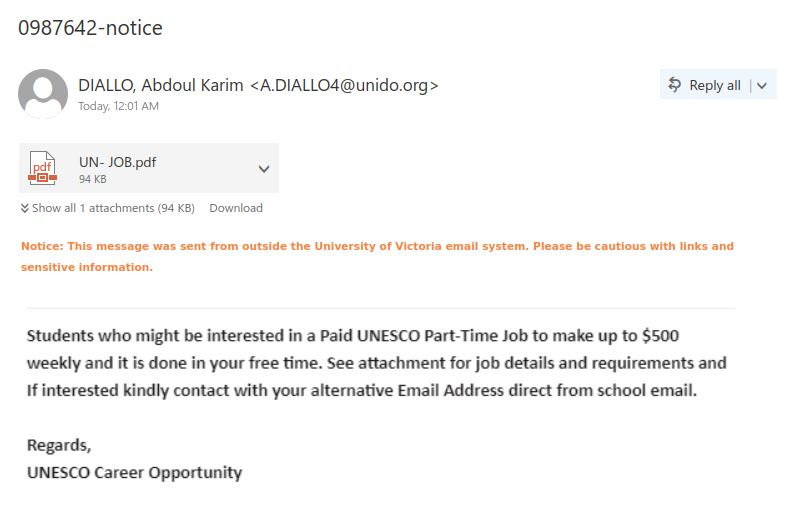
0987642-notice

This morning we received a phish trying to lure students for a paid part-time job. What makes this email a phish? Let’s see:

  1. The phisher claims the email is from UNESCO but the email domain of the sender is not unesco.org.
  2.  Too good to be true offer! Trying to attract recipients with a lucrative offer, good old social engineering trick to reply to the phisher.
  3. The phisher wants the recipients to contact with an alternate email address. Warning bells!! Why do they want that? To evade the University network  security.
  4. Email signature is too vague.


The pdf attachment further contains language to trick individuals into replying to the phisher, such as, no need for an interview, if you do a good job they will consider you for a long-term position.

Never reply to emails which try to lure you with too good to be true offers or states an urgent situation. Take your time to think, and then react if need be.

Never open attachments in emails which you were not expecting. This attachment was viewed by Information Security Office in a safe environment.

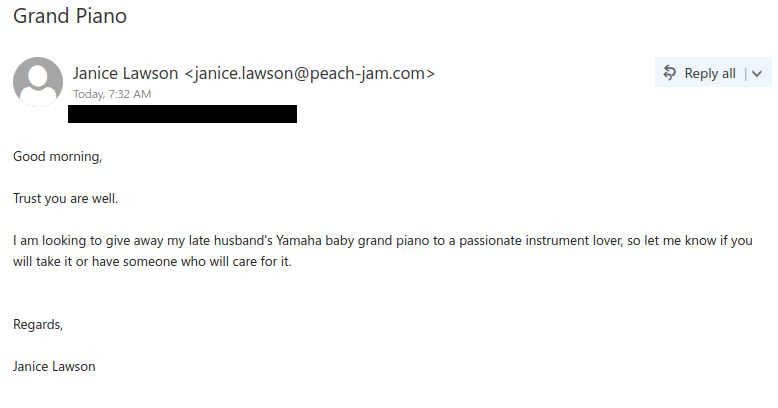
Grand Piano

If you receive an email out of the blue from someone you don’t know, and it offers something of value for free, be extremely wary. More likely than not, the offer is a scam.

For more information on these types of scams, see this article from Brown University’s Phish Bowl Alerts. The scammers seem to try to defraud their victims by charging them a fee to move the piano, but it never arrives. Being told to pay to receive an item sight unseen is another sign it’s a scam.

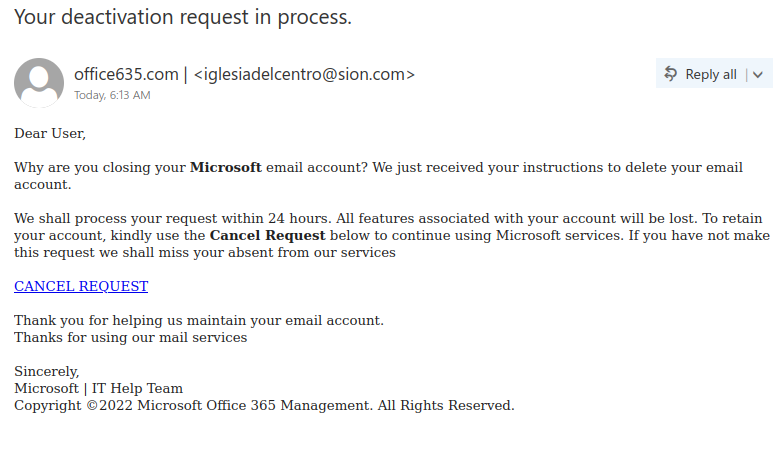
Your deactivation request in process.

Like many other Microsoft-themed phishing messages, this one uses the threat of impending account deactivation to get you to hastily click on the link. But take a moment to look closely and you’ll spot a lot of red flags:

  • The sender display name contains an error (office635)
  • The sender email address is not from Microsoft (or UVic, for that matter)
  • The greeting is impersonal
  • The message contains a good deal of awkward wording and grammatical errors

Hovering over the link is also a good idea–that would show that it doesn’t go to a Microsoft website.

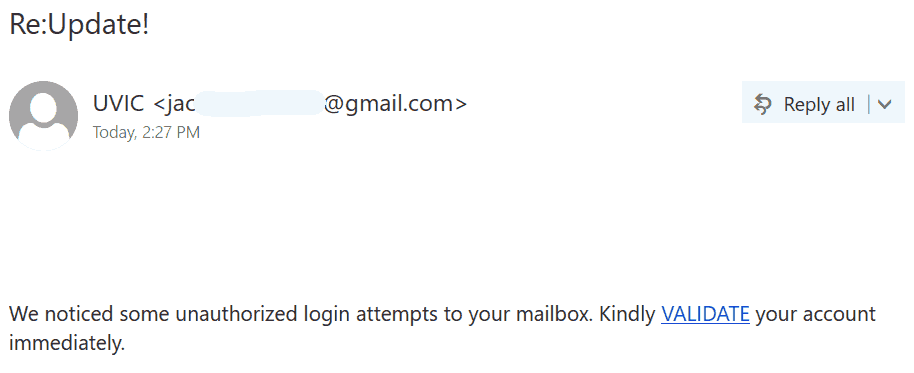
Re:Update!

Another massive phish is circulating this afternoon.
It has “Re:”  in the subject to imply you already had a thread with this sender.
It has an exclamation mark as a typical trick of phish senders is to suggest some level of emergency.

It comes from a gmail sender and overall the short text does not make much sense – to validate (what?) because there were unauthorized login attempts?!?

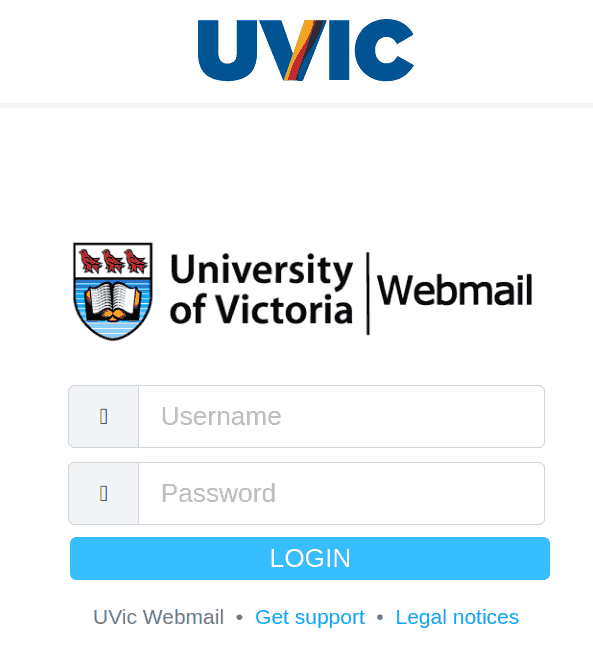
Their fake page contains UVic symbols though. Please do not be curious and do not open such links as they may contain malware to infect your computer instantly (Mac users – that applies to you too!)


The fake logon page is shown below:

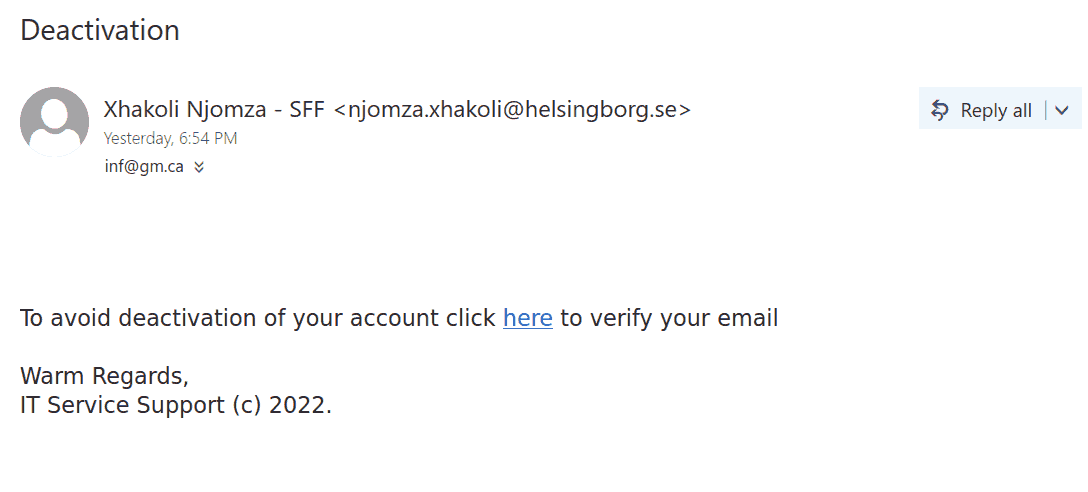
Deactivation

This phish is in circulation today. The same old story – click to prevent deactivation of your account.  See below. The sender is external.  Please don’t be curious and do not click these links. They are designed to steal credentials but they may contain malware to infect your computer instantly. Our experts open them on dedicated isolated machines.

This is how the phish looks like:

And this is a screenshot of the fake page:


RE: HR July Salary Update (Final Notice)

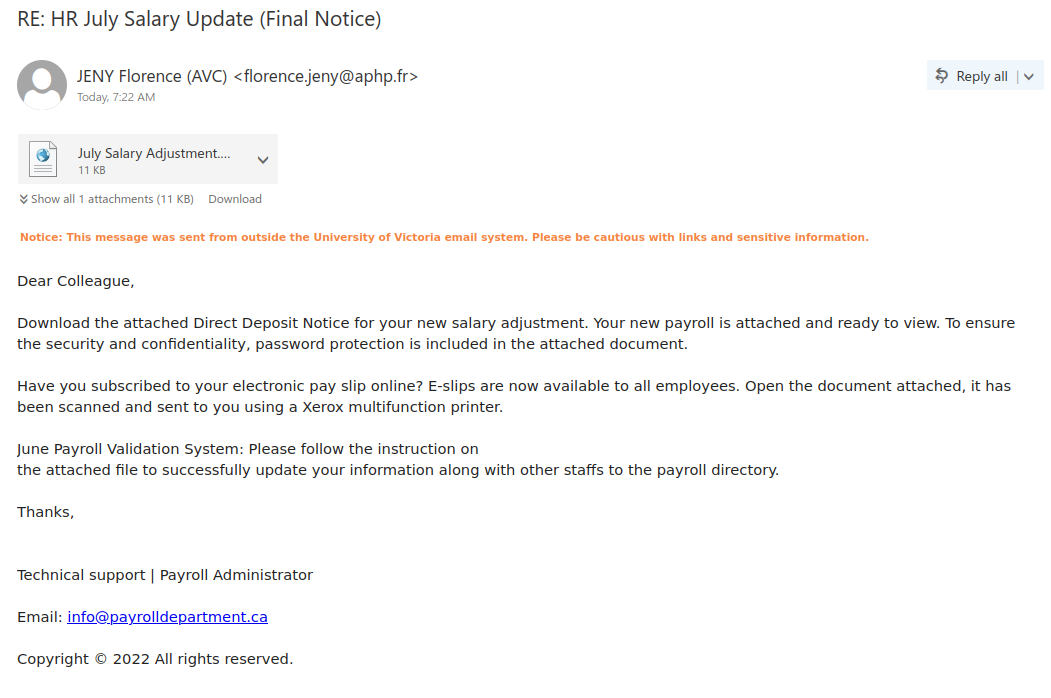
Phishers know that salary notices are a very tantalizing lure, which is why they are always a popular theme for phishes and malspam. If you look at this example, there are quite a few signs that this is not a genuine salary notice:

  • The subject uses words like “Final Notice” to instill a false sense of urgency
  • The email came did not come from a UVic sender
  • The greeting is impersonal
  • The signature block is very generic and does not mention UVic
  • The contact email in the signature block is also not from UVic
  • There are a few grammatical errors in the message

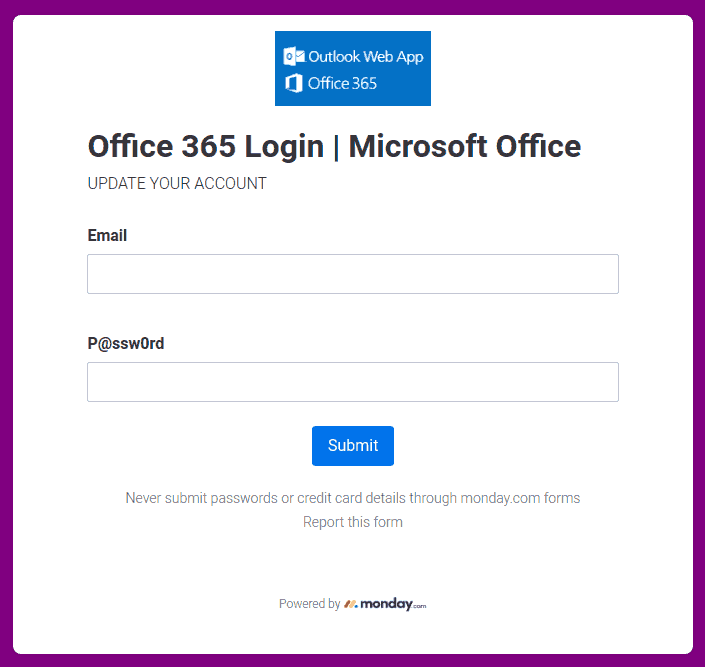
Therefore you should not open the attachment, which is actually a webpage (HTML) file containing a phishing form and code for harvesting your username and password.

Action required

Another try to persuade you to act quick, this phish comes with a subject “Action required”. It may or may not use a forged UVic address as a sender (see the screenshot). To be more convincing the body of the message contains the email address of the recipient.
As usual – do not be curious, do not open these links that point to fake UVic login pages designed to steal your credentials.

Shared “FACULTY & STAFF DATA REVIEW” with you

Although SharePoint Online is a legitimate service (which is why phishers like to abuse it), not all of the content hosted there is safe. Phishers may create fake SharePoint Online notifications or use a compromised account at another organization to send phish containing real SharePoint links. If you hover over the link and find that it doesn’t go to https://uvic-my.sharepoint.com/, that means the file is not from UVic’s SharePoint Online offering.

Another red flag in this phish was the fact the phisher was trying to claim this file was from a UVic director, but that director’s name was different from the one in the subject and at the top of the email.