Part-Time Student Administrative Assistant Needed

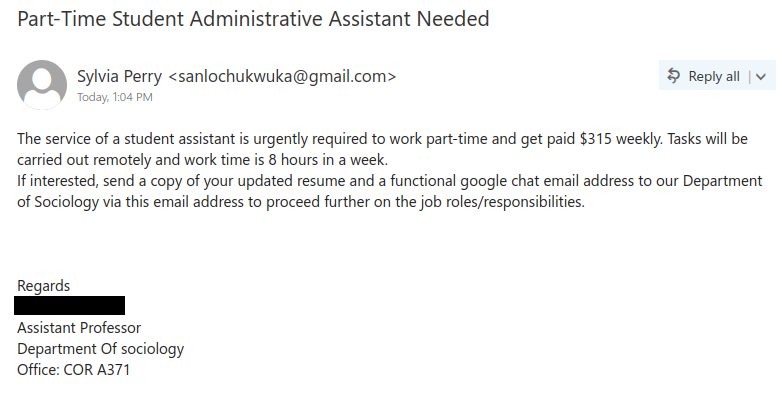
This purported job offer uses the name of a real faculty member from the Department of Sociology, but this job offer did not come from that person or department and is a scam. There are several signs that this is not a legitimate opportunity:

  • The sender’s name does not match the name of the faculty member in the signature. This can be a sign of an impersonation scam.
  • The sender is not using UVic email. Instead, they are using a Gmail address and asking you to reply to it. Always be wary of unsolicited job offers that come from  an address from a free email provider or that ask you to contact that sort of email address.
  • The pay being offered for 8 hours of work per week is too good to be true–that’s much higher than the minimum wage in BC!
  • The scammer is asking you to send alternative contact information to move the conversation away from UVic email to evade detection.
  • There are capitalization errors in the signature block.

If you replied to the scammer, especially if you provided money or sensitive personal information, reach out to the Computer Help Desk for assistance and advice on how to report the fraud.
Update

This phish started circulating today in the afternoon. It clearly comes from some external account. As usual, the goal is to steal your UVic credentials. A screenshot of the phish is shown below:

Please do not be curious and do not click these links because sometimes they may contain malware to infect your machine instantly. Our experts investigate them in dedicated isolated environments.


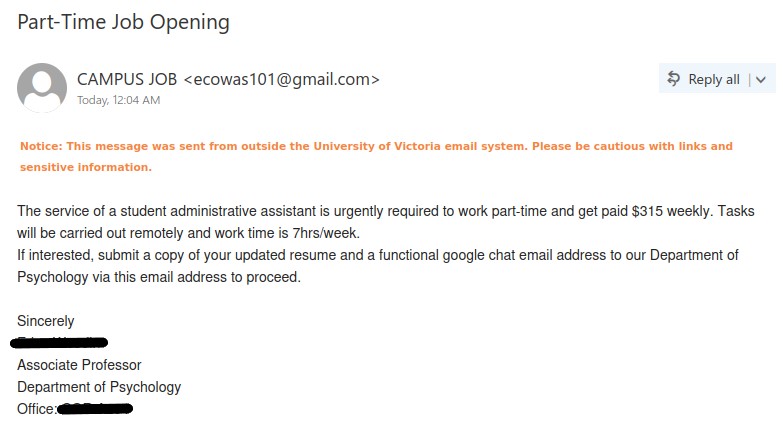
Part-Time Job Opening

Please be aware of this phish as it impersonates a UVic faculty member to make the job offer believable. The sender’s email address is not a UVic email and the sender’s name is generic “CAMPUS JOB”. The phisher asks particularly for your Gmail address which is to avoid detection by UVic network and could also lead to tricking you into giving your google credentials. This phish also has a usual tactic of too good to be true offer.

One can confirm such emails by contacting the person or department or organization from a known contact information (like in this case, from UVic website). Never use contact information given in the email to confirm the legitimacy of that email.


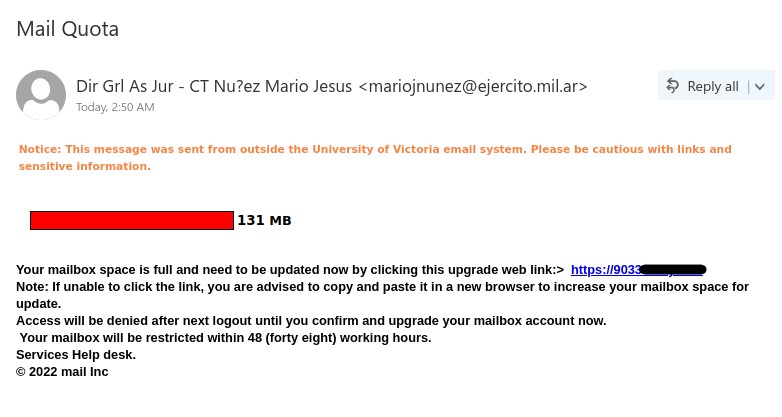
Mail Quota

This phish creates a sense of urgency by stating that your mailbox is full, and you need to update it. It also uses scary tactic, which is common with these phishes, that if you don’t take the action mentioned then your account will be “restricted”.

This email has clear signs of phishing, external sender, no salutation, generic signature, using an image to make you believe that your mailbox is full, external link. Never be in a hurry to take the action mentioned in the email, take your time to think and look for phishing signs.

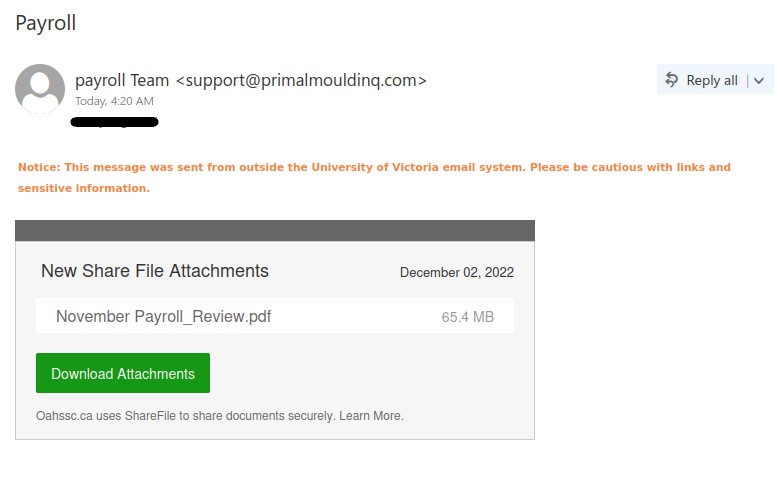
Payroll

This phish tries to get attention by pretending to be coming from payroll office, which is clearly not the case. The subject is too generic, and the sender’s name is fake “payroll Team” with external sender address (not on uvic.ca domain). The link in the email is also external to the services used in UVic. There is no context whatsoever as to why this email is sent to you.

This phish is to steal your credentials. Once you click on the link to download the attachment it asks for credentials. This was observed by Infosec team in an isolated environment. You should never be adventurous about these emails and refrain from the curiosity of clicking on the links. Always check the link by hovering over it.

If in doubt, you can always confirm with the payroll dept by calling them directly from a known contact information (never from the one given in the phish email).

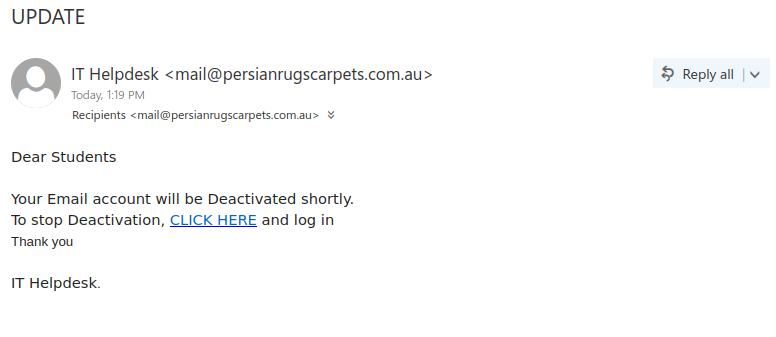
UPDATE

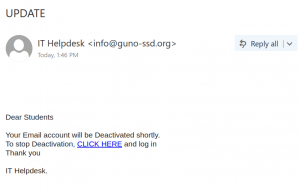
If an unsolicited email seems very vague or generic, that can be a sign it’s a phish. That certainly can be said of this one, which uses a undescriptive subject line and doesn’t even try to give any context or a reasonable explanation for why your account is supposedly being deactivated. On a similar vein, the email claims to be from “IT Helpdesk” in a generic fashion that doesn’t mention UVic in any way, and the greeting is equally impersonal and generic.

The vague and generic nature of the email, along with the non-UVic sender address, inconsistent font formatting, and errors in capitalization and punctuation, are all signs that it is not legitimate. The ultimate red flag is the fact that hovering over the link shows it goes to a website on the Weebly free website builder–a real UVic login page would not be hosted there.


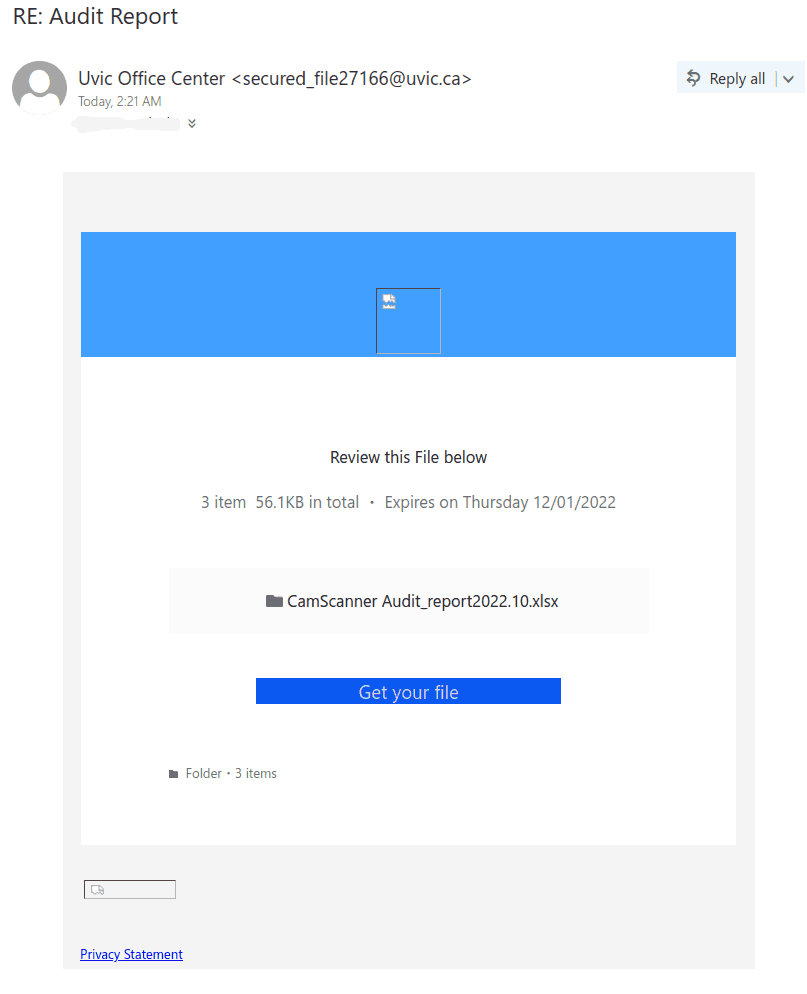
RE: Audit report

This phish circulating today is coming from a Japanese server but the sender is spoofed to look as if internal.  They used some sort of random numbers generator for the spoofed addresses (the number in the sender’s address is different, although they all start with “secured_file” and end up with @uvic.ca.
In some cases the subject is “RE: Audit report”, in other cases it is “Audit_report_Nov.2022”

The “get your file” button and the “Privacy statement” link at the bottom – both lead to the same location – some server in Brazil – fortunately already flagged as dangerous site in Google safe browsing.
Please do not be curious and do not click these links because sometimes they may contain malware to infect your machine instantly. Our experts investigate them in dedicated isolated environments.


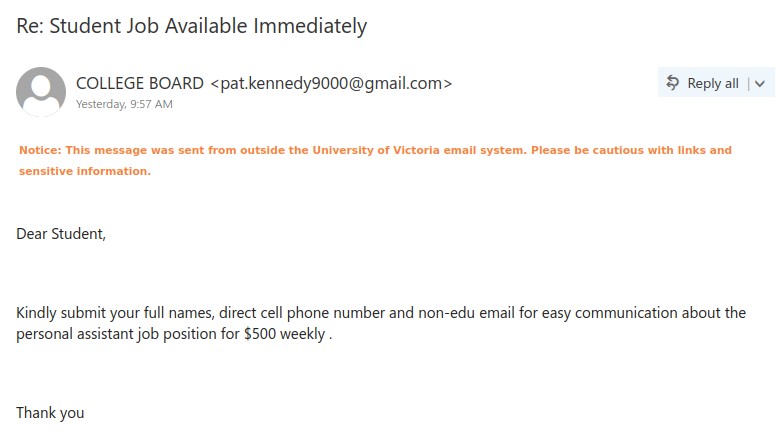
Re: Student Job Available Immediately

This phish was received over the weekend but there are others received over the weekend as well as received this morning from related threat actor with different senders with these subject lines ‘Re: Covid Funds Relief’ or ‘Re: College $1000 benefit check available’ or ‘Re: NOV COLLEGE GRANT/FUNDS APPROVED FOR PAYMENT 2022’ or ‘Re: COLLEGE GRANT/FUNDS APPROVED FOR PAYMENT 2022’. All these are scam phishes asking for your cell number to evade the communication from UVic network.

The sender’s name is too generic ‘COLLEGE BOARD’ or ‘STUDENT JOB BOARD’, generic salutation and no signature, too good to be true offer. All these are signs of a phishing email.

Please do not give your personal information and do not correspond with the phisher on any mode of communication. These scams usually lead to stealing confidential information and/or duping you into giving money. Always pay attention to the phishing signs and think before taking any mentioned action.


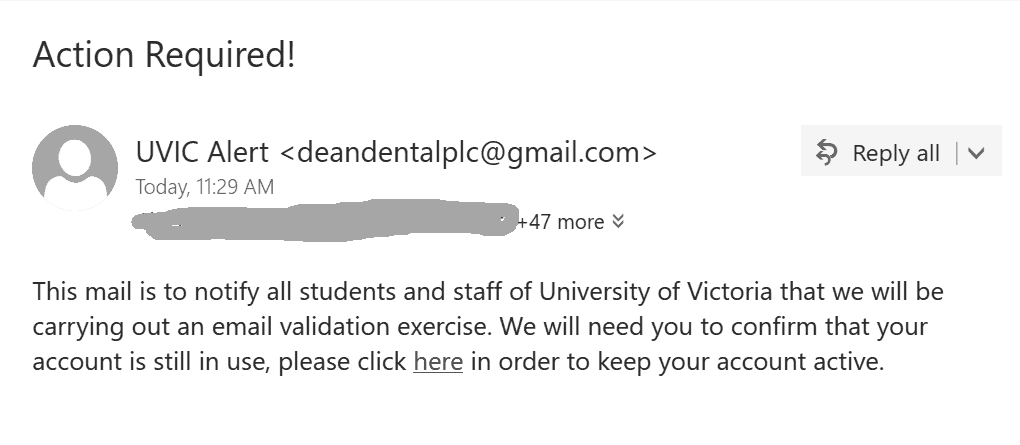
Action Required!

This  phish is circulating today. The text doesn’t  make any sense.  Unlike the malicious actors the UVic Systems can determine if your account is in use without asking you to confirm. The sender is some gmail account.

The goal as usual is to steal your UVic credentials.

As always – please do not click out of curiosity, just to see the fake login page.
Sometimes these pages may contain malware to infect your computer instantly.
Our experts open them in isolated environments. The second screenshot shows the fake login page.


UVic Webmail-themed spoof phish with no subject

This phish spoofed a UVic email address but actually came from outside of UVic. As well as the empty subject line, there are plenty of red flags in the message content:

  • The message instills a false sense of urgency and threatens an adverse impact.
  • There are plenty of capitalization and grammatical errors, and the spacing in the last paragraph is weird. Indeed, the whole email looks like it was put together rather sloppily.
  • The link shown to you is for a site on Weebly, a free website builder. No real UVic login page would ever be hosted on a free website builder.

If you hover over any of the links, you’ll actually see a Google redirect URL. Phishers may use a Google redirect or something similar to make the URL look less phishy and hide the real destination.

As always, don’t click on the links! If you did, reach out to the Computer Help Desk or your department’s IT support staff for assistance.

Your Tax Information is incorrect

This phish creates a sense of urgency by pretending to be sent from human resources dept that if you don’t click on the link to update your tax information that could affect your pay. Phishing signs:

  1. External sender address
  2. The link is external (always check by hovering over the link).
  3. Generic signature.
  4. Fake sense of urgency.
  5. Scary tactic.
  6. Formatting issues.

Never be in hurry to click the links just because the email says so. Pay attention to the details and try to look for any red flags. Whenever in doubt, please confirm with the helpdesk.

RE: IT SERVICE DESK

This Outlook-themed phish has a lot of the usual red flags:

  • The sender is not from UVic or Microsoft
  • The greeting is impersonal
  • The message contains numerous errors in grammar and capitalization
  • The email tries to create a sense of urgency and threatens you with an adverse impact
  • Hovering over the link reveals that it does not go to UVic or Microsoft

All of the above signs indicate that the link should not be clicked on.

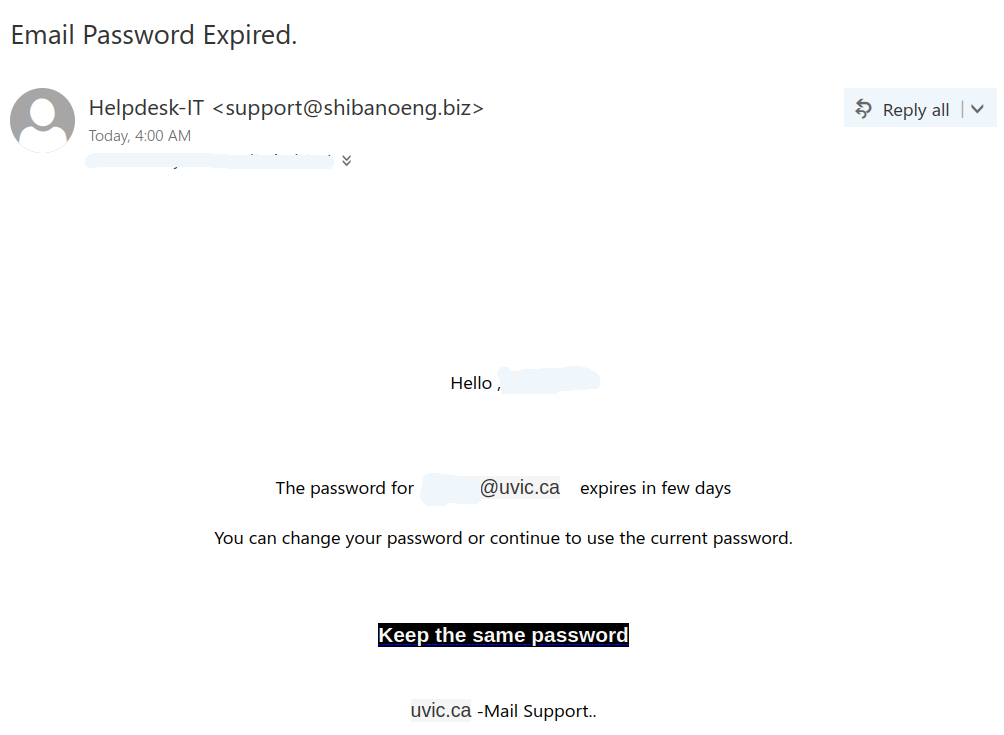
Email Password Expired.

This phish is circulating today. It is virtually the same as our previous posting just a different sender. The sender is  clearly external. The idea of keeping the same password doesn’t make sense. It is always better to change your password periodically with some new long phrase that you never used before. Our tips to choose a new password are published here:
https://www.uvic.ca/systems/support/loginspasswords/password/passwordtips.php

Here is a screenshot of the phish:

The goal is the same as usual – to steal your UVic credentials. For this purpose they created a fake UVic page – an exact copy of the real one. Please do not be curious and do not click these links, as sometimes they may contain malware to infect your computer instantly. Our experts open those in dedicated isolated environment.

Email Password Expired.

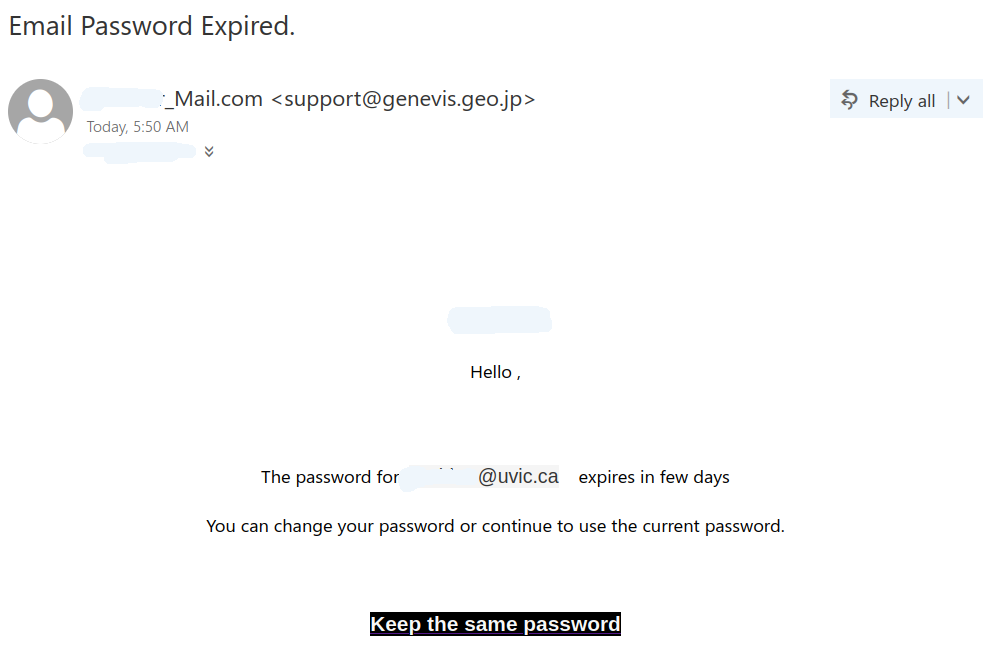
This phish started arriving in the early hours today. The sender display name is formed by attaching _mail.com to the recipient netlinkID. Perhaps the malicious actor thought this would make it look more legitimate?!  The actual sender’s address is external.  Then they use the netlink and the email address of the recipient in the body of the message to make it more convincing.

The goal is the same as usual – to steal your UVic credentials. For this purpose they created a fake UVic page – an exact copy of the real one. Please do not be curious and do not click these links, as sometimes they may contain malware to infect your computer instantly.  Our experts open those in dedicated isolated environment.