$500 Weekly Pay

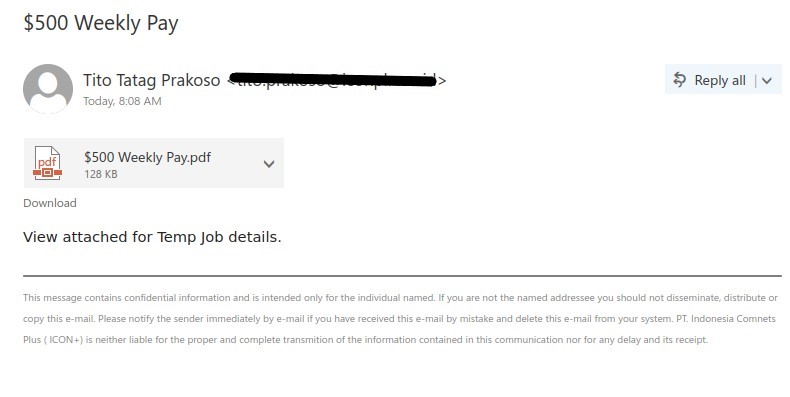
A job scam phish trying to lure users with a lucrative pay offer. There is not much mentioned in the email body itself rather asks for users to open the pdf attachment for details. There is no reason for anyone to open the attachment as it has clear signs of phishing. Email body doesn’t give any information of why someone is sending you this email and subject just states the salary to attract users which is uncommon for legit job emails.

Before opening any attachments, look for phishing signs as those could be infected files. If you have fallen for this scam please contact helpdesk or your IT support contact.

Phish from external sender with subject $500 weekly and a attached pdf file.

Subject: $500 Weekly Pay
From: Tito Tatag Prakoso <[redacted sender address]>

Attachment: $500 Weekly Pay.pdf

View attached for Temp Job details.

This message contains confidential information and is intended only for the individual named. If you are not the named addressee you should not disseminate, distribute or copy this e-mail. Please notify the sender immediately by e-mail if you have received this e-mail by mistake and delete this e-mail from your system. PT. Indonesia Comnets Plus ( ICON+) is neither liable for the proper and complete transmition of the information contained in this communication nor for any delay and its receipt.

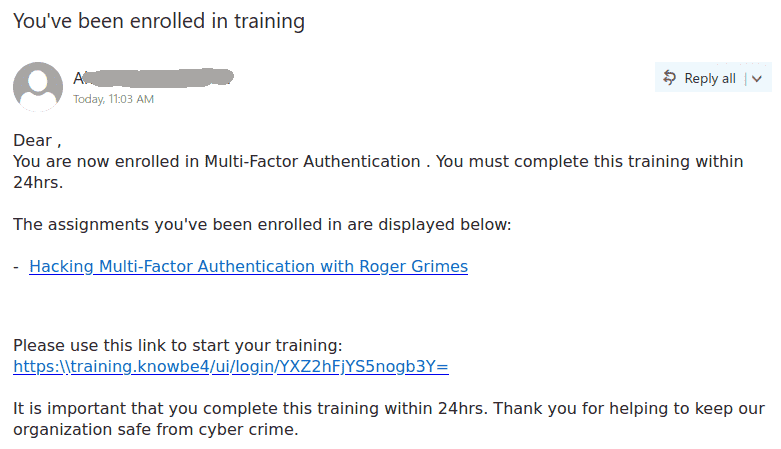
You’ve been enrolled in training

Many UVic recipients received this phish in the morning.  It is easy to see that the links point to a site outside UVic (by hovering the mouse cursor on top without clicking).  As usual the goal is to steal your credentials. Please do not be curious and do not click on such links because they may contain malware to infect your computer instantly.

Note that sometimes the sender may look internal (or be indeed internal if a UVic account was compromised). If not sure, whether an email is legit, ask your Desktop support person or the helpdesk.

Dear ,
You are now enrolled in Multi-Factor Authentication . You must complete this training within 24hrs.

The assignments you’ve been enrolled in are displayed below:

– Hacking Multi-Factor Authentication with Roger Grimes[link to the fake login page/

Please use this link to start your training:
https:\\training.knowbe….[link to the fake login page]

It is important that you complete this training within 24hrs. Thank you for helping to keep our organization safe from cyber crime.


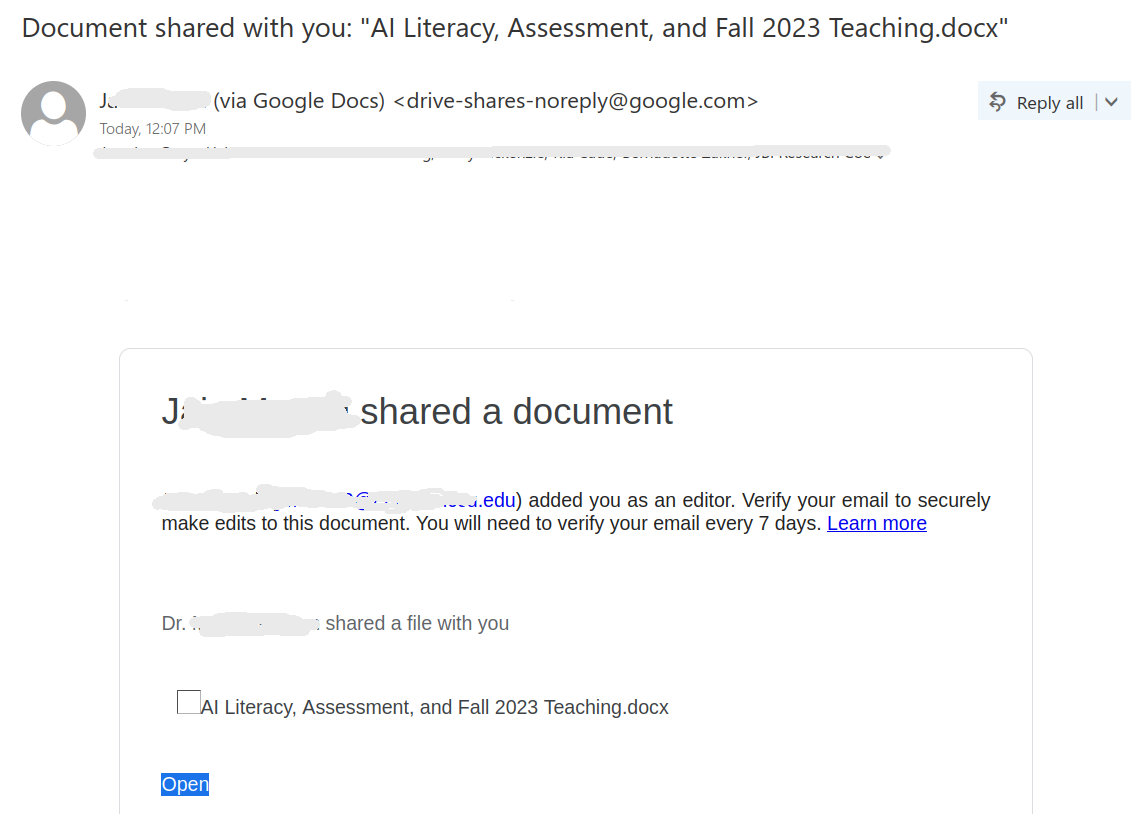
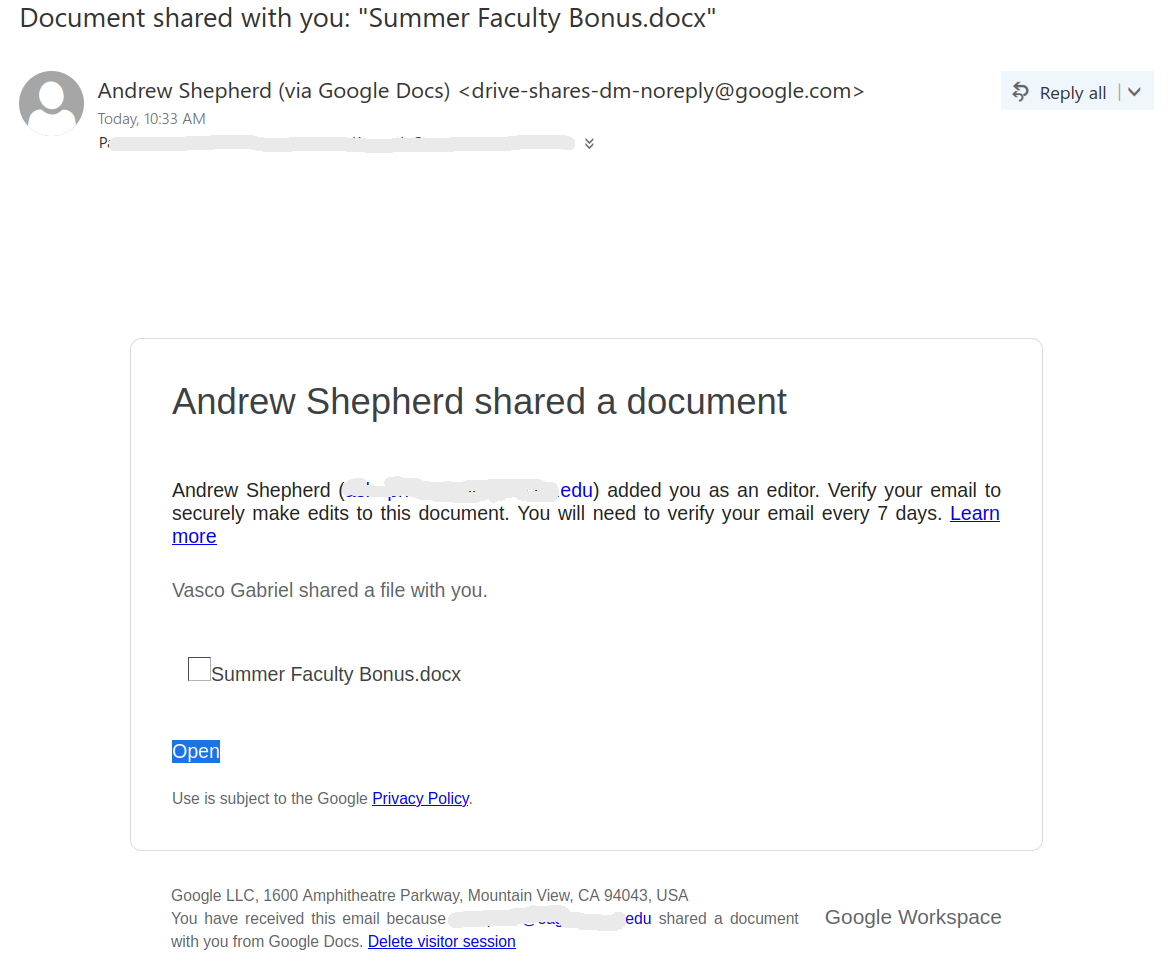
Document shared with you: “Summer Faculty Bonus.docx”

Another massive phish today comes from google docs and points to a malicious document. The subject contains the name of the document.

Please do not open the document and do not enter any credentials.
A screenshot of the phish is shown below.


Andrew Shepherd shared a document
Andrew Shepherd (***.edu) added you as an editor. Verify your email to securely make edits to this document. You will need to verify your email every 7 days. Learn more[link to the malicious document]

Vasco Gabriel shared a file with you.

Summer Faculty Bonus.docx

Open[link to the malicious document]

Use is subject to the Google Privacy Policy[link to the google policy].

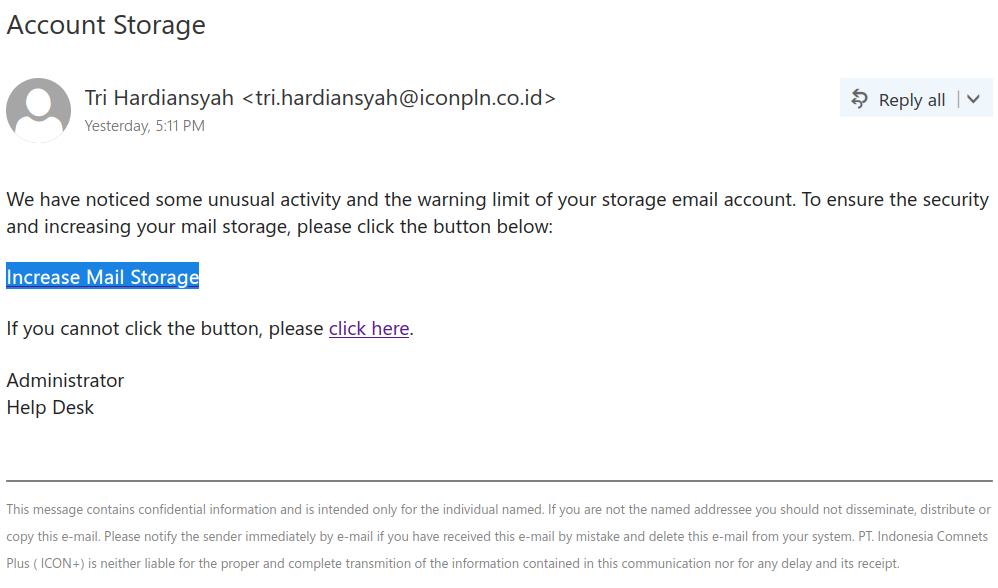
Account Storage

This phish is circulating since yesterday. It is clearly coming from some external email address. There is no personal greeting, and the whole text is pretty common, it does not even try to imply it was UVic related. The goal of course is to harvest credentials. Please do not be curious and do not click these links because sometimes they may contain malware to infect your computer instantly.

Screenshot of the phish message with subject "Account Storage"

Subject: Account Storage

We have noticed some unusual activity and the warning limit of your storage email account. To ensure the security and increasing your mail storage, please click the button below:

Increase Mail Storage[link to phish]

If you cannot click the button, please click here.
Administrator
Help Desk

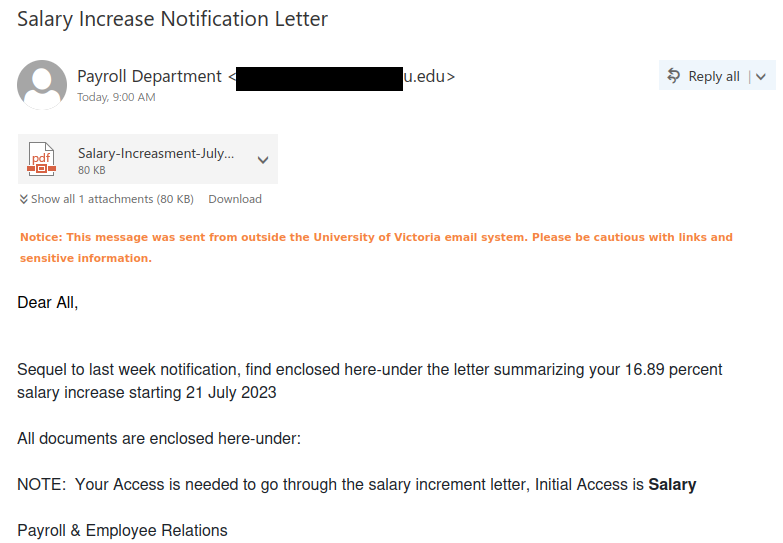
Salary Increase Notification Letter

Who wouldn’t like a sizable salary increase, especially in these times when the cost of living has gone up so much? But that’s precisely what phishers are trying to prey upon when they craft these fake salary increase emails. Thankfully, they left plenty of red flags that you can look for to determine this email is fake:

  • The email did not come from UVic–a real salary increase notice would come from a UVic email address.
  • The greeting is generic and impersonal.
  • The salary increase amount is too good to be true, especially since it’s not spread out over multiple years
  • There are a lot of spelling and grammar errors in both the email and the file name.
  • The signature block is generic and doesn’t mention UVic.

All of those items are signs that you should not open the attachment, as it will either contain phish/scam content or malware.

InfoSec ran the file through some specialized tools to safely examine the content. The results showed the file simply says that the document is protected and that you have to click on a link to view the actual content online. If you open a file and see something like that, contact the Computer Help Desk or your department’s IT support staff immediately for assistance, as that’s a sign that the file is not legitimate.

A phishing email claiming to offer you a 16.89% salary increase and directing you to open a suspicious PDF attachment


Subject: Salary Increase Notification Letter
From: Payroll Department <[redacted]@********u.edu>

Attachment: [PDF icon] Salary-Increasment-July…    80 KB

Notice: This message was sent from outside the University of Victoria email system. Please be cautious with links and sensitive information.

Dear All,

Sequel to last week notification, find enclosed here-under the letter summarizing your 16.89 percent salary increase starting 21 July 2023

All documents are enclosed here-under:

NOTE:  Your Access is needed to go through the salary increment letter, Initial Access is Salary

Payroll & Employee Relations

Job Title

If you get an unsolicited email with an attachment and you don’t recognize the sender, be extremely wary, especially if the message is very vague and only tells you to open the attachment. The vagueness is a ploy to try and get you to open the attachment out of curiosity. Don’t open such attachments! Many contain malware to infect your computer, and even ones that don’t are likely to either load a phishing site or contain a scam.

InfoSec staff use specialized tools to examine the contents in a secure manner. When we examined the attachment for this phishing email, it turned out to contain a job scam pretending to be someone from the World Health Organization. To quickly recap, here are the red flags that can help you identify the offer as a scam:

  • The pay is too good to be true–this one offered $500/week for only a few hours a week of simple tasks.
  • The sender does not match the name of the person supposedly offering the job.
  • You do not need to go through an interview or meet your supposed employer (either virtually or in person) before getting the job.
  • The email asks you to reply and/or provide contact information for a different communication method such as personal email, SMS or Google Chat. This is a common trick that scammers use to move the conversation to a place that cannot be monitored by UVic.

We have many other posts on job scams that are worth a read if you want to learn more about how to spot them.

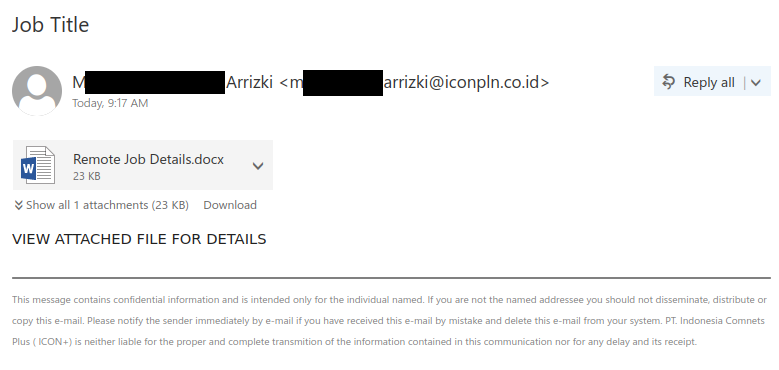
Scam email with a vague message asking you to open a suspicious attachment called "Remote Job Details.docx"


Subject: Job Title
From: M******** Arrizki <m******arrizki@iconpln.co.id>

Attachment: [Word document icon] Remote Job Details.docx    23 KB

VIEW ATTACHED FILE FOR DETAILS


This message contains confidential information and is intended only for the individual named. If you are not the named addressee you should not disseminate, distribute or copy this e-mail. Please notify the sender immediately by e-mail if you have received this e-mail by mistake and delete this e-mail from your system. PT. Indonesia Comnets Plus (ICON+) is neither liable for the proper and complete transmition of the information contained in this communication nor for any delay and its receipt.

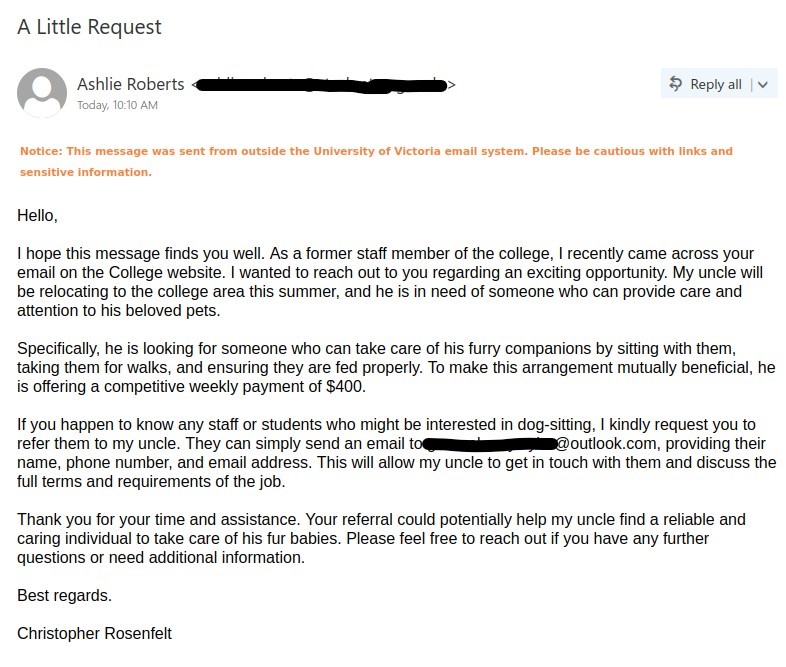
A Little Request

Please be aware of this job scam which tries to lure users with too good to be true offer. Although, it is well written but one can still spot the phishing signs, sender name and signature name doesn’t match. The email mentions about a college website where ours is a University, clearly this email was used to target some other institute and have been reused for our environment. The pay offered is way too high for the job described.

Here is a BBB article which describes such job scams in more detail:

https://www.bbb.org/article/scams/24708-scam-alert-pet-sitting-job-is-too-good-to-be-true

Never be in a hurry to give your personal information for job offers, always look for warning signs. Whenever in doubt contact helpdesk.


Subject: A Little Request
From: Ashlie Roberts [redacted external sender address]

Notice: This message was sent from outside the University of Victoria email system. Please be cautious with links and sensitive information.

Hello,

I hope this message finds you well. As a former staff member of the college, I recently came across your email on the College website. I wanted to reach out to you regarding an exciting opportunity. My uncle will be relocating to the college area this summer, and he is in need of someone who can provide care and attention to his beloved pets.

Specifically, he is looking for someone who can take care of his furry companions by sitting with them, taking them for walks, and ensuring they are fed properly. To make this arrangement mutually beneficial, he is offering a competitive weekly payment of $400.

If you happen to know any staff or students who might be interested in dog-sitting, I kindly request you to refer them to my uncle. They can simply send an email to [external outlook email for contact], providing their name, phone number, and email address. This will allow my uncle to get in touch with them and discuss the full terms and requirements of the job.

Thank you for your time and assistance. Your referral could potentially help my uncle find a reliable and caring individual to take care of his fur babies. Please feel free to reach out if you have any further questions or need additional information.

Best regards.

Christopher Rosenfelt


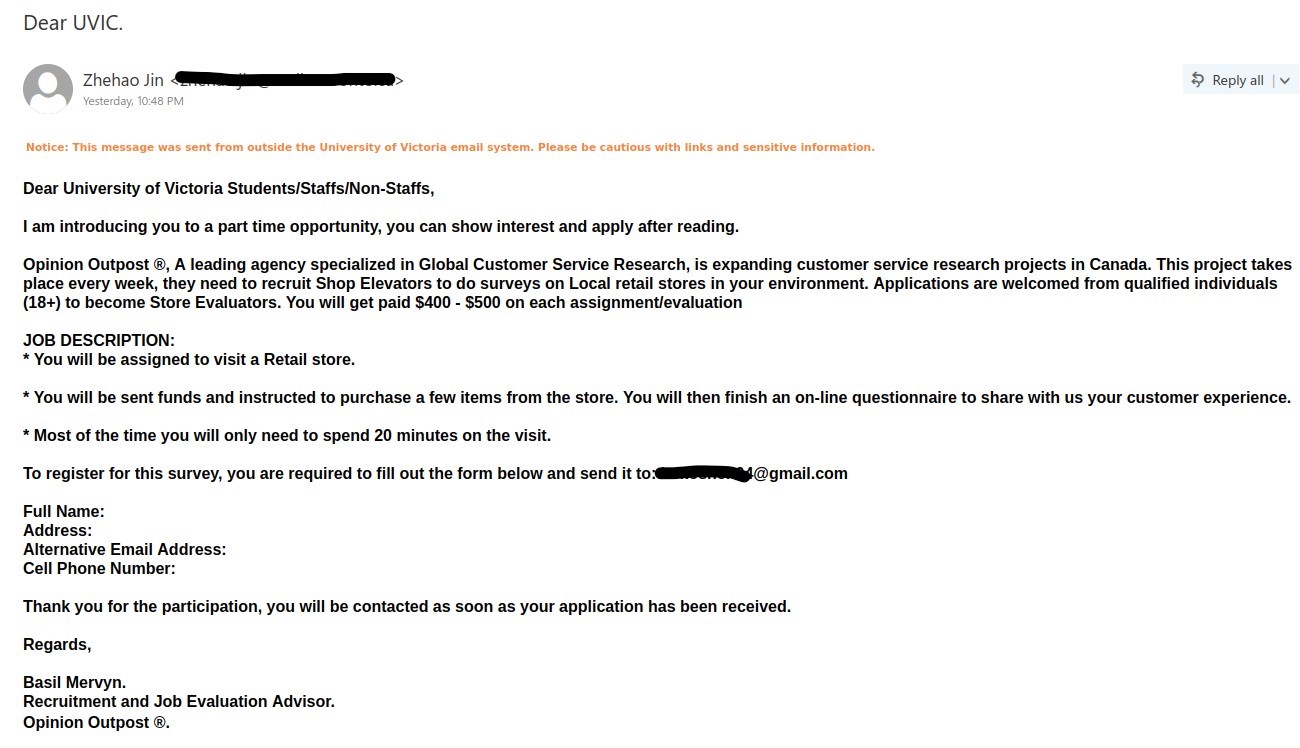
Dear UVIC.

This job scam phish has been circulating today, which spoofs another Canadian institute email. Here is how you can spot this scam:

  1. Subject doesn’t match the content of the emails.
  2. Sender name and Signature name are different.
  3. Too good to be true offer, paying way too high a wage for surveys.
  4. External gmail address is provided for contact, which neither belongs to the sender institute nor the company mentioned in this email.
  5. Alternate email and phone number are asked, this tactic is used by scammers to evade detection from UVic network protections in-place.
  6. Spelling and grammatical mistakes.

Please be aware of such scams, always take a moment to look for red flags. In case, you have already fallen for this scam, please immediately stop any further conversation with the scammer and report it to helpdesk or your departmental  IT support.

Job scam phish from a spoofed account of another Canadian Institute with the subject "Dear UVIC.".

Subject: Dear UVIC.
From: [redacted sender address]

Notice: This message was sent from outside the University of Victoria email system. Please be cautious with links and sensitive information.

Dear University of Victoria Students/Staffs/Non-Staffs,

I am introducing you to a part time opportunity, you can show interest and apply after reading.

Opinion Outpost, A leading agency specialized in Global Customer Service Research, is expanding customer service research projects in Canada. This project takes place every week, they need to recruit Shop Elevators to do surveys on Local retail stores in your environment. Applications are welcomed from qualified individuals (18+) to become Store Evaluators. You will get paid $400 – $500 on each assignment/evaluation

JOB DESCRIPTION:
* You will be assigned to visit a Retail store.

* You will be sent funds and instructed to purchase a few items from the store. You will then finish an on-line questionnaire to share with us your customer experience.

* Most of the time you will only need to spend 20 minutes on the visit.

To register for this survey, you are required to fill out the form below and send it to: [scammer’s gmail address]

Full Name:
Address:
Alternative Email Address:
Cell Phone Number:

Thank you for the participation, you will be contacted as soon as your application has been received.

Regards,

Basil Mervyn.
Recruitment and Job Evaluation Advisor.
Opinion Outpost.

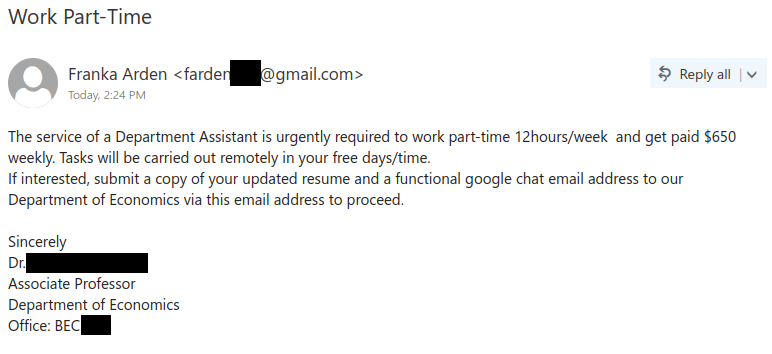
Work Part-Time

Similar to cases we saw in May and June, job scammers are impersonating real UVic professors to make their fake offers look more legitimate. The red flags remain the same as before:

  • The emails are coming from Gmail addresses. A legitimate opportunity should be coming from a UVic email address.
  • The sender name does not match the name of the professor supposedly offering the opportunity. Inconsistencies like this are often a sign of a scam.
  • The salary offered is too good to be true, especially for a small amount of casual work to be done in your free time.
  • The email requests your contact information for a different communication method, in this case Google Chat. This is a trick to move the conversation to a place that can’t be monitored by UVic.

Do not reply to these offers–these scammers are usually trying to defraud you of money in one way or another. They may ask you to transfer money using your own funds (with a promise to reimburse you that will never materialize) or ask you to buy gift cards and send photographs of them. If they ask for personal information such as your driver’s licence or passport, do not provide it or you may be at risk of identity theft.

If you responded to the scammer, contact the Computer Help Desk for assistance, especially if you sent money or personal information. If you forwarded the email to other people, recall the message and warn the recipients as soon as possible.

Job scam coming from a Gmail account that impersonates a UVic professor from the Department of Economics.


From: Franka Arden <farden***@gmail.com>
Subject: Work Part-Time

The service of a Department Assistant is urgently required to work part-time 12hours/week and get paid $650 weekly. Tasks will be carried out remotely in your free days/time.
If interested, submit a copy of your updated resume and a functional google chat email address to our Department of Economics via this email address to proceed.

Sincerely
Dr. [redacted]
Associate Professor
Department of Economics
Office: BEC ***

Please

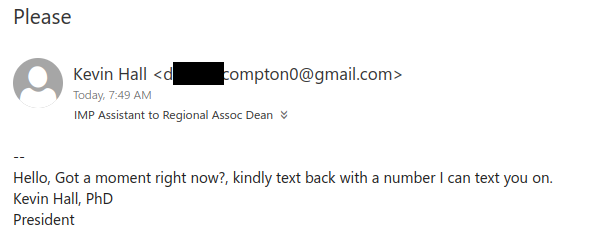
Gift card scammers impersonate people in positions of authority to try to make requests look legitimate and prey on people’s desire to be helpful. This example impersonates UVic President Kevin Hall, but other popular impersonation targets include VPs, faculty deans and directors.

Always pay attention to the sender address for emails that claim to be from someone in a position of authority. This one came from a Gmail address, which is a big sign that this email is not really from the president. A real email from the president or any other UVic authority figure would come from their UVic email address (although you still have to be wary in case that was spoofed).

Another bad sign is the fact that the scammer asks to continue the conversation via text messages and wants your phone number for that reason. Requesting your contact information in order to move the conversation to a different method is a common trick that scammers use to avoid detection. Finally, the errors in punctuation and capitalization and the overall vagueness of the message are also signs that this request is not legitimate.

If you replied with your cell phone number, ignore any text messages that come from the scammer and reach out to the Computer Help Desk or your department’s IT support contact for assistance. You will also need to be on the lookout for future phishing and scam attempts via phone or text message because your phone number is now in the hands of a scammer.

Gift card scammer using a Gmail address but claiming to be President Kevin Hall. The scammer is asking for your cell phone number to continue the conversation via text message to avoid detection.


From: Kevin Hall <d******compton0@gmail.com>
Subject: Please


Hello, Got a moment right now?, kindly text back with a number I can text you on.
Kevin Hall, PhD
President

Job Offer or Job Offered

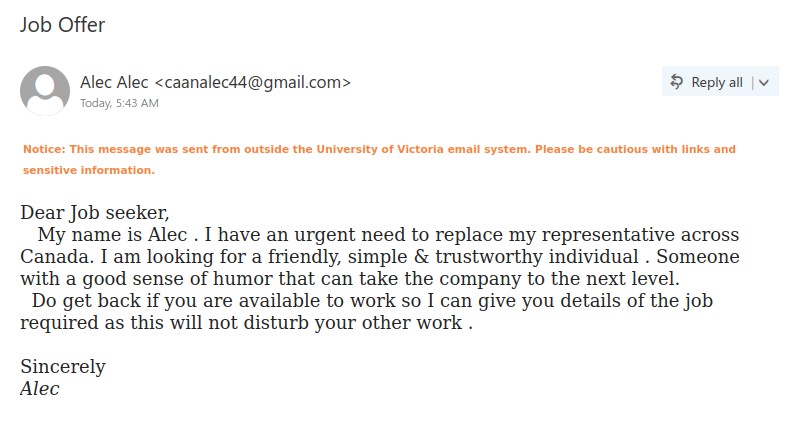
This phish has no hidden agenda, plain and simple job scam. The phisher has clearly put no effort, whatsoever, into making it look legit.

There is no mention of who this person is and what organization they work for, not even their last name. Salutation is generic and formatting of the text is weird along with grammatical errors.

Please don’t reply to such job scams and be aware of the phishing signs.

Job scam phish from external sender.

Subject:Job Offer
From: [external sender]@gmail.com

Notice: This message was sent from outside the University of Victoria email system. Please be cautious with links and sensitive information.

Dear Job seeker,
My name is Alec . I have an urgent need to replace my representative across Canada. I am looking for a friendly, simple & trustworthy individual . Someone with a good sense of humor that can take the company to the next level.
Do get back if you are available to work so I can give you details of the job required as this will not disturb your other work .

Sincerely
Alec

[Someone] shared “FILE REVIEW 2023” with you

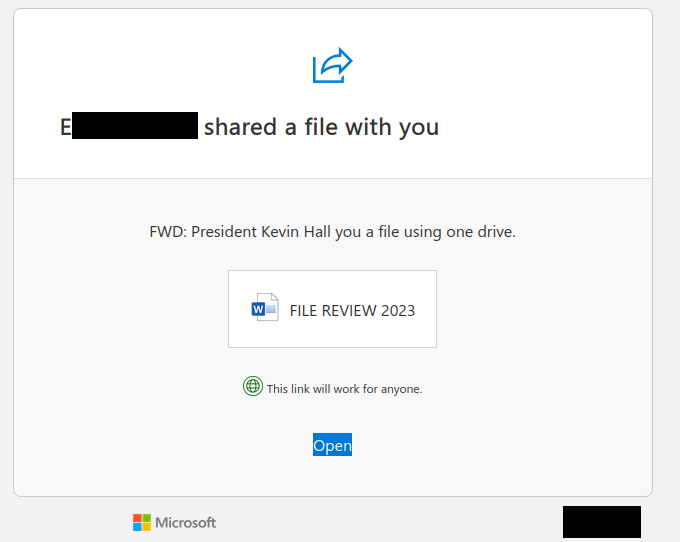
This phish is an actual SharePoint Online file sharing email, but that doesn’t mean the file it goes to is legitimate. Phishers are known to use compromised Microsoft 365 accounts at other organizations to create a phishing document. Instead of creating their own phishing email, they instead send out the phish by sharing that phishing document with the other people they want to target. That can potentially make the phish harder to detect because the emails have the same look and feel as legitimate SharePoint Online file sharing emails.

Despite all that, there are still some red flags:

  • The message claims that the file is from the UVic president, but the file wasn’t shared by him or someone from the UVic President’s Office. Inconsistencies like this can often be a sign of a phish or scam.
  • The message is very vague. This may be a trick to make you curious and go to the file to find out what’s actually in it.
  • There is incorrect grammar and capitalization in the message.
  • At the bottom-right corner of the message, you’ll see a different university’s logo. This is a sign that the file did not come from within UVic’s Microsoft 365 tenant. An actual file from the UVic President should not be coming from a different university’s Microsoft 365 service.

A SharePoint Online file sharing email from a compromised account at another organization. It pretends to be a file from President Kevin Hall but actually goes to a phishing document.

From: E********** <noreply@sharepointonline.com>
Subject: E********** shared “FILE REVIEW 2023” with you.

E********** shared a file with you

FWD: President Kevin Hall you a file using one drive.

[Word document icon] FILE REVIEW 2023

This link will work for anyone.

Open

[Microsoft logo]
[Other university’s logo]

2023 Employee Assistance Program

Alas, scammers and phishers have no hesitation about taking advantage of events like the COVID-19 pandemic and preying on people who are in financial need. This phish does just that, using the lure of financial assistance to get people to click on the link. Look closely at the email and you will find a number of red flags that indicate that this is not a legitimate offer from UVic:

  • The sender is not from UVic.
  • The signature block is generic and does not mention UVic at all. It also contains an American city and zip code, which does not fit for a Canadian university.
  • Hovering over the link reveals a destination that is not on uvic.ca.

Therefore, do not click on the link from this email and do not enter login credentials on the page. Also, avoid rushing to approve MFA pushes when they come. If an MFA push is unexpected or it’s coming from a weird/unexpected location, it’s safest to deny the attempt, then report it as a suspicious login so that the UVic Information Security Office can investigate. You should also change your password as soon as possible.

Phishing email making a fraudulent offer of financial assistance to employees in light of the COVID-19 pandemic.


Subject: 2023 Employee Assistance Program
From: [redacted]@******xusa.com

Notice: This message was sent from outside the University of Victoria email system. Please be cautious with links and sensitive information.

I want to let you know about the 2023 Employee Assistance Program [EAP], which will be available to help employees and their families with financial assistance.

Most families have had trouble over the past few years because of the COVID-19 pandemic. The goal of the Employee Assistance Program[EAP] is to give workers and their families financial support up to $800.

New applications are being accepted for the Employee Assistance Program. Applications can be submitted via the 2023 Employee Assistance Program [link].

Sincerely,

EAP COVID-19 support team.
Los Angeles, CA 90032.

Email Security Gateway Update

It’s certainly ironic when phishers say something about an increase in spam emails and even say you should be careful when handling emails. That being said, it’s not an uncommon tactic; they do it to make you think it’s from your IT Security staff, hoping that you won’t apply that sense of caution to this particular email. They also create a false sense of urgency by requiring you to act before a fast-approaching deadline.

However, the sender address is not from UVic, which is a sign that the email is not legitimate. Hovering over the link (without clicking on it!) also reveals that the destination is not on uvic.ca. Do not click on the link from this email and do not enter login credentials on the page.

Also, avoid rushing to approve MFA pushes when they come. If an MFA push is unexpected or it’s coming from a weird/unexpected location, it’s safest to deny the attempt, then report it as a suspicious login so that the real UVic Information Security Office can investigate. You should also change your password as soon as possible.

Phishing email pretending to be a security alert and asking you to register for a new email security filter.


Subject: Email Security Gateway Update
From: [redacted] <[redacted]@******xusa.com>

Notice: This message was sent from outside the University of Victoria email system. Please be cautious with links and sensitive information.

The amount of spam emails reaching email inboxes has increased recently, according to the IT department. We wish to warn you to open and respond to any email with caution.

All users must register for the new email security filter on or before June 17, 2023, to use it. To register, go to Barracuda Email Gateway  and log in with your details.

Kind Regards,

[redacted]

Student Research Position

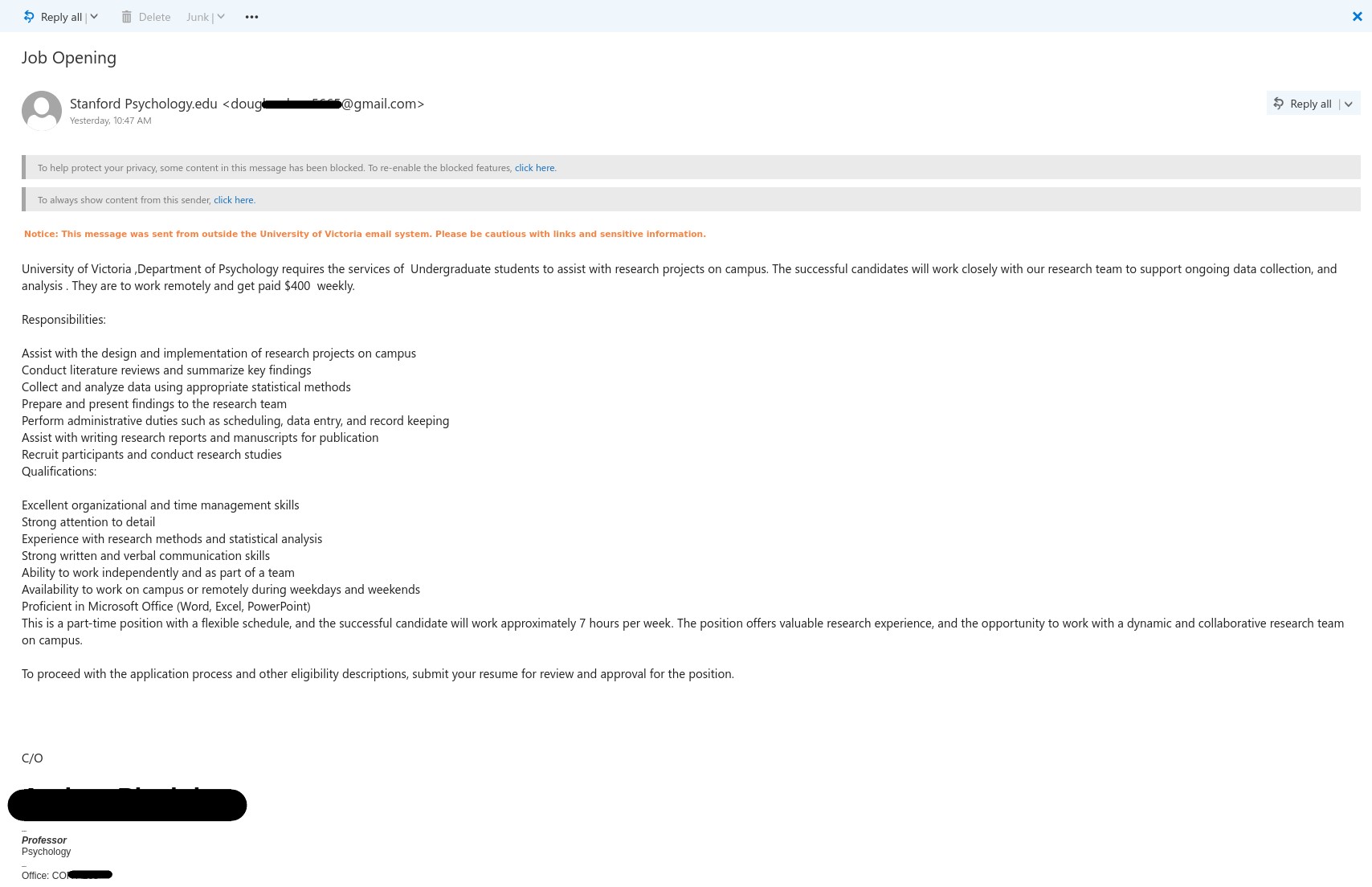
This is a typical job scam that we have been seeing since past month impersonating a faculty member. Following are the red flags:

  1. External sender address as opposed to UVic address.
  2. Sender’s name doesn’t match the faculty member impersonated.
  3. The salary offered is too good to be true.
  4. Contact number is given by the scammer with intent to move the conversation away from UVic email to avoid UVic’s monitoring.

Please do not reply or contact the scammer. If you have replied please contact helpdesk or your DSS.

Always look for warning signs before taking the action mentioned in emails. When in doubt contact helpdesk.

Job scam email from a gmail address with subject Student Research Position.

Subject: Student Research Position

From: INFORMATION SUPPORT SERVICE <sack****99@gmail.com>

Notice: This message was sent from outside the University of Victoria email system. Please be cautious with links and sensitive information

University of Victoria, The Department of Psychology urgently requires the service of student research assistants, whose engagement will contribute to our interconnected goals of excellence, diversity, equity, and inclusion. They are to work remotely and get paid $350 weekly.
The research position applications are open to students from any academic department, and tasks can be carried out remotely. It gives excellent opportunities for students to study and earn money, including assigned research work, mentorship, travel funding, and program-based professional development opportunities related to scholarship and teaching to prepare them for possible tenure-track appointments in the Institution. All this could be achieved without affecting academic performance or leisure time.
To proceed with the application process and other eligibility descriptions, submit a copy of your resume via email or text me on (424) ***-**** to receive the job description and further application requirements.

Best regards,

[impersonated professor]

Associate Professor

Psychology

Office: [Office location]

[Professor’s joining information]

Clinical Psychology