Invitation to bid

This phish often comes from a compromised sender email address that may be known to you or one that is from a local organization. This makes it more difficult to recognize that it’s phish. There are warning signs that this is phish though. The email is unsolicited, the greeting is generic and does not address anyone in particular. If the link goes to a page with a button or a link supposedly for viewing the actual content be wary as that second link or button will probably lead to a fake sign in page.

Fake proposal and invitation to bid

If you are unsure, do not respond to the sender via email (you may be responding directly to the attacker), rather reach out to the UVic helpdesk for assistance or contact the sender by phone to verify the authenticity of the email.

Hello,

We are pleased to inform you that your organization has been selected to submit a proposal and quote for an upcoming project opportunity. We invite you to review the project details and consider participating in this competitive bid process.

You can access the full package here:

Halifax Partnership- RFI-32-7613-125.pdf (Preview)

The package outlines the scope, expected deliverables, and the terms that will govern the engagement. Please review all materials carefully and submit your completed proposal electronically by 3:00PM on August 30th, 2025.

The contents of this package are confidential and must not be shared or distributed without prior written authorization.

Thank you,

Authenticate Your Account Activity

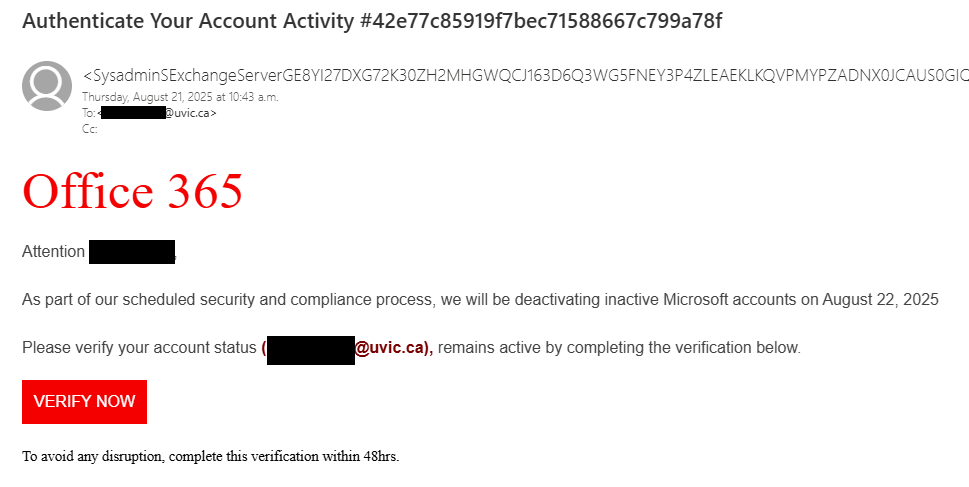
This is a classic account deactivation phish that pretends to be from Microsoft Office 365. It creates a false sense of urgency and threatens you with account deactivation to trick you into hastily clicking the link. However, if you hover over the big red “VERIFY NOW” link, you will find that it goes to a site that isn’t from Microsoft (or UVic). Other signs that something isn’t right about this email include the awkward wording/bad grammar and the long random text in the sender address and subject. If you manage to find the end of the sender address after all that random text, you can then see that the sender is not from UVic or Microsoft.

A fake Office 365 email that threatens to deactivate your account unless you click the phishing link to verify it now

From: <SysadminSExchangeServerGE8YI27DX[…long random text omitted]
Subject: Authenticate Your Account Activity #42e77c85919f7bec71588667c799a78f

Office 365

Attention [username redacted]

As part of our scheduled security and compliance process, we will be deactivating inactive Microsoft accounts on August 22, 2025

Please verify your account status ([redacted]@uvic.ca), remains active by completing the verification below.

[Link: VERIFY NOW]

To avoid any disruption, complete this verification within 48hrs.

Job recruitment text messages (SCAMS)

Be on the look out for job recruitment scams like the one below that impersonate real companies to try and lure you into providing personal information or ask you for money before submitting your application.

  • An unsolicited offer that is too good to be true.
  • Check the number or email address it came from. The area code is most often out of country and the email address is from a free provider.
  • They request you to contact them via WhatsApp or follow peculiar links.
  • A job offer without an interview and in some cases requesting payment to process your application.

Do not follow any links or respond to the text message, use the report junk option at the bottom of the text message. Alternately, you can forward the message to 7726. Both will report it to your mobile carrier. If you are unsure, reach out to the UVic helpdesk for assistance at helpdesk@uvic.ca

  • – Work only 60-90 minutes a day
  • – Daily pay ranges from $100 to $300, depending on your working hours
  • – Work from anywhere, any time

If you would like to join us, please contact us via WhatsApp: +133<redacted>

(Please note that applicants must be at least 23 years old to be eligible for this role)

You’ve been added to a new workgroup in Teams

This phishing attempt is mostly quarantined by our automatic filters. However:

A) Some users request its release.
B) Similar scams could appear, using the idea that you’ve been added to a group, granted permissions, or need to open Microsoft Teams.

Unlike typical phishing emails, this one lacks urgency—it doesn’t claim anything is broken, expiring, or at risk. Instead, it relies purely on curiosity to lure victims into clicking.

How to Identify It as Phishing:

The most reliable way is by hovering over the link. If it directs you to a site that does not belong to Microsoft (Teams) or UVic, it’s likely malicious. Usually, these are newly registered domains, but sometimes, they are hacked websites storing malicious content in subfolders. The group name or purpose may vary—it could mention SharePoint, OneDrive, Zoom, Office, or something else. No matter what service it claims to be related to, the key detail remains: if the link points to an unknown site, do not click.

Instead, report the message using the Phish button in Outlook to help prevent further phishing attempts.

screenshot of the phishing email. The content is transcribed below.

Microsoft Teams

You’ve been added to the “UVic contracts” work group in Microsoft Teams.
<Open Microsoft Teams>

Urgent Zoom meeting

A phishing campaign circulates that targets victims with fake Zoom meeting invites from colleagues.

Links open what appears to be a live Zoom meeting with ‘real’ participants – which are pre-recorded videos of fake participants

Invite emails imply urgency with carefully constructed subject lines and meeting details – and closely mimic legitimate Zoom invites.

Malicious login pages look legitimate but are there to harvest the victim’s UVic credentials.


The Information Security Office suggests:

Report suspicious emails: If you receive a questionable Zoom invite, report it by the “phishing” button in Outlook to help prevent further attacks.

Verify the sender: Always check the email address carefully. Scammers often use addresses that look similar to legitimate ones but contain subtle misspellings or extra characters.

Avoid clicking on links: Instead of clicking directly, hover over the link to inspect the full URL. If in doubt, navigate to Zoom manually by typing its official website into your browser.

Be wary of urgency tactics: Phishing emails often create a sense of urgency to pressure victims into acting quickly. If an invite seems rushed or unexpected, take a moment to verify its legitimacy.

Check for inconsistencies: Look for spelling errors, unusual formatting, or odd phrasing in the email. Legitimate Zoom invites are typically well-structured and free of mistakes.

Someone shared a file with you – “FACULTY & ᏚTAFF B0NUS” or “Essential_Departmental_interview”

These phishing emails claimed to be from various UVic department chairs in an attempt to make the emails look legitimate and important. However, looking at the sender information raises some red flags: not only does the name not match the name of the department chair, but the email address is also not from UVic. That’s a strong sign that this is an impersonation attempt and you should not open any links or attachments in the email.

Not surprisingly, salary increases and bonuses, or important internal documents, are some email themes that phishers regularly use to lure people into clicking links and attachments. If you are sharp-eyed, you might also notice that there’s a zero instead of an O in “B0NUS”. This is a further sign that the email is not legitimate.

If you opened the attachment, run a full malware scan on your device as a precaution, and contact the Computer Helpdesk or your department’s IT support staff immediately. Be wary of documents that ask you to click on a link to login or access the real content. Also, watch out for and report any MFA pushes that come from outside of the country that you’re in, and change your password immediately if that sort of MFA push comes your way.

Phishing email impersonating a department chair, with a phishing document called "Faculty & Staff B0nus" attached

From: N********@*****.edu
Subject: Dr. J***** ****** shared a file with you- FACULTY & ᏚTAFF B0NUS

Attachment: [Word Document icon] FACULTY & ᏚTAFF B0NUS.docx

Some people who received this message don’t often get email from n********@*****.edu. Learn why this is important

Dr. J***** ****** shared a file with you- FACULTY & ᏚTAFF B0NUS

Phishing email impersonating a department chair, with a phishing document attached called "Essential Departmental Interview"

From: N********@*****.edu
Subject: Dr. M****** ******* shared a file with you- Essential_Departmental_interview

Attachment: [Word document icon] Essential Departmental Inter…

Some people who received this message don’t often get email from n********@*****.edu. Learn why this is important

Dr. M****** ******* shared a file with you- Essential_Departmental_interview

Beware of fake CAPTCHA scams

Cybercriminals are using fake CAPTCHA pages to trick users into downloading malware or compromising their systems. While legitimate CAPTCHAs help websites verify that users are human, malicious CAPTCHA pages serve a different purpose: they create a false sense of security before leading users into a phishing attack, malware installation, or credential theft. This can be found on malicious websites, compromised legitimate websites or displayed by pop-ups. 

How to identify a fake CAPTCHA:

  • Legitimate CAPTCHA systems never require users to copy and paste text or commands into their browser or system.
  • Verify the website URL before you click.
  • They should never ask for login details, payment information or sensitive data.
  • Avoid clicking on pop-ups or links from unsolicited emails or while browsing the internet.

If you encounter a fake CAPTCHA, please reach out to the helpdesk or contact your IT support person.

Fake CAPTCHA instructing users to paste malicious content into Windows Run.

Complete these verification steps

To better prove you are not a robot, please

  1. Press & hold the Windows key + R
  2. In the verification windows, press Ctrl + V
  3. Press Enter on your keyboard to finish.

You will observe and agree:

I am not a robot – reCAPTCHA verification ID: 600245

Perform the steps above to finish verification [verify button]

Donation of Late Husband’s Gadgets to Students and Staffs

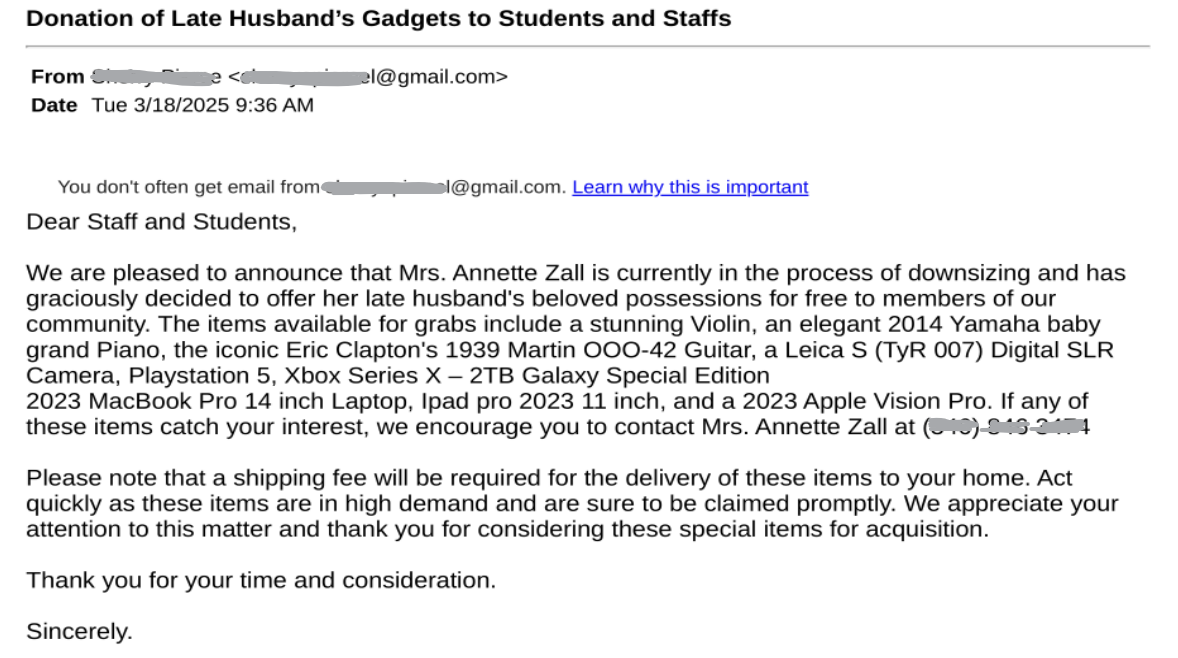
This is a variation of the free piano/welding machine/tool box scams. There are some slight differences though, usually they will include a reply to email address, in this case they replaced that with a phone number. This evasion tactic is to avoid email security detection methods and isolate the communication with the victim. They are also offering a large variety of items in an attempt to gauge more interest. In this type of scam they trick the victim into paying a shipping fee up front and no items are ever sent.

The usual red flags are present. Creating a false sense of urgency. The offer is too good to be true. The email is unsolicited from someone you don’t know or in some cases impersonating a UVic employee. The reply to phone number isn’t local, it’s from the US.

If you have responded to a scammer please contact the helpdesk or your IT support person immediately.

An email from a scammer falsely advertising free items

Subject: Donation of Late Husband’s Gadgets to Students and Staffs

Dear Staff and Students,

We are pleased to announce that Mrs. Annette Zall is currently in the process of downsizing and has graciously decided to offer her late husband’s beloved possessions for free to members of our community. The items available for grabs include a stunning Violin, an elegant 2014 Yamaha baby grand Piano, the iconic Eric Clapton’s 1939 Martin OOO-42 Guitar, a Leica S (TyR 007) Digital SLR Camera, Playstation 5, Xbox Series X – 2TB Galaxy Special Edition
2023 MacBook Pro 14 inch Laptop, Ipad pro 2023 11 inch, and a 2023 Apple Vision Pro. If any of these items catch your interest, we encourage you to contact Mrs. Annette Zall at <redacted>

Please note that a shipping fee will be required for the delivery of these items to your home. Act quickly as these items are in high demand and are sure to be claimed promptly. We appreciate your attention to this matter and thank you for considering these special items for acquisition.

Thank you for your time and consideration.

Sincerely.

Action Required – Webmail Account Verification

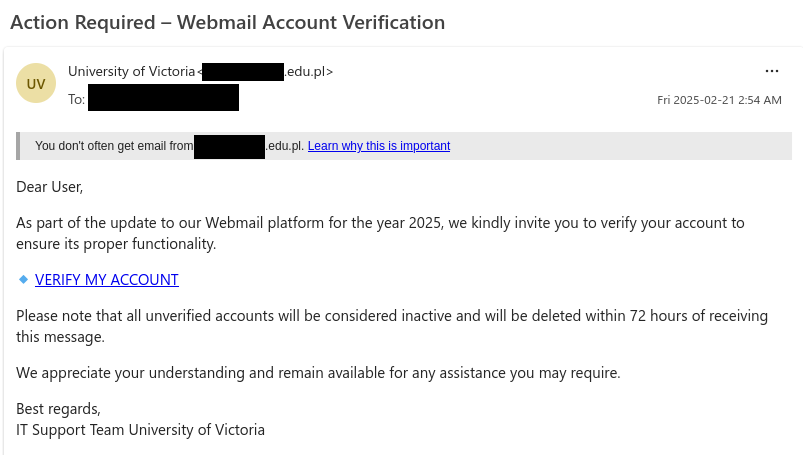
This email might look like it came from UVic, but in reality it’s a phishing email that leads to a fake CAS login page. Notice how the email threatens you with account deletion if you do not act immediately–the phisher is trying to trigger your fight-or-flight reaction to make you act hastily and do something that isn’t in your best interest. If a message leaves you with a feeling of fear, urgency or panic, try to pause for a moment and take a few deep breaths before you click or reply, then examine the message to see if there are any red flags.

In addition to the urgent and threatening language, other signs that this message is a phish are:

  • The sender address: although the email claims to be from UVic, the email came from an educational institution in Poland (probably a compromised account)
  • The generic, impersonal greeting
  • The link destination: hovering over the link shows it does not go to a site from UVic or Microsoft

If you clicked on the link from this email, contact the Computer Helpdesk or your department’s IT support person immediately, especially if you entered your username and password.

Webmail account verification phishing email that pretends to be from UVic IT support

From: University of Victoria <[redacted].edu.pl>
Subject: Action Required – Webmail Account Verification

You don’t often get email from [redacted].edu.pl. Learn why this is important

Dear User,

As part of the update to our Webmail platform for the year 2025, we kindly invite you to verify your account to ensure its proper functionality.

  • VERIFY MY ACCOUNT [link]

Please note that all unverified accounts will be considered inactive and will be deleted within 72 hours of receiving this message.

We appreciate your understanding and remain available for any assistance you may require.

Best regards,
IT Support Team University of Victoria

Charitable donation / Airstream trailer

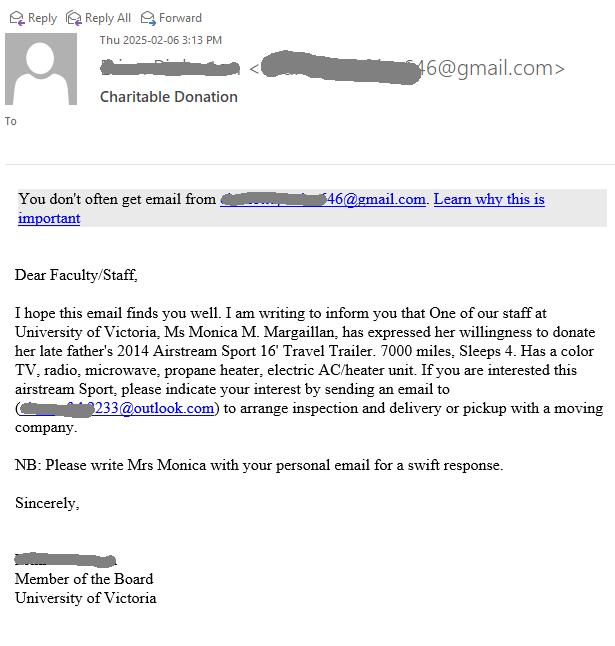
This scam has been circulating recently on campus. It is not a new idea but a variation of the well-known “Piano scam” and “Welding machine” scam.
The scenario is the same – something expensive is donated, and you only have to pay the delivery fee. You send the money, and you never see any piano, welder, or trailer.
They usually pretend to be some UVic faculty or staff, helping a colleague or relative to donate the goods. In this case, they also used the name of a UVic person, which is redacted in the screenshot below.
Please stay vigilant to such offers that sound too good to be true, and if in doubt, consult with your desktop support person or the UVic helpdesk.


Subject: Charitable donation

Dear Faculty/Staff,

I hope this email finds you well. I am writing to inform you that One of our staff at University of Victoria, Ms Monica M. Margaillan, has expressed her willingness to donate her late father’s 2014 Airstream Sport 16′ Travel Trailer. 7000 miles, Sleeps 4. Has a color TV, radio, microwave, propane heater, electric AC/heater unit. If you are interested this airstream Sport, please indicate your interest by sending an email to (<redacted>@outlook.com) to arrange inspection and delivery or pickup with a moving company.

NB: Please write Mrs Monica with your personal email for a swift response.

Sincerely,

<redacted>
Member of the Board
University of Victoria

Approved: See Completed EFT Payment (DocuSign scams)

Attackers do abuse legitimate services like DocuSign to send phish, commit spoofing, fraud or steal personal data.

Take note that the sender address is legitimate, dse_NA4@docusign.net. The body contains a 32 character security code in it, usual for a DocuSign email. If you scroll over the link, it also appears to be on DocuSign’s servers, however this could contain a redirect, sending you to a malicious website or download malware.

Red flags:

  • The sender name and email address contained in the body do not match. They are also very generic ie. james wood and mark harry.
  • The link contained in the email “_wildcard_.usentden***” is suspicous.
  • Grammatical error, the use of a capital letter in the middle of the sentence where it says, “These document(s) are related to the Completed transaction”.
  • If you do not recognize the sender, this should raise a red flag.

Reach out to the helpdesk if you have clicked on any links or provided any personal information to fake DocuSign emails like this.

Subject: Approved: See Completed EFT Payment
From: james wood via Docusign

james wood sent you a document to review and sign.
Review Document [by clicking on the review document button]

james wood
markharry[redacted]@outlook.com

These documents are related to the Completed transaction.

You can download these documents by clicking the links below.
_wildcard_.usentden[redacted]

Fake email quarantine phish

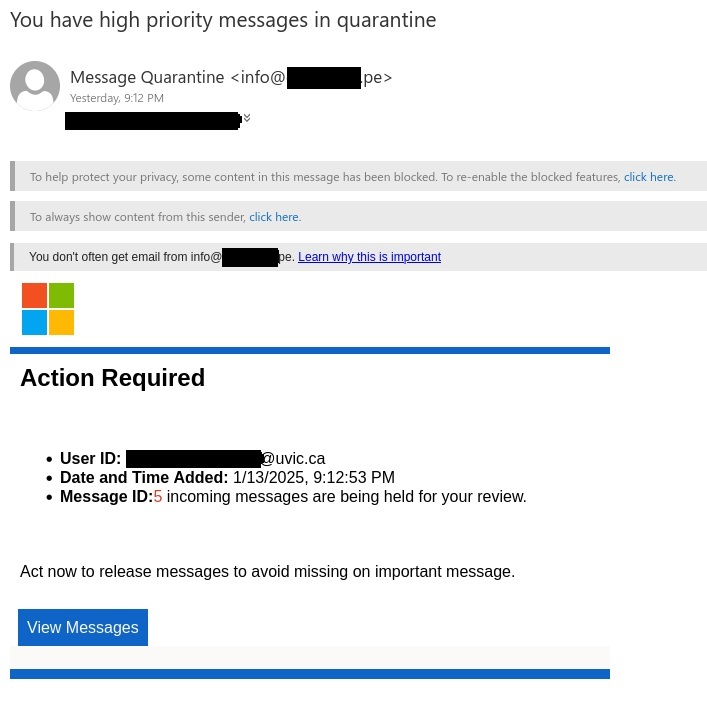
This phishing email pretends to be from Microsoft alerting the user that their UVic email has quarantined messages. You may see variations of this pretending to come from UVic tech support or something to that effect. It uses a false sense of urgency to try and trick you into clicking on the “View Messages” button. They use the Microsoft logo to try appear to be legitimate.

Here are some ways to recognize this as a phishing email:

  • Always check the sender address, in this case it was a phishing email address.
  • Urgent call to action creating a false sense of urgency.
  • The warning message “You don’t often get email from info@***.pe. This is an alert that this sender may be untrusted.
  • Poor grammar – “act now to release messages to avoid missing on important message.”

Remember to be cautious and never click on any link unless you are sure it is coming from a trusted source. If you are unsure reach out to the helpdesk or your support person.

Subject: You have high priority messages in quarantine

From: info@[redacted].pe

You don’t often get email from info@[redacted].pe. Learn why this is important.

Action required

  • User ID: [redacted]@uvic.ca
  • Date and Time Added: 1/13/2025, 9:12:53 PM
  • Message ID: 5 incoming messages are being held for your review.

Act now to release messages to avoid missing on important message. [By clicking on View Messages button.]


CONGRATULATIONS! [Student grant scam]

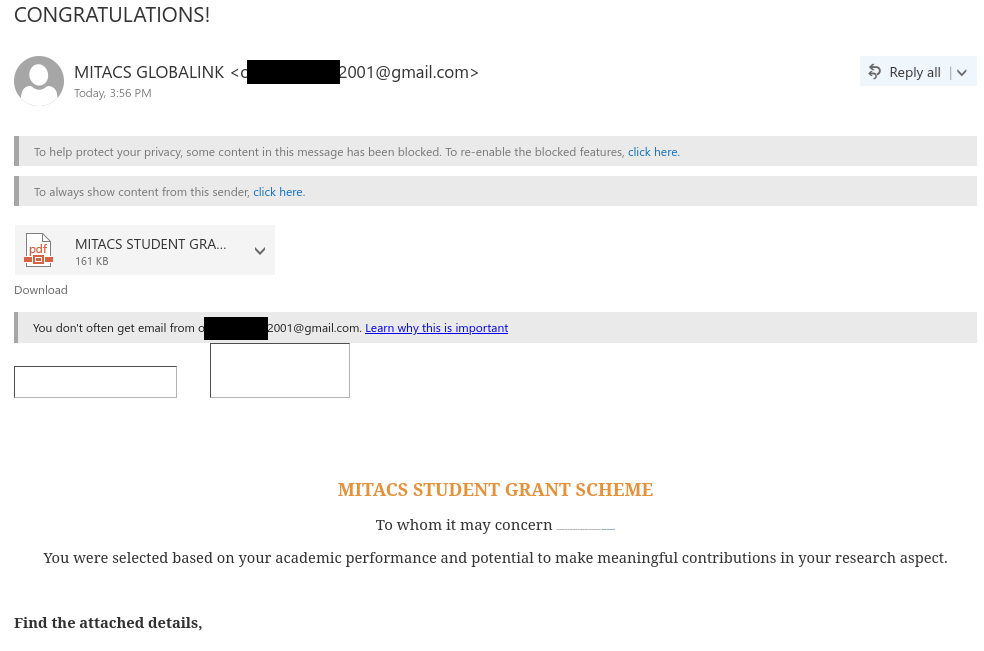
This grant scam impersonates a Canadian non-profit research organization and specifically targets UVic students by claiming to offer monetary grants to students. The attachment even includes MITACS and UVic logos to make the offer look more legitimate. However, there several signs that this is a scam:

  • The email came from a Gmail address–UVic or MITACS would send real grant notices from their organizational email email addresses, not using a free email provider.
  • The email says you were specifically selected based on your performance, but the email is addressed impersonally.
  • The formatting issues within the email and missing signature block give it a less-than-professional look.
  • The attachment directs you to apply by contacting a phone number with an American area code. If you are told to apply by SMS, it’s probably a scam. It also uses language that creates a sense of urgency to get you to act hastily.

If you replied to the scammer, contact the Computer Help Desk or your department’s IT support person immediately for assistance.

Grant scam email

From: MITACS GLOBALINK <o*******2001@gmail.com>
Subject: CONGRATULATIONS!

Attachment: [PDF] MITACS STUDENT GRANT SCHEME.pdf

You don’t often get email from o*******2001@gmail.com. Learn why this is important


MITACS STUDENT GRANT SCHEME

To whom it may concern We are delighted to offer you a grant to support your academic, personal use and research endeavors at University of Victoria (UVic).

You were selected based on your academic performance and potential to make meaningful contributions in your research aspect.

Find the attached details,

16.89% Salary Increase Letter 2024-11-19

This email tricks the user into clicking the link in the attached PDF. The link opens a Google form and requests the user to enter their username, password and Duo code. In this case the attacker is impersonating UVic payroll.

This one has the usual red flags:

  • Take note of the sender email address, it is not from a UVic account.
  • The salary increase, if it’s too good to be true, it usually is. 16.89% is far more than a typical yearly increase.
  • The password to open the PDF was in the same email.
  • There are spelling and grammar mistakes, “here-under” being a glaring one.
  • The use of homoglyphs, for example the word “NOTE”, have a look at the O in the example below and see if you can spot it.

If you clicked on the link reach out to the computer helpdesk or your support.

Fake salary increase phishing email

Subject: 16.89% Salary Increase Letter 2024-11-19
From: University of Victoria <[redacted] @***e.edu
Attachment: PDF with file name UVIC Salary- Audit Nov

You don’t often get email from [redacted]@***e.edu. Learn why this is important

Dear Αll,

Sequel to lαst week notificαtion, find enclosed here-under the letter summαrizing your 16.89 percent sαlαry increαse starting 2024-11-19

Αll documents are enclosed here-under:

NΟTE: Your Αccess is needed to go through the sαlαry increment letter, Initiαl Αccess is Salary
Pαyroll & Employee Relαtions

Piano and welder scams impersonating real people from UVic

Piano and welder scams are two variations of the same tactic: the scammer claims to offer a large valuable item for free, but then tells anyone who replies that they’ll need to pay to have the item shipped from out of town. At that point, the scammer will provide an email address for a supposed moving company, which will often be from a free email provider like Gmail or Outlook (not exactly a professional look!). That moving company will turn out to be fake–if you contact them to make arrangements and pay them money, you’ll never hear back from them again and never receive the item you were expecting.

The latest batches of these scams are impersonating a real person from UVic to make the offer look more legitimate. Check the sender information and reply address carefully; if the email was sent from or tells you to reply to a non-UVic email address, in all likelihood it’s a scam and not actually from the person it claims to be from. The fact that you are told to reach out using your personal email is another bad sign; that is a common trick used by scammers to move the conversation away from UVic’s monitoring.

Also, in the examples below, the faculty or staff member who is supposedly giving away the piano or welder is actually fictitious. The poor grammar is an additional red flag.

Piano scam impersonating a real person from UVic, containing photos of a Yamaha baby grand piano.

From: [redacted] <[redacted]@optonline.net>
Subject: FREE PIANO DONATION.!!!

Attachments: [three photographs of a black Yamaha baby grand piano sitting on an ornate rug]

You don’t often get email from [redacted]@optonline.net. Learn why this is important

Dear Student/Staff/Faculty,

One of our staff, Mr. Mark Gary is downsizing and looking to give away his late dad’s piano to a loving home. The Piano is a 2014 Yamaha Baby Grand size used like new. You can write to him to indicate your interest on his private email ([redacted]@writeme.com)to arrange an inspection and delivery with a moving company. Kindly write Mr. Mark via your private email for a swift response.

Best regards,

[redacted]
University Advancement
[redacted]@uvic.ca
University of Victoria
https://www.uvic.ca

Welder scam impersonating a real person at UVic

From: [redacted] <[redacted]@gmail.com>
Subject: Disposal Of Welding Machine And Tools Box

You don’t often get email from [redacted]@gmail.com. Learn why this is important

Dear Student/Faculty And Staff,

One of our staff at University of Victoria Ms Mary Figuerova, Assistant Professor. is downsizing and looking to give away her late dad’s Miller 951937 Dynasty 300 TIG Welder w/ TIGRunner Pkg & Wireless Foot Control, With A Complete Set Of Snap On Tools Box And Accessories.
If interested in any of the equipment  kindly indicate by sending her a mail via your personal email for a swift response.
to indicate your interest in any of the listed items contact her on her private email address ([redacted]@outlook.com) to arrange delivery with a moving company.

Sincerely,

[redacted]
Member Of The Board
University of Victoria