UPDATE

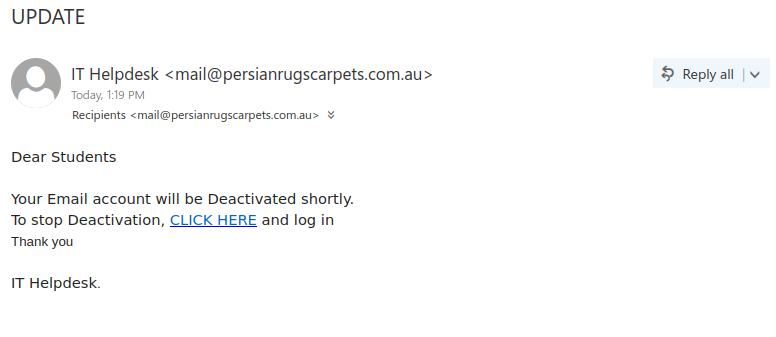
If an unsolicited email seems very vague or generic, that can be a sign it’s a phish. That certainly can be said of this one, which uses a undescriptive subject line and doesn’t even try to give any context or a reasonable explanation for why your account is supposedly being deactivated. On a similar vein, the email claims to be from “IT Helpdesk” in a generic fashion that doesn’t mention UVic in any way, and the greeting is equally impersonal and generic.

The vague and generic nature of the email, along with the non-UVic sender address, inconsistent font formatting, and errors in capitalization and punctuation, are all signs that it is not legitimate. The ultimate red flag is the fact that hovering over the link shows it goes to a website on the Weebly free website builder–a real UVic login page would not be hosted there.
 

UVic Webmail-themed spoof phish with no subject

This phish spoofed a UVic email address but actually came from outside of UVic. As well as the empty subject line, there are plenty of red flags in the message content:

  • The message instills a false sense of urgency and threatens an adverse impact.
  • There are plenty of capitalization and grammatical errors, and the spacing in the last paragraph is weird. Indeed, the whole email looks like it was put together rather sloppily.
  • The link shown to you is for a site on Weebly, a free website builder. No real UVic login page would ever be hosted on a free website builder.

If you hover over any of the links, you’ll actually see a Google redirect URL. Phishers may use a Google redirect or something similar to make the URL look less phishy and hide the real destination.

As always, don’t click on the links! If you did, reach out to the Computer Help Desk or your department’s IT support staff for assistance.

RE: IT SERVICE DESK

This Outlook-themed phish has a lot of the usual red flags:

  • The sender is not from UVic or Microsoft
  • The greeting is impersonal
  • The message contains numerous errors in grammar and capitalization
  • The email tries to create a sense of urgency and threatens you with an adverse impact
  • Hovering over the link reveals that it does not go to UVic or Microsoft

All of the above signs indicate that the link should not be clicked on.

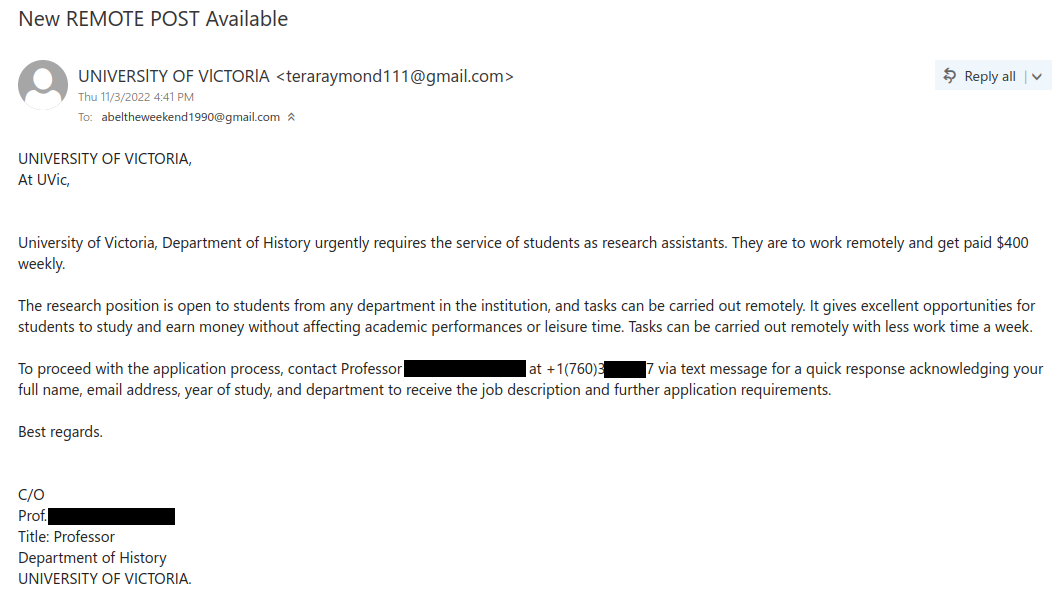
New REMOTE POST Available / New PART-TIME POST (Remote) Available / New Remote Job Paying $400 WEEKLY!

Other variations of the subject line have also been seen.

This is a job scam email that is impersonating UVic, specifically the Department of History. There are several red flags that indicate that this offer is not legitimate:

  • The sender is not from UVic–it’s a Gmail address. Unsolicited job offers from free email providers should always be viewed with suspicion.
  • The capital I’s in the sender display name may look wonky depending on your mail app’s font. That’s because the scammer is actually using lowercase l’s.
  • The greeting is impersonal and awkwardly worded.
  • There are a few grammatical errors.
  • The high amount of weekly pay for a small amount of remote work is too good to be true. Describing an urgent need for students is also suspicious.
  • The email asks you to reply with your personal information via text message to get more information about the supposed job.
  • The phone number provided doesn’t use a local area code–the area code in the example below is for Southern California!

If you got this email, do not reply to the scammer and definitely do not send your personal information or contact information to their email address or phone number (doing the latter might also incur a charge for long-distance SMS). If you did, contact the Computer Help Desk for assistance.

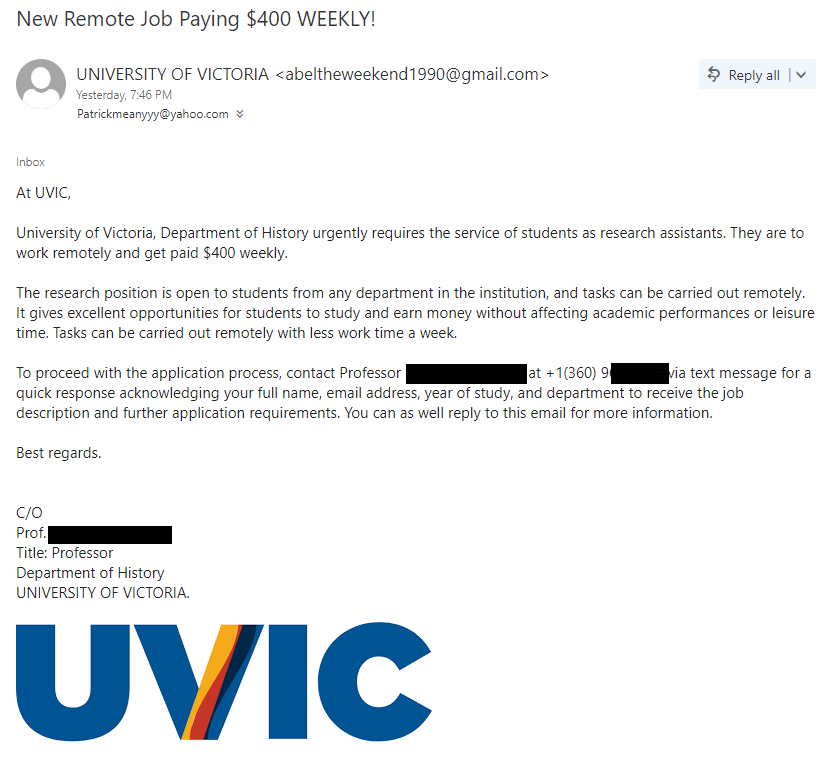
Update 2022-11-04: we have also seen some later variants of this scam that have added UVic Edge branding to make the emails look more polished and legitimate. The red flags above still apply, including the use of a (different) non-local phone number.

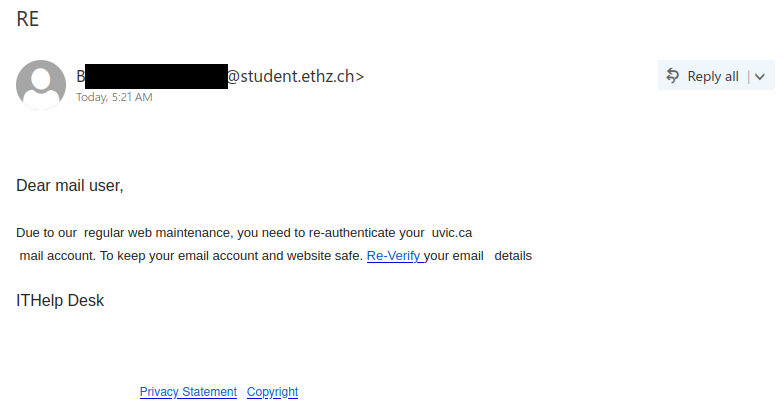
RE

This phish tries to convince you to click the link by saying that will keep your email and website safe, but in reality that would achieve the opposite outcome. There are a number of signs that this email is malicious:

  • The subject line is empty except for “RE”
  • The email did not come from a UVic sender
  • The greeting is impersonal
  • There are errors in spacing, capitalization, punctuation and grammar
  • The signature line is generic

As always, hover over the link before clicking on it (or hold down your finger on it if you’re using a mobile device). While you would see a mention of UVic Webmail in the destination address, you would also see that it ends in “.weebly.com”. That means the page is hosted on the Weebly free website builder. Phishers often abuse Weebly and similar services to create phishing pages. A real UVic login page would never be hosted on a free website builder.

If you clicked the link, reach out to the Computer Help Desk or your department’s IT support staff immediately.

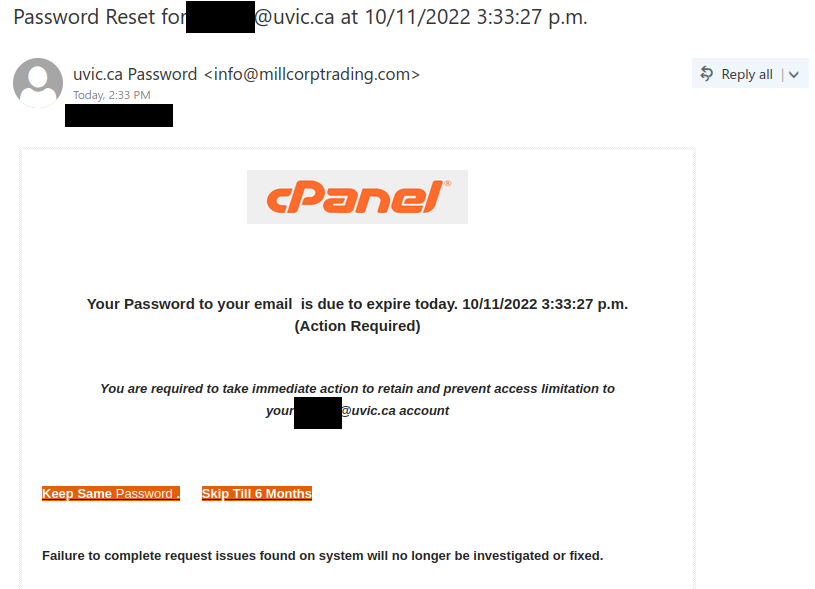
Password Reset

This phish used a sender display name of “uvic.ca Password” to make it look like this email came from an internal system, but that was fabricated by the phisher. The actual sender address gives away the fact that this really came from an external origin, which is not something that would occur for a real Netlink password reset email.

Besides that, the email text has a lot of the usual red flags. In particular, it creates a false sense of urgency and threatens you with an adverse impact if you don’t act immediately. It also contains quite a few errors and irregularities in grammar, spacing and punctuation.

As always, don’t click the link out of curiosity or to determine whether the email is legitimate. It’s always safer to look at the email for warning signs first, in case there is something nasty on the other side of the link.

Microsoft account security code

This phish is probably imitating real account verification code emails that Microsoft sends in certain circumstances. However, although the sender claims to be the “Microsoft team”, their email address gives away the fact that they are not actually from Microsoft (note: this information may not be immediately visible in mobile mail apps). Also, if you hover over the “click here” link (or hold down your finger on it if you’re using a mobile mail app), you will see that it goes to a site on sibforms.com, which is an email sign-up form builder. Phishers regularly abuse such form builders to create phish sites; a genuine Microsoft login page would not be built on one of those.

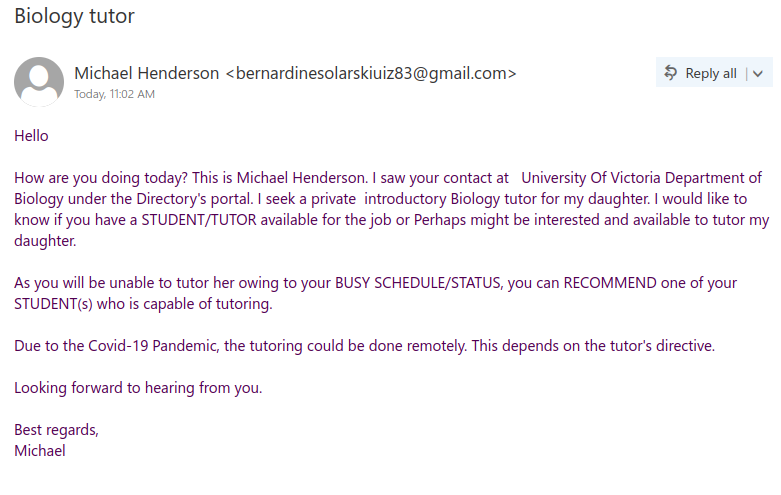
Biology tutor [field of study will vary]

Staff from various departments were targeted with variations of this email, and the scammer seems to have made the effort to tailor the field of study to match the recipient’s department. This scam is likely to be a cheque overpayment scam or could be some other type of job scam. We have seen a previous case of a tutor scam in the past that turned out to be the former.

There are a few red flags in this email:

  • There are errors in capitalization, punctuation and grammar
  • The email was not addressed to a specific recipient (a sign that it was sent in bulk to many people) and the greeting is impersonal

If you received this scam, do not reply to the email and do not forward it to others (especially students). If you did either, reach out to your department’s IT support or the Computer Help Desk for assistance.

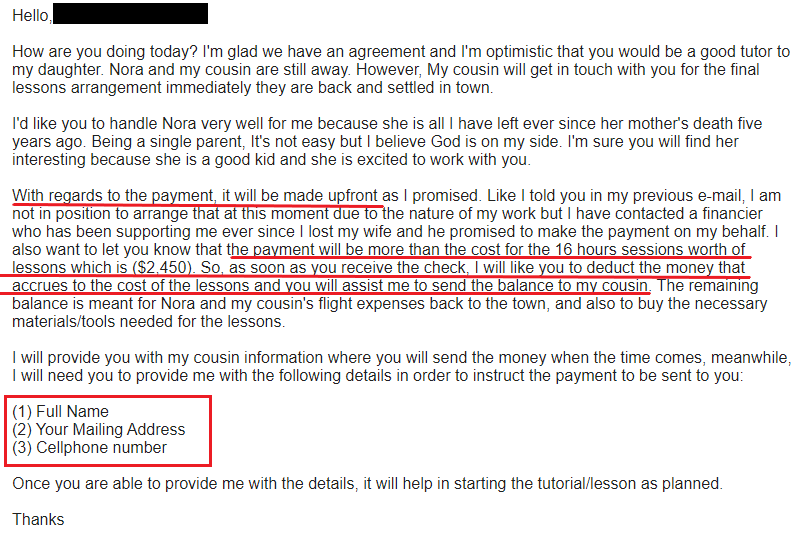
Update 2022-09-09: we can now confirm that this is a cheque overpayment scam. After some back and forth to build rapport, explain the (plausible but fictional) situation and discuss terms of employment, the scammer eventually will reach out with an email like this. The most significant red flags are underlined in the screenshot below:

  • The payment will be in advance of the actual lessons
  • The cheque will be for significantly more than the amount for the tutor’s actual wages, and the recipient is to transfer the remainder to someone else to cover for other expenses
  • The scammer requests PII

According to this article, what eventually happens is that the cheque turns out to be fraudulent and bounces some time after the tutor sends away the surplus amount, leaving them out of pocket for a non-trivial sum of money.

“Job Offer” or “Job Opportunity”

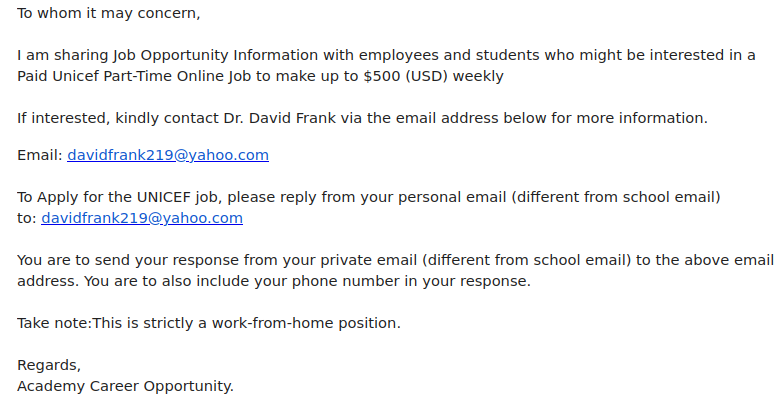
This job scam is similar to several previous UN-themed job scams from the past few weeks, but the latest batch is particularly concerning because the messages were sent from compromised UVic email addresses. Phishers and scammers love to send these sorts of emails from compromised accounts to make them look more legitimate, so if an email doesn’t look right, be wary even if it came from within UVic.

Signs that this email is a scam:

  • The greeting is impersonal
  • There are errors in capitalization and punctuation
  • The email instructs you to contact a Yahoo email address; job offers that instruct you to contact an address from a free email provider such as Gmail, Outlook, Hotmail or Yahoo are very likely to be scams
  • The email instructs you to use your personal email to reply–this is a ploy to evade any monitoring and defences on university email systems
  • The signature is vague and generic

If you replied to the scammer, reach out to your department’s IT support staff or the Computer Help Desk for assistance, especially if you sent money or personally identifiable information.

For more information:

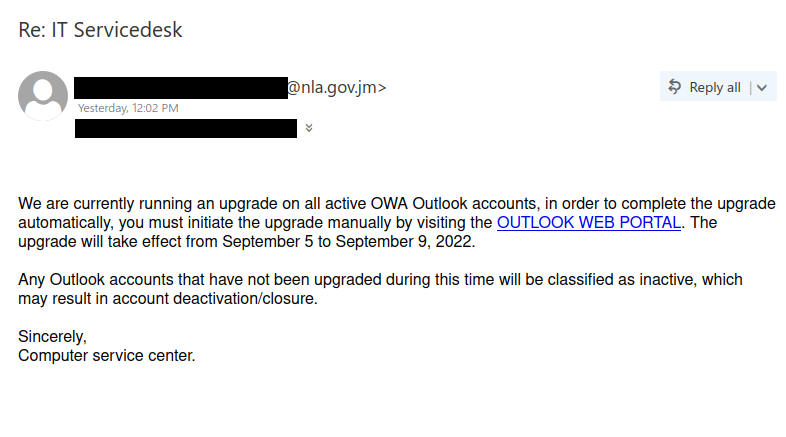
Re: IT Servicedesk

Outlook upgrades and migrations are a popular theme for phishes. Here are some red flags that you can use to conclude that this email is a phish:

  • The sender is not from UVic
  • The message instills a false sense of urgency and threatens you with an adverse impact
  • There are some (relatively subtle) issues with capitalization, punctuation and grammar
  • The signature is very generic and does not mention UVic
  • Hovering over the link will show that the URL does not go to UVic or Microsoft

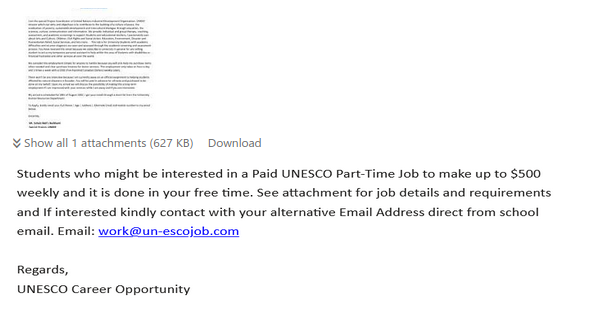
RE: GN109643HT [Another UN-themed job scam]

Once again, a compromised account from a UN organization has been abused to send job scam emails claiming to be from UNESCO. Be wary of unsolicited job offer emails, especially if they come from an organization that you don’t recognize or don’t have prior dealings with. Such emails are very likely to be scams, especially if the offer seems too good to be true. Do not open attachments from such emails in case they contain malware.

A key sign that this email is not legitimate is the fact that it is instructing you to contact an email address on un-escojob[.]com (don’t try going to that site!). This is a fraudulent domain that has been crafted to look like a UNESCO email address. Other red flags include various proofreading errors and the impersonal signature line.

For more information:

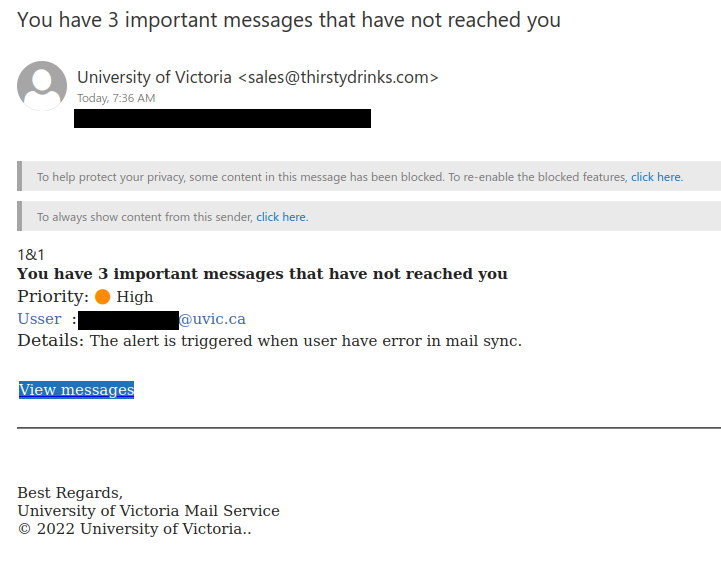
You have 3 important messages that have not reached you

This targeted phish claims to come from UVic, but the sender address is external, which is a warning sign. Depending on what mail app you use and how you’ve configured it, you might see the UVic wordmark at the top of the message. Phishers often copy the branding of the organization they are trying to impersonate to make the phishing email look like it’s legitimate.

There are also other red flags in the message text:

  • It instills a false sense of urgency by claiming there are important messages that have not reached you
  • There are a couple of errors or typos, most notably the spelling error in “Usser”
  • If you hover over the link, you will see it does not go to www.uvic.ca

Always evaluate whether the message could be phish before clicking the link. The factors described above indicate this link is not safe. Clicking on the link to determine whether it is legitimate is a bad idea; the link could lead to malware, or it could go to a phish site that closely imitates the real login page. The latter is the case for this phish–the link leads to a replica of the real UVic login page.

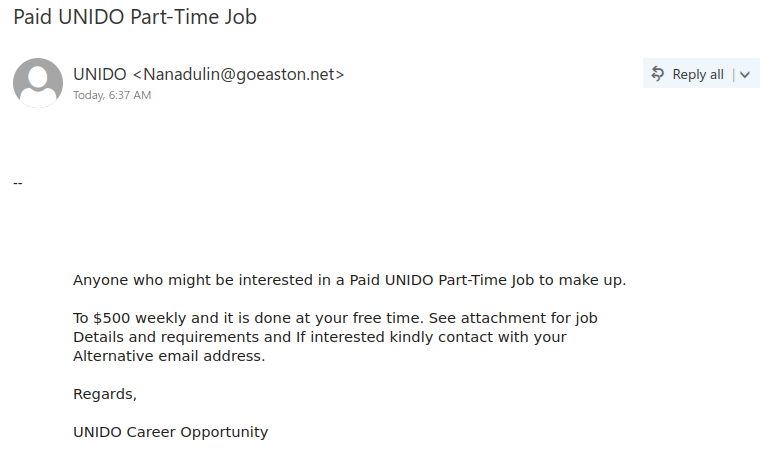
Paid UNIDO Part-Time Job

Once again, there is a job scam email circulating that is impersonating a UN organization, specifically the United Nations Industrial Development Organization (UNIDO). It is quite similar to a fake UNESCO job offer email that we saw a few weeks ago. Note that the sender is not someone from unido.org; this is a sign that the email is fraudulent.

Always be wary of job offers that come out of the blue from a person or organization that you don’t know; they are very likely to be a scam. The numerous capitalization and grammar errors in the email are also a bad sign. Do not open any attachments from such emails in case they contain malware.

If you’re wondering why the scammer is asking you to reply from your alternative email address, it’s because they want to shift the conversation off UVic email to evade our monitoring and detection systems.

For more tips on how to spot job scams, see this CBC article.

Your Immediate Request For Verification

This email looked like it came from “uvic.ca <email_server@uvic.ca>” but that sender information was spoofed; the email was actually external in origin. Like many phishing emails, it tries to instill a false sense of urgency to get you to click the link in haste. However, if you hover over the link, you’ll see the links don’t go to UVic. The many capitalization errors in this email are also a sign it isn’t legitimate.

Grand Piano

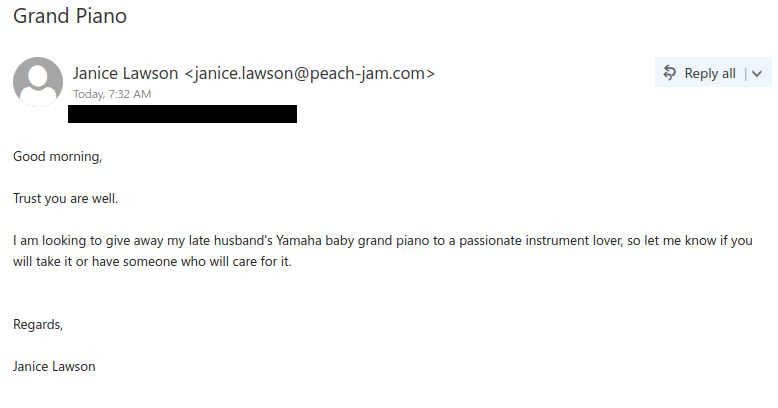
If you receive an email out of the blue from someone you don’t know, and it offers something of value for free, be extremely wary. More likely than not, the offer is a scam.

For more information on these types of scams, see this article from Brown University’s Phish Bowl Alerts. The scammers seem to try to defraud their victims by charging them a fee to move the piano, but it never arrives. Being told to pay to receive an item sight unseen is another sign it’s a scam.